 Analysen


Onshape bietet Dashboards für eine Vielzahl von Informationskategorien.
Jeder Benutzer hat Zugriff auf alle im Enterprise verfügbaren Dashboards, sofern ihm vom Enterprise-Administrator die Globale Berechtigung Zugriff auf Analysen erteilt wurde.
Um auf Analysen zuzugreifen, klicken Sie auf der Dokumentenseite in der linken Dokument-Palette auf das Analysen-Symbol ( ):
):
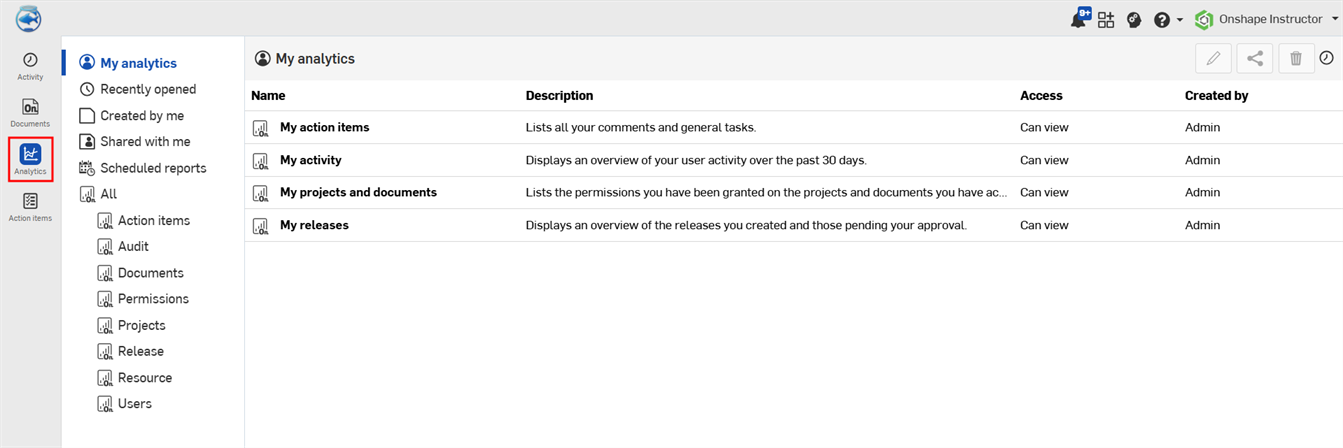
Wählen Sie ein Dashboard aus der Hauptliste oder über einen der Filter auf der linken Seite aus.
Beachten Sie bei der Anzeige in einem Browser, dass das Backend von Analysen von Amazon Quick Sight betrieben wird.
Wenn Änderungen an einem Dashboard vorgenommen werden (Filter werden bearbeitet oder Anpassungen vorgenommen), können diese Änderungen in einem neuen Dashboard gespeichert werden. Weitere Informationen finden Sie unter Dashboard speichern.
Um Daten für eine Dashboard-Grafik zu exportieren, siehe Visuelle Daten als CSV- oder Excel-Datei exportieren.
Weitere Informationen finden Sie unter Arbeiten mit Analytik-Dashboards und Arbeiten mit Analytik-Dashboard-Grafiken.
 Navigationspalette für Analysen
Die Filter für die Navigationspalette auf der linken Seite sind:
-
Meine Analysen (
 ): Dieser Filter zeigt gespeicherte Dashboards und Dashboards, die mit Ihnen geteilt wurden, an. Sie können ein Dashboard auch mit den Dashboard-Filtern bearbeiten und dieses neue Dashboard unter Meine Analysen speichern, sofern Sie über die entsprechenden Berechtigungen verfügen.
 -
Zuletzt geöffnet (
 ): listet die zuletzt von Ihnen geöffneten Berichte auf.
 -
Von mir erstellt (
 ): Listet Dashboards auf, die Sie selbst erstellt haben, unabhängig vom Eigentümer.
 -
Mit mir geteilt (
 ): listet alle Dashboards auf, die von einem anderen Onshape-Benutzer explizit mit Ihnen geteilt wurden.
 -
Geplante Berichte (
 ): listet alle geplanten Berichte für gespeicherte Dashboards auf.
 -
Alle (
 ): gruppiert Dashboards nach den folgenden Analyse-Ordnern. Wenn Sie auf den Filter Alle klicken, wird eine Tabelle aller Dashboards nach den Spalten Name, Beschreibung, Zugriff und Erstellt von angezeigt.
Die Navigationspalette auf der linken Seite bleibt beim Anzeigen von Dashboards geöffnet. Dies erleichtert das Wechseln zwischen den Dashboards.