

Disponible dans : Dessin
Raccourci : faites un clic droit sur une zone vide du dessin et sélectionnez Propriétés du dessin
L'icône permettant d'accéder au panneau des propriétés du dessin se trouve sur le côté droit de la zone des dessins. Cliquez sur l'icône pour ouvrir le panneau, puis cliquez à nouveau pour le fermer :
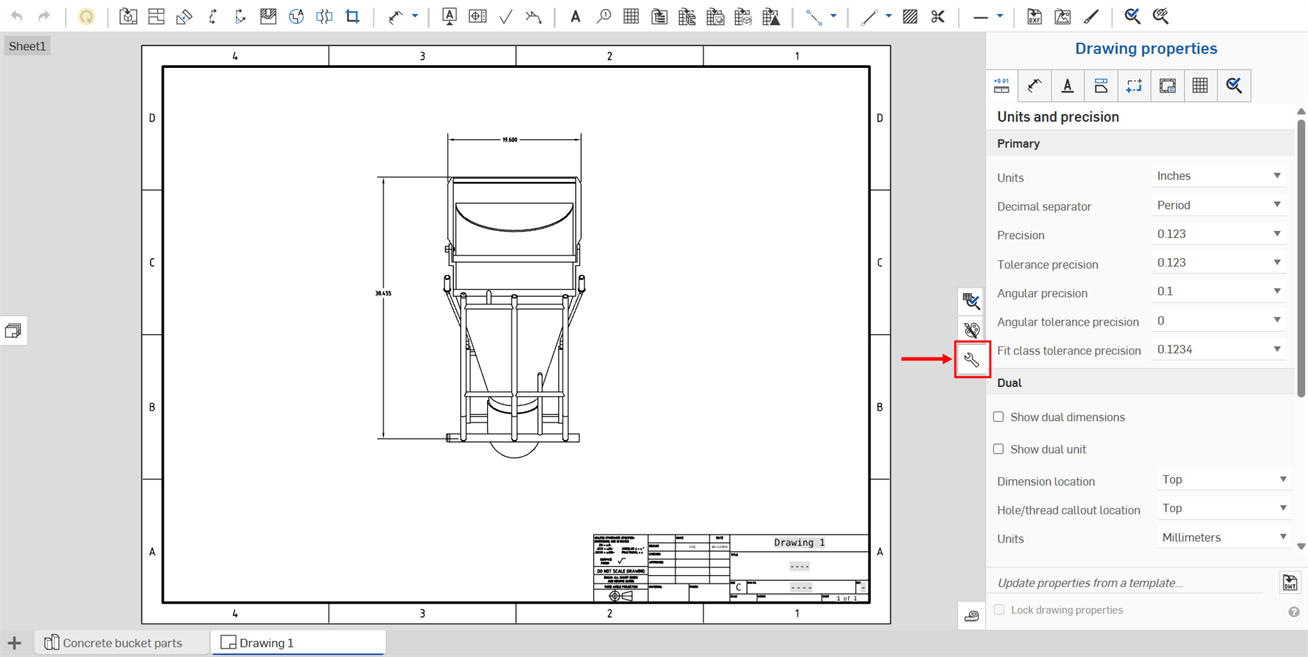
Le panneau Propriétés comporte plusieurs onglets, dont chacun est décrit dans une rubrique distincte ci-dessous.
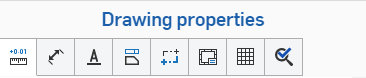
Utilisez ces paramètres pour définir les valeurs par défaut de votre dessin. Les entités de dessin individuelles peuvent être modifiées séparément, mais ces paramètres s'appliquent par défaut à toutes les entités d'un dessin.
Une fois que les propriétés de votre dessin sont définies comme vous le souhaitez, vous pouvez enregistrer le dessin et ses paramètres en tant que modèle. Pour plus d'informations sur la création d'un modèle, voir Modèles de dessin personnalisés.
Pour modifier les métadonnées du dessin, voir Propriétés (métadonnées).
Utilisez Reproduire la mise en forme pour appliquer le format d'une cote ou d'une annotation à d'autres cotes ou annotations.
 Mettre à jour et verrouiller les propriétés des dessins
Dans Onshape, vous pouvez modifier les propriétés d'un dessin en important un modèle de dessin que vous avez déjà créé à l'aide de la fonction située en bas du panneau Propriétés du dessin (illustré ci-dessous en rouge). Vous pouvez également utiliser la case à cocher Verrouiller les propriétés du dessin pour éviter qu'elles ne soient modifiées accidentellement.
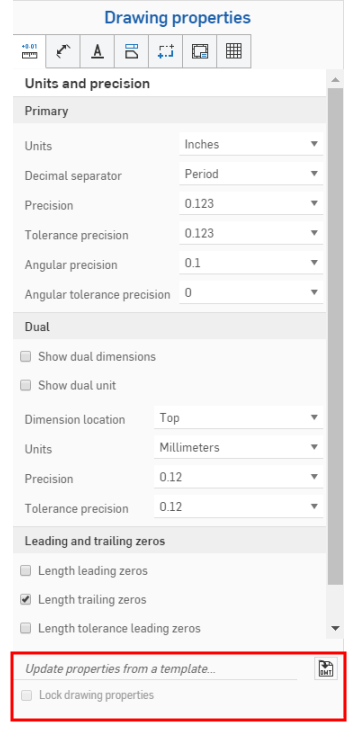
Pour mettre à jour les propriétés d'un modèle de dessin Onshape existant, ouvrez le volet Propriétés du dessin.
Cliquez sur l'icône Sélectionner un DWT  à droite de Mettre à jour les propriétés à partir d'un modèle... pour ouvrir la boîte de dialogue Sélectionner un DWT :
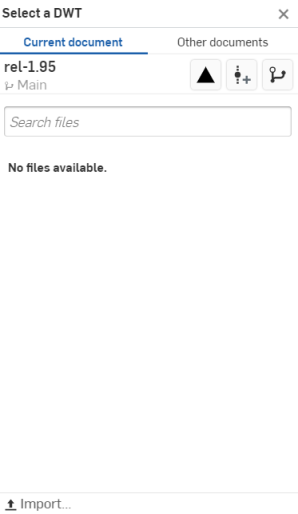
Pour sélectionner un DWT dans le document actif
- Cliquez sur
 en haut de la boîte de dialogue.
 - Saisissez dans la barre Rechercher des fichiers pour trouver un fichier, ou sélectionnez-en un dans la liste ci-dessous.
- Pour importer un DWT depuis votre bureau, cliquez sur
 Importer en bas de la boîte de dialogue, sélectionnez le fichier que vous souhaitez importer, puis cliquez sur Ouvrir.
Utilisez les trois icônes en haut de la boîte de dialogue, sous Autres documents, comme expliqué ci-dessous :
 Afficher les éléments publiés - Cliquez sur l'icône Afficher les éléments publiés pour répertorier tous les éléments publiés parmi lesquels choisir.
 Créer une version - Cliquez sur l'icône Créer une version pour ouvrir la boîte de dialogue Créer une version :
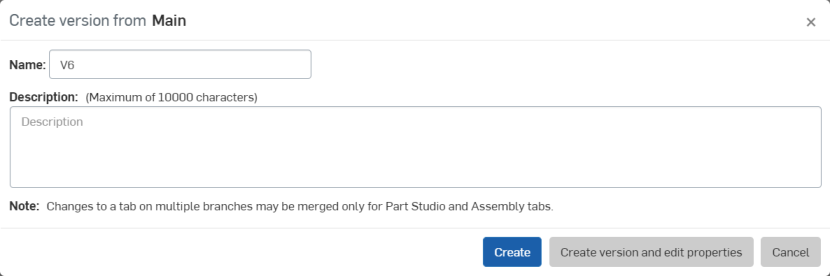
Ajustez le nom et/ou la description de votre version, puis cliquez sur Créer pour créer la version, ou Créer la version et modifier les propriétés pour ouvrir la boîte de dialogue Propriétés :
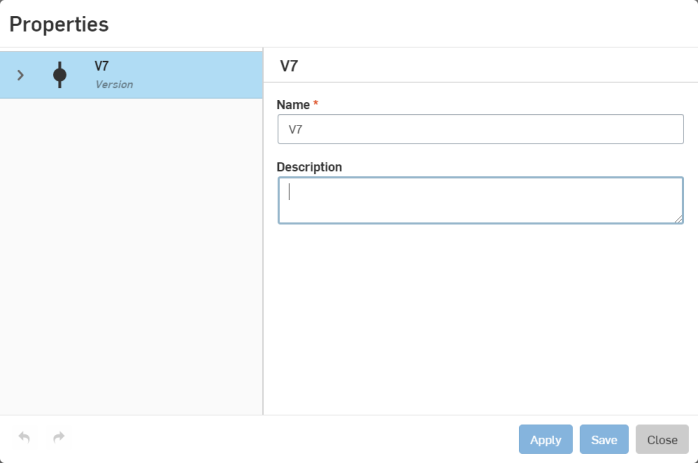
Ajustez les propriétés de votre version, cliquez sur Appliquer pour appliquer vos modifications ou cliquez sur Enregistrer pour appliquer les modifications et fermer la boîte de dialogue Propriétés.
Cliquez sur Fermer pour fermer la boîte de dialogue Propriétés sans appliquer de modifications.
 Graphique des versions - Cliquez sur l'icône du graphique des versions pour sélectionner une version différente du document à partir du graphique des versions.
Pour sélectionner un DWT dans d'autres documents
- Cliquez sur
 en haut de la boîte de dialogue.
 - Utilisez la barre de recherche ou cliquez sur une des options ci-dessous pour sélectionner un DWT dans un autre document dans Onshape.
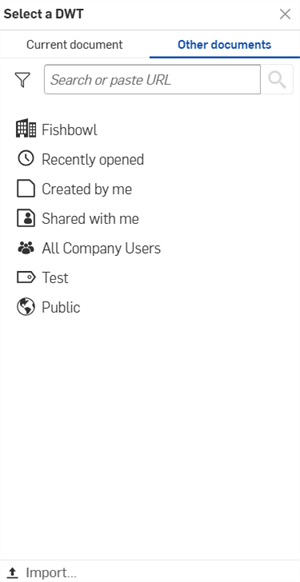
 Détenu(s) par moi - Sélectionnez un fichier DWT pour les documents dont vous êtes propriétaire.
 /
/ /
/ Entreprise/Classroom/Company - Sélectionnez un fichier DWT dans un document publié dans votre entreprise/classe/société.
 Ouvert récemment - Sélectionnez un DWT à partir de vos documents récemment ouverts.
 Créé par moi - Sélectionnez un DWT pour les documents que vous avez créés.
 Partagé avec moi - Sélectionnez un DWT à partir de documents partagés avec vous.
- Pour importer un fichier DWT à partir de votre ordinateur, cliquez sur Importer... au bas de la boîte de dialogue, sélectionnez le fichier que vous souhaitez importer, puis cliquez sur Ouvrir.
Après avoir importé un modèle de dessin, les propriétés sont automatiquement mises à jour.