 Configuración


Disponible en: elemento Part Studio, ensamblaje, elemento Variable Studio
Cree variaciones de una pieza, elemento Part Studio, ensamblaje o elemento Variable Studio. Por ejemplo, puede configurar la profundidad de una función de extrusión, la supresión de un redondeo, el elemento FeatureScript de una operación personalizada, los números de pieza, los colores, los materiales, etc.
Consulte lo siguiente para obtener más información sobre la creación y el uso de configuraciones:
Consulte lo siguiente para obtener más información sobre la administración de las configuraciones, como el cambio de nombre, la copia y el pegado y el lanzamiento:
Consulte lo siguiente para obtener más información sobre la aplicación de la lógica de configuración avanzada:
Cuando más de una persona está trabajando en el mismo documento, cada una de ellas ve su propia configuración seleccionada. Al trabajar en modo de seguimiento, el seguidor ve las configuraciones seleccionadas por la directriz.
 Terminología
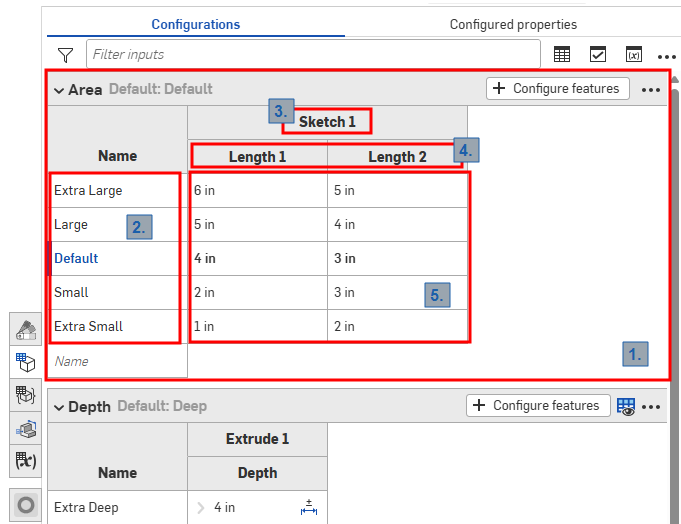
Panel de configuración en un elemento Part Studio
En la configuración de Onshape se utilizan los siguientes términos, tal como se indica en la imagen de arriba:
-
Entradas: cada entrada de configuración se representa como una tabla que se puede contraer. Cada elemento Part Studio, Ensamblaje y elemento Variable Studio solo tiene un panel de configuración, pero cada panel puede contener muchas entradas.
-
Opciones: cada fila de una tabla de entradas se convierte en las opciones disponibles al seleccionar una opción de configuración.
-
Operaciones configuradas: la operación o variable que se está configurando. Estas siempre corresponden a una operación o variable existente. Los nombres no se pueden cambiar.
-
Parámetros: cada columna de una tabla de entradas representa el parámetro de operación específico que se está configurando.
-
Valores de opción: cada celda indica el valor que se debe definir para el parámetro de la opción indicada.
Todos los elementos Part Studio, ensamblajes y elementos Variable Studio tienen un panel de configuración que resume las configuraciones disponibles para el elemento. Puede crear múltiples ajustes de configuración dentro de una configuración. Esto es especialmente útil cuando la operación o los valores de entrada que desea configurar no están necesariamente relacionados entre sí. Por ejemplo, si la longitud y el diámetro de una pieza no están relacionados con la aplicación de un redondeo, puede utilizar dos ajustes de configuración. Esto permite una mayor flexibilidad y puede ayudar a evitar que cada ajuste de configuración se complique innecesariamente. Los ajustes de configuración que defina se convierten en opciones del cuadro de diálogo Insertar al insertar el elemento configurado.
Ajustes de configuración: iOS y Android
La compatibilidad con iOS y Android para los ajustes de configuración se limita a lo siguiente:
-
Visualización del panel Configuración (
 ) a la derecha.
 -
Seleccione de ajustes de configuración en el panel lateral izquierdo (arriba de la Lista de operaciones):
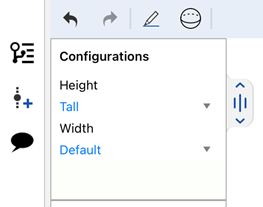
Selección de ajustes de configuración en iOS
-
Se aplican condiciones de visibilidad si están presentes en la configuración (solo para iOS).
No se pueden crear ni editar valores de configuración ni condiciones de visibilidad desde las plataformas iOS ni Android. Esto solo se puede hacer desde la plataforma de escritorio (navegador).
Para obtener recursos adicionales del centro de aprendizaje, consulte: Cursos a su propio ritmo > Configuraciones. También puede seguir el itinerario de aprendizaje aquí: Introducción a las configuraciones de piezas (se requiere una cuenta de Onshape), y el artículo de información técnica aquí: Variables paramétricas frente a variables de configuración (se requiere una cuenta de Onshape).