 Konfigurationen


Verfügbar in: Part Studios, Baugruppen, Variable Studio
Erstellen Sie Varianten von einem Bauteil, Part Studio, Variable Studio oder von einer Baugruppe. Sie können zum Beispiel die Tiefe eines Extrusionsfunktion, die Unterdrückung einer Verrundung, das FeatureScript eines benutzerdefinierten Features, Bauteilnummern, Farben, Materialien und mehr konfigurieren.
Einzelheiten zum Erstellen und Verwenden von Konfigurationen finden Sie im Folgenden:
Im Folgenden finden Sie Einzelheiten zur Verwaltung von Konfigurationen, einschließlich Umbenennen, Kopieren/Einfügen und Freigeben:
Einzelheiten zur Anwendung der erweiterten Konfigurations-Logik finden Sie im Folgenden:
Wenn mehrere Personen dasselbe Dokument bearbeiten, sieht jede Person ihre eigene ausgewählte Konfiguration. Wird im Folgemodus gearbeitet, sieht der Follower die ausgewählte Konfiguration der Person, der er folgt.

 Videobeispiel
Video-Transkript
Configurations create variations of a design, making it easy to build and manage multiple versions of the same part or assembly. They are also commonly referred to as part families, variants, or design tables.
A flange pipe fitting is a common example: outer and inner diameters, flange size, hole count, and hole diameter vary while the overall design remains consistent. When inserting a configured part into an assembly, select the required configuration during insertion. Configurations provide a quick workflow for creating a family of parts without modeling each unique permutation.
Older CAD systems use design tables to control permutations. Complex designs often require hundreds or thousands of rows to manage every possible combination. These large tables become difficult to maintain and increase the likelihood of errors.
Onshape reimagined configuration tables. Configurations use independent inputs such as lists, checkboxes, and configuration variables. Each configurable input is managed separately in its own, smaller, easier-to-manage configuration table. This modern approach eliminates the hassles of managing large tables, greatly simplifying configuration management.
Terminologie
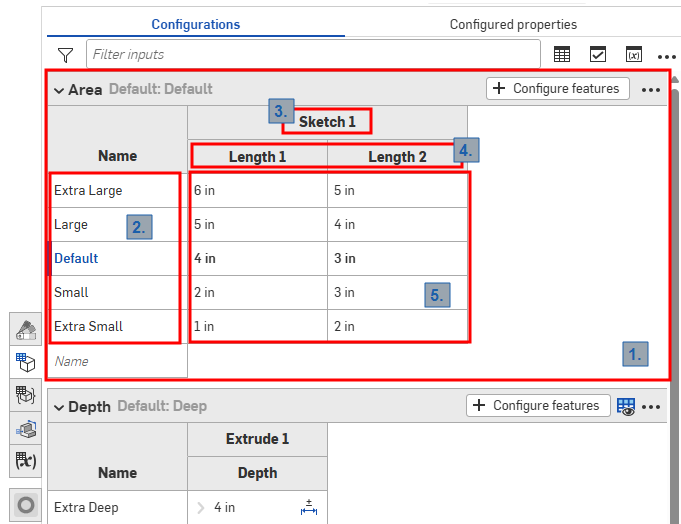
Screenshot der Konfigurationspalette in einem Part Studio
Onshape-Konfigurationen verwenden die folgenden Begriffe, wie in der Abbildung oben angegeben:
-
Einträge: Jede Konfigurationseingabe wird als reduzierbare Tabelle dargestellt. Jedes Part Studio, jede Baugruppe und jedes Variable Studio hat nur jeweils eine Konfigurationspalette, aber jedes Palette kann viele Einträge enthalten.
-
Optionen: Der Eintrag in jeder Zeile wird zu einer verfügbaren Option, wenn Sie eine Konfiguration auswählen.
-
Konfigurierte Features: Das Feature oder die Variable, die konfiguriert wird. Diese entsprechen immer einem vorhandenen Feature bzw. einer vorhandenen Variablen. Namen können nicht geändert werden.
-
Parameter: jede Spalte in einer Eintragstabelle steht für den spezifischen Feature-Parameter, der konfiguriert wird.
-
Optionswerte: Jede Zelle gibt den Wert an, der für den Parameter für die angegebene Option festgelegt werden soll.
Alle Part Studios, Baugruppen und Variable Studios haben eine Konfigurationspalette, die die für das Element verfügbaren Konfigurationen zusammenfasst. Sie können mehrere Konfigurations-Einträge innerhalb einer Konfiguration erstellen. Das ist besonders hilfreich, wenn die Feature- oder Eintragswerte, die Sie konfigurieren möchten, nicht zwangsläufig miteinander in Beziehung stehen. Wenn zum Beispiel die Länge und der Durchmesser eines Bauteils nichts damit zu tun haben, ob eine Verrundung angewendet wird, können Sie zwei Konfigurations-Einträge verwenden. Das ermöglicht mehr Flexibilität und kann dazu beitragen, dass jeder Konfigurations-Eintrag nicht unnötig kompliziert wird. Die Konfigurations-Einträge, die Sie definieren, werden zu Optionen im Dialogfenster Einfügen, wenn Sie das konfigurierte Objekt einfügen.
Konfigurationen: iOS und Android
Die iOS- und Android-Unterstützung für Konfigurationen ist auf Folgendes beschränkt:
-
Anzeige der Konfigurationspalette (
 ) auf der rechten Seite.
 -
Auswahl zwischen Konfigurationen im linken Seitenbereich (über der Features-Liste):
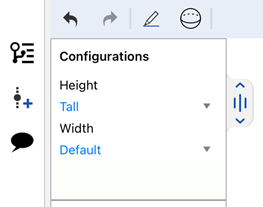
Konfigurationen unter iOS auswählen
-
(Nur iOS) Sichtbarkeitsbedingungen werden angewendet, sofern sie in der Konfiguration vorhanden sind.
Auf iOS- oder Android-Plattformen können Sie keine Konfigurationen oder Sichtbarkeitsbedingungen erstellen oder bearbeiten. Dies kann nur von der Desktop-Plattform (Browser) aus erfolgen.
Weitere Learning-Center-Ressourcen finden Sie unter: Kurse zum Selbststudium > Konfigurationen. Sie können auch den Lernpfad-Kurs Einführung in Bauteilkonfigurationen (Onshape-Konto erforderlich) machen und den Artikel zur technischen Einweisung lesen: Parametrische Variablen im Vergleich zu Konfigurationsvariablen(Onshape-Konto erforderlich).