


利用可能: アセンブリ
Onshape の部品表 (BOM) 機能を使用して、任意のワークスペースアセンブリから BOM を自動的に作成できます。リリース後、Onshape のバージョンからアセンブリにパーツとアセンブリを挿入したり、パーツとサブアセンブリを組み立ててからアセンブリを同時にリリースできます。リリース管理について詳しくは、リリース管理を参照してください。
Onshape BOM には既定のプロパティのセットが列として含まれており、必要に応じて列を追加または削除できます。プロパティの設定と管理の詳細については、プロパティ (メタデータ)を参照してください。
管理者は、カスタムプロパティを定義してBOMに含めることも、すべての既定の Onshape プロパティの表示名を指定することも、既定の部品表テンプレートを作成することもできます。詳細は、Company/Classroom/Enterprise の設定:カスタムプロパティを参照してください。
追加情報については、BOM テーブル操作、BOM テーブルの書式設定、BOM テーブルのテンプレートの使用を参照してください。
iOS と Android のプラットフォームでは、BOM テーブルを表示し、タイプを [フラット化] または [構造化] に変更できます。

 動画の例
動画の例
動画のトランスクリプト
Onshape はすべてのアセンブリに部品表 (BOM) を自動的に作成します。
テーブルはインタラクティブで、アセンブリの変更やプロパティの更新と同時に更新されます。
テーブルの行にカーソルを合わせると、グラフィック領域でコンポーネントが強調表示されます。テーブル内のアイテム番号を選択すると、インスタンスリストとグラフィック領域で横断的に強調表示されます。これにより、アセンブリのどこで使用されているかが簡単にわかります。
テーブルアイテムの順序は、インスタンスリストの順序を反映しています。リスト内のインスタンスを新しい場所にドラッグして並べ替えます。
列ヘッダーをダブルクリックして、選択した列を基準にテーブルをアルファベット順または数値順に並べ替えます。
テーブルには、[構造化] と [フラット化] の 2 つの表示オプションがあります。[構造化] には、最上位のインスタンスと拡張可能なサブアセンブリが一覧表示されます。サブアセンブリのアイテム番号セルをダブルクリックすると、展開したり折りたたむことができます。展開すると、サブアセンブリのインスタンスが表示されます。[フラット化] は、サブアセンブリインジケータなしで最上位に挿入されたかのようにすべてのインスタンスを一覧表示します。
特定のサブアセンブリのプロパティに移動し、テーブルでの特定のサブアセンブリの表示方法を設定します。リスト内のサブアセンブリを右クリックして [プロパティ] を選択し、[サブアセンブリ BOM の動作] をクリックします。アセンブリとコンポーネントを表示すると、BOM 内のサブアセンブリとそのインデントされたコンポーネントが一覧表示されます。これは既定の BOM 構造化ビューです。アセンブリを表示すると、コンポーネントを除くサブアセンブリアイテムのみが表示されます。これは、1 つのベンダーのパーツ番号で識別する必要があるインポートまたは購入したアセンブリに役立ちます。コンポーネントを表示すると、コンポーネントが最上位のアセンブリに挿入されたかのように、サブアセンブリコンポーネントのみが表示され、サブアセンブリ自体は表示されません。これにより、BOM に影響を与えずに、追加のグループ分けや整理用のツールを使用できるようになります。
テーブルに追加のプロパティを含めるには、[列を追加] をクリックします。列を削除するには、列ヘッダーを右クリックして [列を削除] を選択します。列を並べ替えるには、同じコンテキストメニューで [左に移動] または [右に移動] を選択します。
[テンプレートを適用] をクリックして、使用可能なテンプレートから 1 つを選択します。新しい BOM テーブルを定義するには、将来使用できるようにテーブルをテンプレートとして保存します。オーバーフローメニューにアクセスし、[テンプレートとして保存] を選択します。
オーバーフローメニューを使用して、テーブルをコピーするか、CSV にエクスポートします。[テーブルをコピー] を選択するとクリップボードに保存され、外部の場所に貼り付けることができます。CSV にエクスポートすると、テーブルが CSV ファイルとしてダウンロードされ、外部のスプレッドシートプログラムで使用できます。
構造化 BOM のアイテムを抑制するには、行を右クリックして [この BOM から抑制] を選択します。これにより、テーブルの行が非表示になります。最初に抑制されたアイテムの可視性をオンにして、アイテムを含めます。オーバーフローメニューから [除外/抑制を表示] を選択します。抑制されたアイテムが表示され、アイテム番号にダッシュが付きます。行を右クリックして、[この BOM の抑制を解除] を選択します。オーバーフローメニューから [除外/抑制を非表示にする] を選択すると、テーブルに表示されなくなります。
Company の管理者が集約されたアセンブリプロパティをセットアップしている場合、オーバーフローメニューには、[最上位のアセンブリ行を表示] という追加オプションが表示されます。表示すると、集約値が BOM の下部に表示されます。この行アイテムは、同じオーバーフローメニューで再び非表示にできます。
BOM プロパティはテーブル内で編集でき、個々のプロパティダイアログに移動しなくてもプロパティと同時に更新されます。セルを選択し、値を入力します。マテリアルセルをダブルクリックして、マテリアルを選択します。
Company または Enterprise の番号付けスキームの設定が [順次パーツ番号の生成] に設定されている場合は、パーツ番号の列の見出しを右クリックして、BOM 全体で欠落しているパーツ番号を生成します。
テーブルのプロパティを入力または編集すると、パーツまたはサブアセンブリレベルのプロパティが自動的に更新され、パーツまたはサブアセンブリレベルでプロパティを更新すると、テーブルも自動的に更新されます。
BOM テーブルへのアクセス
すべての形状アセンブリでは、グラフィック領域の右端の [ビューツール] アイコンの下に BOM テーブルアイコンが表示されます。
- [アセンブリ] で、グラフィック領域の右端にある [BOM テーブル] アイコンをクリックします。

- テーブルが開くと、Onshape は [アセンブリ] 用データを取得し、テーブルに入力します (パーツまたはアセンブリが存在する場合。以下の例の一番上を参照)。パーツまたはアセンブリが存在しない場合は Onshape が開き、既定の列名 (プロパティ) が表示されます (以下の例の一番下を参照)。
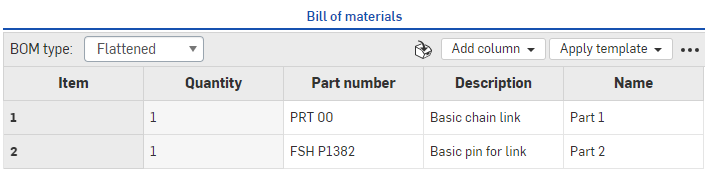
ブラウザ上に表示されるパーツを含む部品表 (上)
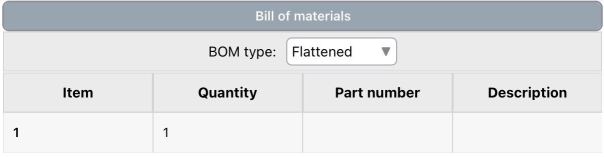
iOS 上に表示されるパーツを含む部品表 (上)
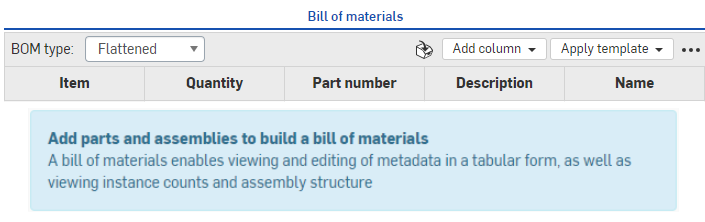
ブラウザ上に表示されるパーツを含まない部品表 (上)
- 空の BOM に入力するには、単に、[パーツとアセンブリの挿入] の手順に従って、[アセンブリ] タブでアセンブリを作成します。
- [BOM] パネルで、情報の表示方法を (BOM タイプメニューで) 選択します。
- フラット化 - このビューには、アイテム番号ごとの単純なパーツのリストが、サブアセンブリの表示なしで表示されます。
階層化 - このビューには、展開可能なサブアセンブリの表示を含むパーツのリストが表示されます。サブアセンブリは右向きの小さなキャレットで示されます。次に例を示します。

[階層化] 形式で表示する場合は、キャレット (サブアセンブリ) のあるセルをダブルクリックしてセルの下のリストを展開し、サブアセンブリに含まれるパーツを表示します。このパーツには、サブアセンブリのアイテム番号に、ドットとパーツのアイテム番号 (次の例では 9、9.1、9.2、9.3) が続くラベルが付けられます。
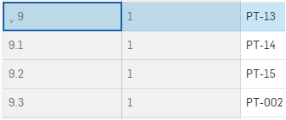
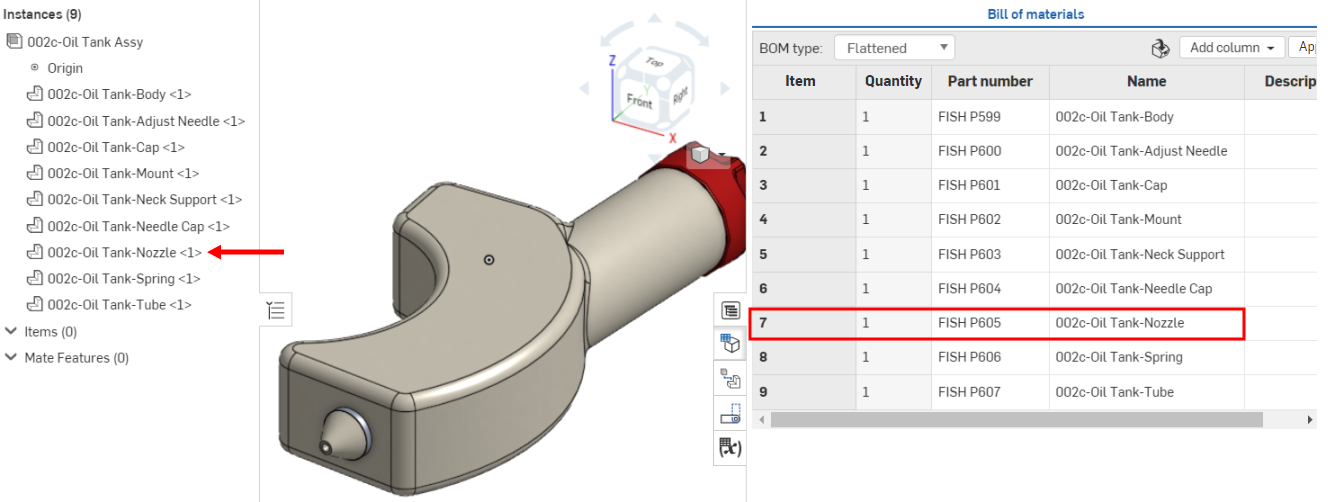
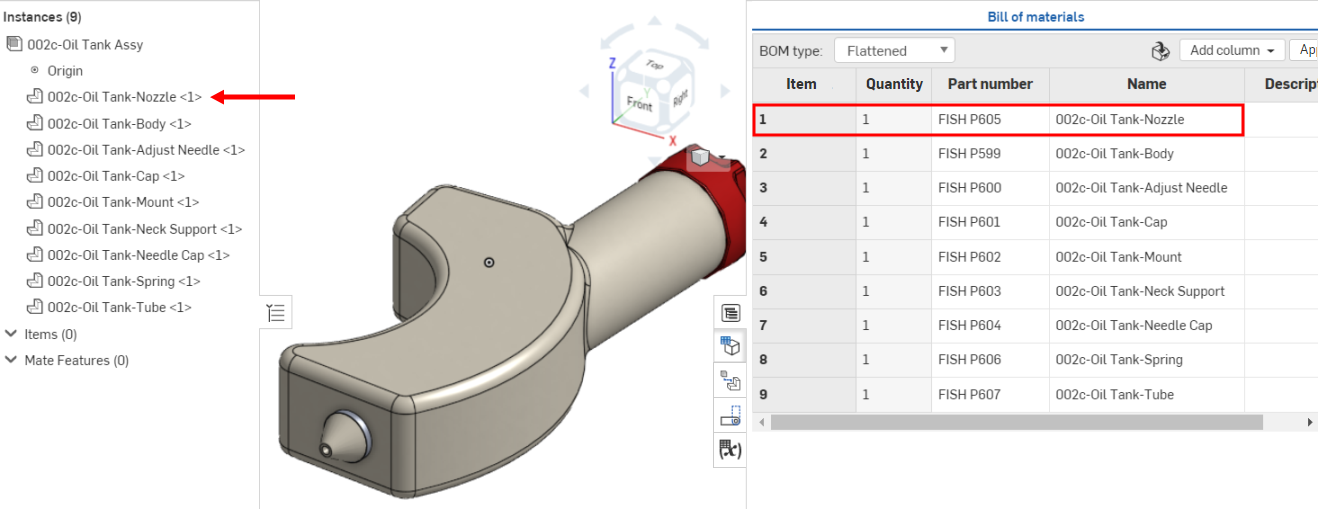
サブアセンブリおよびパーツに割り当てられたアイテム番号は、[インスタンス] リストのインスタンスの順序を反映します。リスト内のインスタンスの順序を変更すると、BOM テーブルが更新され、その新しい順序が反映されます。
以前は、「002C-オイルタンクノズル」は [インスタンス] リストの 7 番目で、BOM テーブルでアイテム番号 7 です。
パーツを [インスタンス] リストの 1 番目の場所に移動すると、BOM テーブルの項目番号 1 に更新されます。
BOM テーブルのインターフェイス
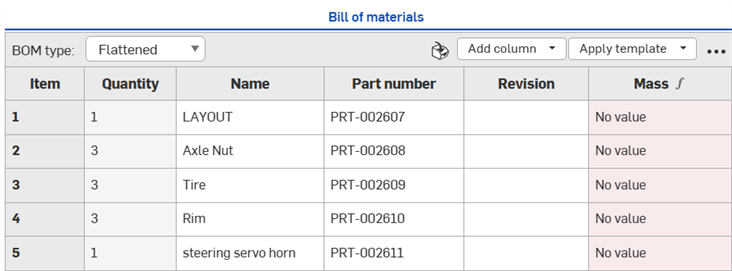
BOM テーブルを開くと、次のフィーチャーが表示されます。
-
BOM タイプ - フラット化または構造化された BOM タイプから選択します。
-
フラット化 - このビューには、アイテム番号ごとの単純なパーツのリストが、サブアセンブリの表示なしで表示されます。
-
構造化 - このビューには、展開可能なサブアセンブリの表示を含むパーツのリストが表示されます。サブアセンブリは右向きの小さなキャレットで示されます。
-
-
アイテムを挿入 - 非幾何学的アイテム (接着剤、テープ、塗料、スレッドロッカーなど、CADでモデル化されていないアイテム) を BOM に挿入します。非幾何学的アイテムの挿入を参照してください。
-
列を追加 - BOM テーブルに列を追加します。列を追加または削除するを参照してください。
-
テンプレートを適用 - Enterprise、Professional、Education のサブスクリプションのみで利用できます。現在の BOM テーブルに適用する BOM テンプレートを選択します。詳細は、BOM テーブルのテンプレートを参照してください。
-
オーバーフローメニュー - 追加のテーブルオプションを含むメニュー。BOM テーブルのオーバーフローメニューを参照してください。
BOM テーブルインタフェースに関する追加情報については、BOM テーブルとBOM テーブルの書式設定のトピックを参照してください。
BOM テーブルのオーバーフローメニュー
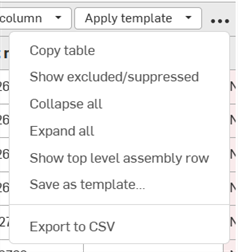
テーブルの右上隅にあるオーバーフローメニューのアイコン ( ) をクリックすると、BOM テーブルの追加オプションにアクセスできます。
-
テーブルをコピー - BOM テーブルをクリップボードにコピーし、Microsoft Excel や Google スプレッドシートなど外部のプログラムに貼り付けられます
-
除外/抑制された行を表示/非表示にする - BOM テーブルで除外/抑制した行のデータを表示/非表示にします。ローカルで BOM から除外したデータを抑制または表示とBOM データをグローバルに除外または含めるを参照してください。
-
すべて折りたたむ - 構造化された BOM ビューでのみ使用できます。これにより、すべてのサブアセンブリ行が折りたたまれ、各サブアセンブリが BOM テーブルの 1 行を占めます。
-
すべて展開 - 構造化された BOM ビューでのみ使用できます。これにより、BOM テーブルのすべてのサブアセンブリ行が展開されます。
-
最上位アセンブリの行を表示/非表示にする - 最上位アセンブリの行の表示/非表示を切り替えます。この行は BOM テーブルの一番下に表示されます。
-
テンプレートとして保存 - Enterprise プランと Professional プランのみで使用できます。これにより、現在の BOM テーブル形式がテンプレートとして保存されます。BOM テンプレートを参照してください。
-
CSV にエクスポート - BOM テーブルをカンマ区切りの形式にエクスポートして、Microsoft Excel や Google スプレッドシートなど外部のスプレッドシートプログラムにインポートできるようにします。CSV にエクスポートを参照してください。
注記
-
水平スクロール - パネルよりも BOM テーブルの幅が広い場合は、下部に水平スクロールバーが表示されます。最初の列 (アイテム) はスクロールしても固定されたままになります。
-
リリースするパーツまたはリリース済みのパーツに関する考慮事項
-
[アセンブリ] で、インポートまたはリリースされたパーツを使用する場合、プロパティは BOM テーブルに閲覧専用として表示されます。編集可能なフィールドを使用して BOM を作成するには、バージョンから分岐して新しいワークスペースを作成できます。BOM のフィールドは、各プロパティの設定ごとに (アカウント設定で) 編集可能になります。
-
リリース済み (リビジョン済み) パーツを [アセンブリ] に挿入し、BOM テーブルを作成すると、状態プロパティは「リリース済み」になります。
-
-
BOM を図面に挿入 - BOM テーブルを図面に挿入するには、BOM テーブルを参照してください。
-
BOM テーブルのアイテムのクロスハイライト - モデルのインスタンスリストからアイテムを検索するには、[インスタンス] リストでアイテム名をクリックすると、選択したアイテムがモデルで強調表示されます。同時に、BOM テーブルでは関連するアイテムの行が強調表示され、フォーカスにスクロールされます。また、BOM テーブルのアイテム名をクリックすると、選択したアイテムが [モデル] リストおよび [インスタンス] リストで強調表示されます。