


在組合件中提供此功能
使用 Onshape 材料表 (BOM) 功能來自動從任何工作區 Assembly 建立 BOM。您可以插入來自 Onshape 版本的零件與組合件至 Assembly 的後期版本,或是組裝零件及次組合件,然後一次發行釋出 Assembly。關於發行管理的詳細資訊,請參考發行管理。
Onshape BOM 中包括以欄表示的預設屬性組,您可以根據需要新增或移除欄。關於設定與管理屬性的詳情,請參考:屬性 (中繼資料)
管理員也可以定義自訂屬性然後將其包括在 BOM 之中,提供所有預設 Onshape 屬性的顯示名稱,並建立預設材料表的範本。詳情請參考:公司/課堂/企業設定:自訂屬性。
若要了解更多資訊,請參考操作 BOM 表格、格式化 BOM 表格、與 BOM 表格範本。
在 iOS 與 Android 平台中,可以在不同類型間檢視與切換 BOM 表格;平階化與結構化。

 影片範例
影片範例
影片字幕
Onshape 會自動為所有組合件建立材料表 (BOM)。
表格會是互動式的,當變更組合件或更新屬性時會同時更新表格。
將游標移動至表格的某列上暫留以在圖形區域中查看強調顯示的零組件。在表格中選擇一個項目編號來查看在「實例」清單與圖形區域中的交叉強調顯示。這樣就很容易找出它在組合件中的使用位置。
表格項目的順序反映出「實例」清單的順序。在清單中將實例拖曳到新位置來重新排序。
連按兩下欄表頭來根據所選欄按字母或數字順序排序表格。
表格有兩個檢視選項:「結構式」與「平階化」。「結構式」會列出最上層的實例與可展開的次組合件。連按兩下次組合件的「項目編號」儲存格來展開或摺疊。在展開時,次組合件實例會是可見的。「平階化」列出所有實例,就好像它們是插入到最上層一樣,沒有次組合件的指標。
透過導覽至次組合件的屬性來設定特定次組合件在表格中的顯示情形。在清單中的次組合件上按右鍵,選擇 [屬性],然後按一下「次組合件 BOM 行為」。「顯示組合件與零組件」會列出在 BOM 中的次組合件與其縮排的零組件。這是預設的 BOM 結構式檢視。「僅顯示組合件」會列出次組合件項目,但排除其零組件。這對進口或採購組合件時需要用供應商的零件編號來辨識時相當有用。「僅顯示零組件」會列出次組合件零組件,但排除次組合件本身,就像零組件是插入至最上層組合件一般。這樣可允許使用其他的群組或組織工具而不會影響 BOM。
按一下 [新增欄] 來在表格中包括其他的屬性。在欄表頭上按右鍵並選擇 [移除欄] 來移除該欄。使用相同的環境選單來以 [左移] 和 [右移] 重新排序欄。
按一下 [套用範本],然後選擇可用的範本之一。若要定義一個新的 BOM 表格,請將表格儲存為範本以供將來使用。存取溢位功能表然後選擇 [儲存成範本]。
使用溢位功能表來複製表格或匯出為 CSV。「複製表格」會將其儲存到您的剪貼簿中,讓您可以將其貼到外部的位置上。「匯出為 CSV」會將表格下載為 CSV 檔案,以供在外部的試算表程式中使用。
在結構式 BOM 的列上按右鍵然後選擇 [從這個 BOM 中抑制] 來抑制項目。這樣會在表格中隱藏列。若要包含一個項目,請先開啟受抑制項目的顯示。存取溢位功能表然後選擇 [顯示排除的/抑制的]。受抑制項目的項目編號會以破折號顯示。在列上按右鍵然後選擇 [在這個 BOM 中取消抑制]。存取溢位功能表然後選擇 [隱藏排除的/抑制的] 來不在表格中看見它們。
如果公司管理員已設定彙總的組合件屬性,溢位功能表會顯示其他的選項:「顯示最上層組合件列」。當顯示時,彙總的值會顯示 BOM 的底部。可以從相同的溢位功能表中再次隱藏這個項目行。
BOM 屬性在表格中是可編輯的,並會同時更新到屬性中而無需至個別的屬性對話方塊中操作。選擇儲存格然後輸入值。在材料儲存格中連按兩下,然後選擇材料。
如果公司或企業的「編號方案設定」是設定為「產生連續的零件編號」,請在「零件編號」欄表頭上按右鍵來為整個 BOM [產生遺漏的零件編號]。
在表格中輸入或編輯任何屬性會自動更新在零件或次組合件階層的屬性。同樣地,在零件或次組合件階層更新屬性也會自動更新表格。
存取 BOM 表格
所有的 Onshape 組合件在圖形區域的最右邊有 BOM 的表格圖示,就在「檢視」工具圖示的下方。
- 在組合件中,按一下圖形區域右側的 BOM 表格圖示。

- 當表格開啟時,Onshape 會從組合件中取得資料,然後將其填入表格中 (如果組合件中有零件或次組合件,請見下方的第一個範例)。如果沒有零件或次組合件,Onshape 會以所示的預設欄名稱 (屬性) 開啟表格 (請見下方的第二個範例):
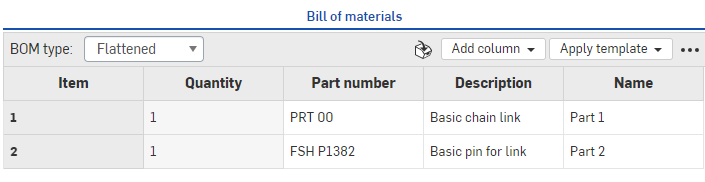
上圖顯示在瀏覽器版本中列出零件的材料表
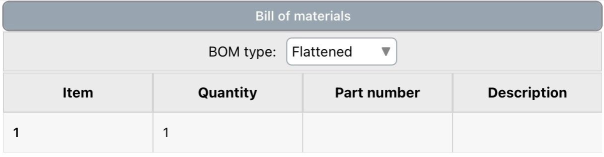
上圖顯示在 iOS 中列出零件的材料表
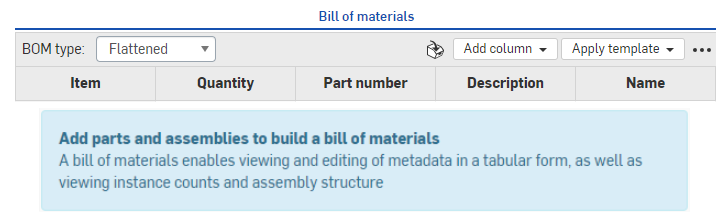
上圖顯示在瀏覽器版本中未列出零件的材料表
- 若要填入空白的 BOM 之中,只要在 Assembly 分頁中建立您的組合件,然後根據插入零件與組合件中的指示操作。
- 在 BOM 面板中選擇要如何檢視資訊 (透過 BOM 類型功能表):
- 平階化 - 這個檢視方式根據項目編號提供零件的簡易清單,不會表明是否有次組合件。
結構化 - 這個檢視方式提供零件的清單 (包括可展開次組合件的指示)。次組合件會以小的朝右插入符號表明;例如:

當在結構化形式中檢視時,連按兩下有插入符號 (次組合件) 的儲存格來展開儲存格之下的清單,以檢視包括在次組合件中的零件。標記的方式是次組合件項目編號,伴隨小數點,最後加上零件項目編號 (如下方範例中的 9、9.1、9.2 與 9.3):
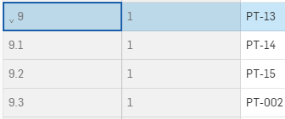
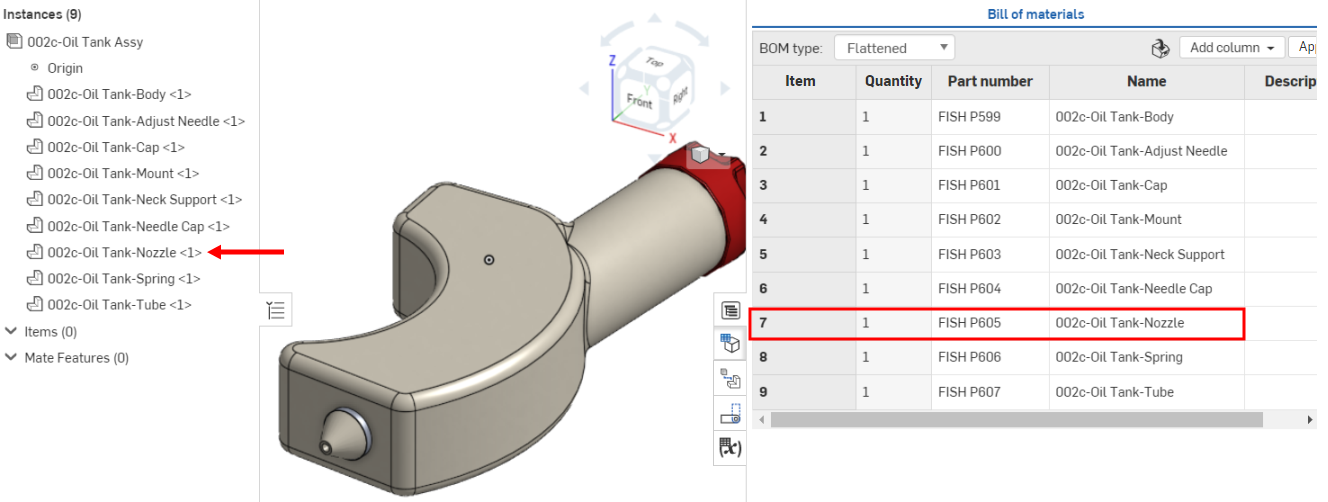
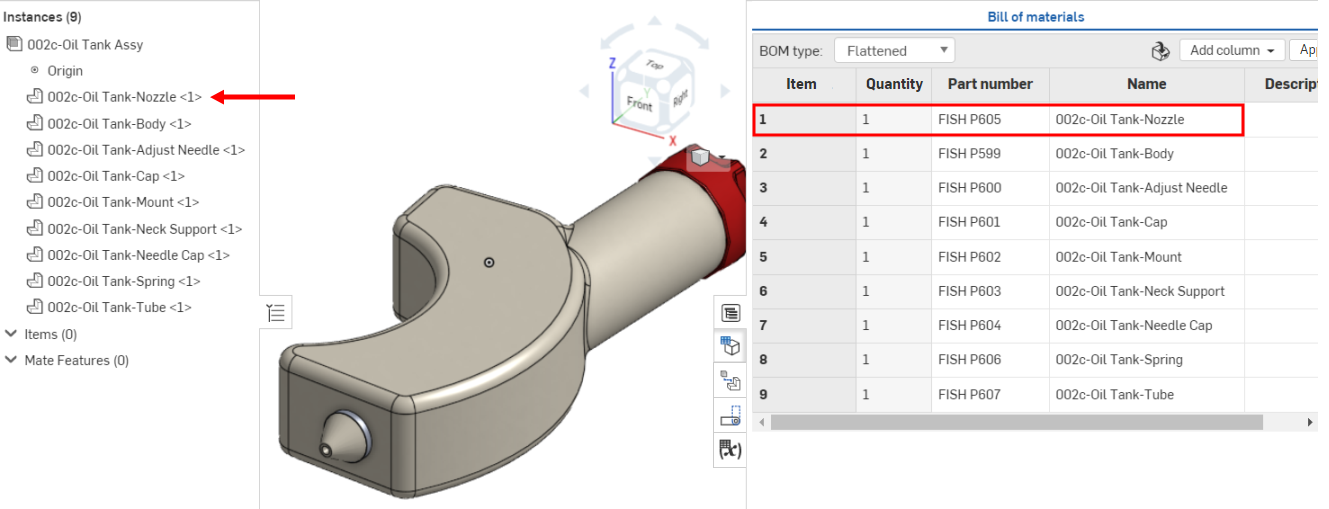
指派給次組合件與零件的項目編號反映了實例在實例清單中的順序。如果您重新排列清單中的實例,則 BOM 表格會更新以反映新的順序。
之前,002c-Oil Tank Nozzle 是在實例清單中的第七個項目,也是 BOM 表格中的項目編號 7:
在實例清單中將零件移動至最上方第一個位置後,隨即更新成為 BOM 表格中的項目編號 1 :
BOM 表格介面
在開啟之後,BOM 表格有下列特點:
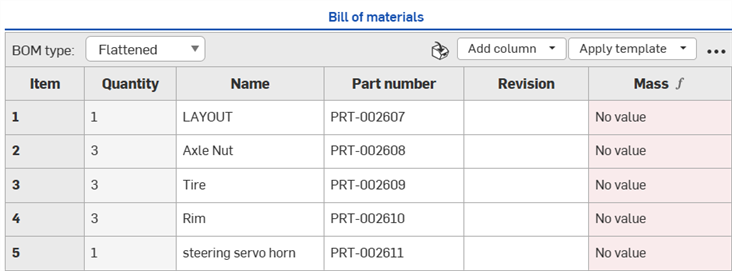
-
BOM 類型 - 從「平階化」或「結構化」BOM 類型中選擇:
-
平階化 - 這個檢視方式根據項目編號提供零件的簡易清單,不會表明是否有次組合件。
-
結構化 - 這個檢視方式提供零件的清單 (包括可展開次組合件的指示)。次組合件會以小的朝右插入符號表明。
-
-
插入項目 - 插入非幾何項目 (不是在 CAD 中建構的項目,像是膠水、膠帶、塗漆、缺氧膠等) 到 BOM 中。請參考 插入非幾何項目。
-
新增欄 - 新增欄位到 BOM 表格中。請參考加入或移除欄。
-
套用範本 - 僅為 Enterprise、Professional、與 Educator 訂閱提供。選擇 BOM 範本來套用至目前的 BOM 表格中。詳細資訊請參考 BOM 表格範本。
-
溢位功能表 - 有其他表格選項的功能表。請參考 BOM 表格溢位功能表。
若要了解更多關於 BOM 表格介面的資訊,請參考操作 BOM 表格與格式化 BOM 表格說明主題。
BOM 表格溢位功能表
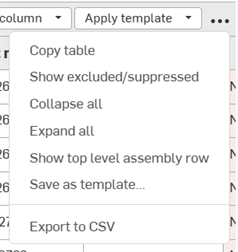
按一下右上角的溢位功能表圖示 ( ) 來存取其他的 BOM 表格選項:
-
複製表格 - 將 BOM 表格複製到剪貼簿中,使其可以貼到像是 Microsoft Excel 或 Google Sheets 等的外部程式中
-
顯示/隱藏 排除/抑制 - 顯示或隱藏 BOM 表格中已排除與抑制的列資料。請參考局部抑制或顯示排除的 BOM 資料與整體排除與包括 BOM 資料。
-
全部摺疊 - 僅適用於結構化的 BOM 視圖中,會摺疊所有次組合件的列,因此每個次組合件在 BOM 表格中僅佔用一列。
-
全部展開 - 僅適用於結構化的 BOM 視圖中,會在 BOM 表格中展開所有次組合件的列。
-
顯示/隱藏最上層組合件列 - 顯示或隱藏最上層組合件列。這個列會顯示在 BOM 表格的底部。
-
儲存為範本 - 僅為 Enterprise 與 Professional 訂閱提供,會將目前的 BOM 表格範本另存為範本。請參考 BOM 範本。
-
匯出為 CSV - 將 BOM 表格匯出為以逗點分隔的檔案格式,使其可匯入到像是 Microsoft Excel 或 Google Sheets 等的外部試算表程式中。請參考匯出為 CSV。
注意
-
水平捲動 - 如果 BOM 表格比其所在的面板更寬,則會在底部顯示一個水平捲軸,在您捲動時,第一個欄 (項目) 會保持為凍結的。
-
對於正要發行與已發行零件的應考慮事項
-
當在組合件中使用匯入或已發行零件時,顯示在 BOM 表格中的屬性是唯讀的。若要建立有可編輯欄位的 BOM,您可以從版本中產生分支來建立新的工作區。BOM 中欄位的可編輯與否會根據每個屬性的設定 (透過帳戶設定) 決定。
-
在您將已發行 (經修訂) 零件插入到組合件中,並建立 BOM 表格之後,狀態的屬性將會是「已發行」。
-
-
將 BOM 插入至工程圖中 - 若要將 BOM 表格插入到工程圖中,請參考 BOM 表格。
-
交叉強調顯示 BOM 表格項目 - 若要從「實例」清單中找到模型上的項目,請在「實例」清單中點按項目名稱,系統會在模型中強調顯示所選的項目。目前會在 BOM 表格中強調顯示相關聯的項目列並將其設定為焦點。或者是在 BOM 表格中點按項目名稱,系統即會在模型與「實例」清單中強調顯示選取的項目。