 Part Studio 和装配体配置


可用于:Part Studio、装配体
创建零件、Part Studio 或装配体的变体。例如,您可以配置拉伸特征的深度、圆角的抑制、自定义特征的 FeatureScript、零件编号、颜色、材料等。
在装配体中,您只能配置嵌合(不能配置嵌合连接器)、实例和阵列。无论是否存在任何 Part Studio 配置,您都可以配置装配体。
配置只能在浏览器上创建,但可以在 iOS 和 Android 上查看。
请参见以下页面了解有关使用配置的更多详细信息:

 Video example (List input)
视频字幕
A List configuration input is a table where each named row sets values for selected parameters, letting the model switch between predefined design permutations in a Part Studio or assembly. Open the Configuration panel. If the Part Studio has no configurations, no tables exist, and the Configurations selector is not available above the Features list.
To create a list input table, click Configure Part Studio, or click the dropdown arrow and select List. The Configurations selector is now available. The table starts with one column for configuration names, including the first Default configuration. Configure the required parameters. Click Configure features to enter configure mode; a yellow banner indicates the mode is on. Select sketches or features to configure their parameters.
For this example, the variables that define the outer, and inner, circle diameters are selected. The parameters are added as columns in the table. Configured parameters in a sketch or feature are outlined with a dashed yellow line. When the table includes all required columns, select Done on the banner. Edit the cells in the table to include all required sizes.
To rename the input table, click the current name or click the overflow icon and select Rename. Renaming the table updates the input in the Configurations selector, which is especially important when multiple input tables exist. If a dimension uses an expression, the expression populates the cells.
The active configuration shows a blue bar in the name column. To switch the active configuration, use the Configuration selector or right-click a row and select Switch to. When a new configuration becomes active, the model updates based on the table values.
Video example (Checkbox input)
视频字幕
A checkbox input toggles a parameter on or off.
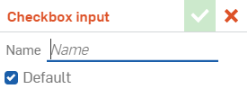
Open the Configuration panel. Click the arrow next to Add configuration input and select Checkbox. Name the input and set the default option as either checked or cleared. The machined features are organized into folder. Configure Extrude 14. Select Configure features and then click the Extrude feature. Hover over the Unsuppressed checkbox until the yellow highlight appears and then click. The feature’s suppression state is now a column in the input table.
Alternatively, right-click a feature or sketch in the Features list and select Configure suppression. Once in the input table, check the boxes in the column to suppress the Extrude feature when the Machined configuration is active. When the table includes all required columns, select Done on the banner. In the Configuration selector, clear the Machined checkbox to suppress the Machined features.
A checkbox input can include multiple parameter columns, and not just suppression. In the pneumatic cylinder, a rod clevis with one hole is configured using a checkbox input that controls End type and the Up to face selection. The flat blind cap checkbox is configured by suppression of several features to achieve the desired result. Use checkbox inputs to create parameters that toggle on or off.
Video example (Configuration variable input)
视频字幕
Configuration variable inputs control design parameters and constrain values to a defined range.
Open the Configuration panel. Click the Add configuration input arrow, and select Configuration variable. Enter a Name for the variable that informs the user of its purpose. Select the Variable type. In this example, the Length type is selected. The variable will be used to drive the sound hole radius.
With the exception of the text type, all other types define values for Default, Minimum, and Maximum. Enter values to finish defining the parameter. After creating the variable, use it to drive sketch dimensions, feature values, and more.
To adjust the sound hole radius, edit the sketch dimension that controls it. Double-click the dimension, enter a valid expression, converting the radius into a diameter, then enter the configuration variable name. Select the variable from the list, and accept both the dimension and the sketch. The configuration input table adds a column with a Default configuration row. The feature updates based on the value in the Configuration selector.
Video example (Inserting configurations into an assembly)
视频字幕
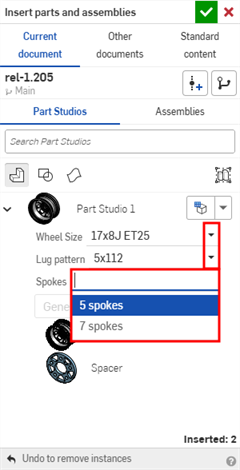
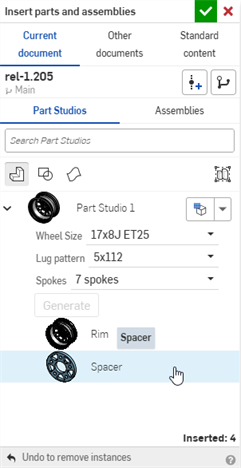
When inserting instances into an assembly, configurations make it easy to manage variations without creating separate models. The Insert dialog includes the Configurations selector to set the configuration option before insertion.
The instance initially has the default configuration options selected. Default options are designated during creation, but can be changed at any time. To set a default option, navigate to the Part Studio or assembly Configuration panel, right-click the row in the desired input table, and select Set as default.
In an assembly, click Insert, and expand a configured Part Studio or assembly to access the Configuration selector. Click the Set to last viewed configuration dropdown for two options. Select Set to last viewed to use the configuration most recently viewed in the Part Studio. Select Reset to default to restore the options to their defaults. Select the desired options. Click Generate to refresh the preview if needed. Then select the parts, Part Studio, or assembly, and accept to insert.
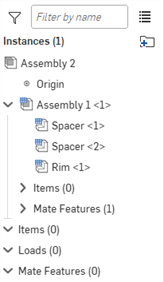
Instances with configurations are indicated with the configuration icon. An instance's configuration can be changed after it is inserted into the assembly. Right-click an instance in the graphics area or in the Instances list and select Change configuration. Select parameters and accept.
Patterning, replicating, or mirroring a configured instance creates additional instances that reference the same configuration as the seed instance. Changing the configuration of the seed instance updates all patterned instances. Independently inserted or pasted instances have their own referenced configurations. This includes instances of a dissolved replication.
Select all instances of a part with the same configuration by right-clicking the part and choosing Select instances with same part and same configuration. Use Select instances with same configuration to select all parts configured in the same input table that currently reference the same configuration options. Then right-click a selected instance and click Change configuration to update in bulk.
基本步骤:创建一个列表输入
- 单击屏幕右侧的配置面板图标 (
 )。
)。 -
配置面板打开。单击“配置 Part Studio”或“配置装配体”以添加输入:
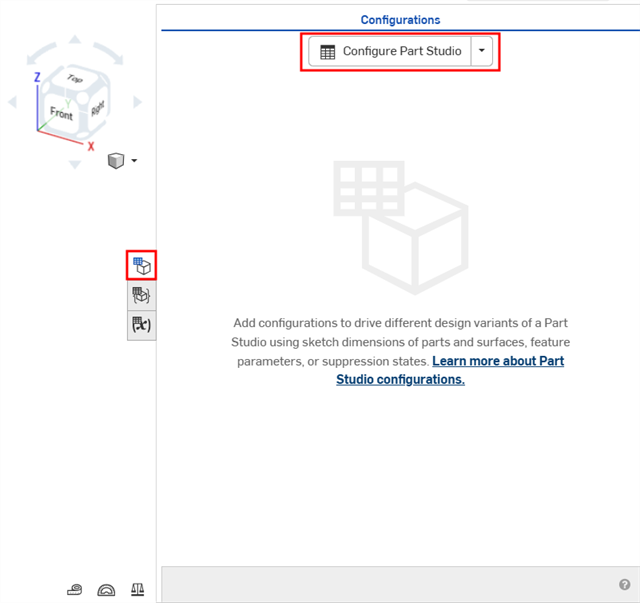
在 Part Studio 中创建配置
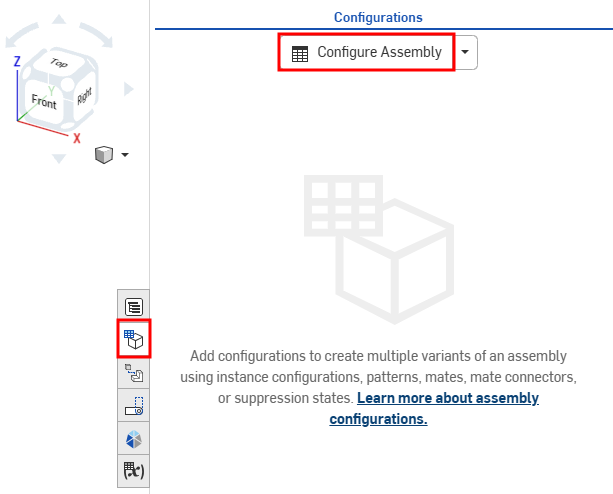
在装配体中创建配置
默认情况下,“配置”左边的插入符号是展开的,当您完成面板的某个部分后,点击插入符号即可折叠该部分。
- 单击第一行将其激活,然后在第一列中输入输入值名称。按 页签以移至下一行。该行左侧的蓝条表示当前在 Onshape 窗口中选择的配置。
此示例有 3 种可能的配置:“短”、“中”和“高”。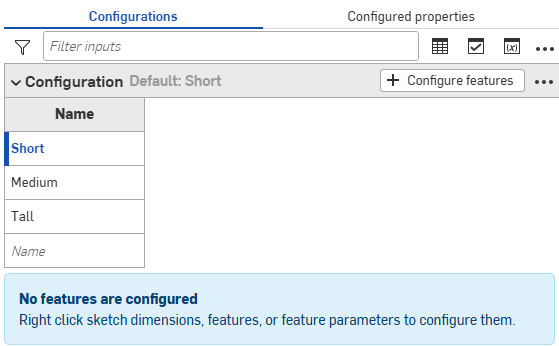
- 要为选定的输入值配置特征,请单击“+ 配置特征”(或“+ 配置装配体特征”)。
- 单击要配置的特征或实例并选择参数。该参数将以黄色虚线框标出,并为该参数创建了一个新列。
例如,单击特征列表中的“拉伸”特征,然后在“拉伸”对话框中选择“深度”参数。该参数在对话框中以黄色亮显,表格中会出现一个新列。
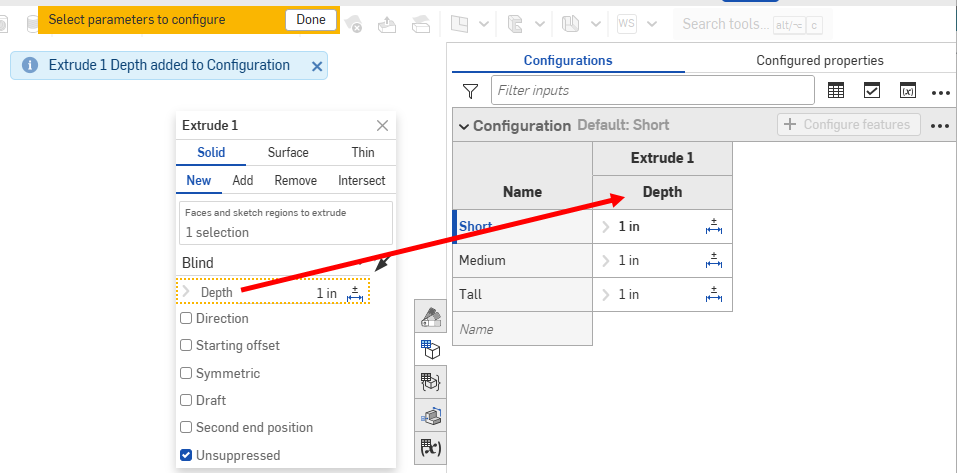
列名称默认为特征名称(作为顶级标题)加上参数名称(作为从属标题),在本例中“拉伸 1”是特征名称,“深度”是输入框名称。
将光标悬停在特征对话中的输入框上,以查看哪些参数可以配置。当您悬停在这些参数上时,可配置的参数会以黄色亮显。
您可以直接在“配置表”中为许多草图和特征尺寸配置“公差选项”(
 )。每个选项值都可以有自己的“公差选项”设置。
 - 要配置参数,请执行以下操作:
- 要编辑某个值,请双击该值并输入新值。
在此示例中,我们将为 3 个输入值设置深度: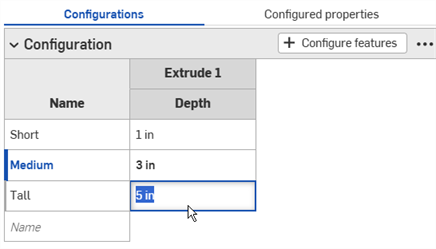
- 要编辑对话框中的选择,请双击表中配置的参数以打开特征对话框。
特征对话框中的参数以蓝色亮显。移除任何不需要的选择,然后在模型或草图上做出新的选择。单击特征对话框中的绿色复选标记将其关闭。
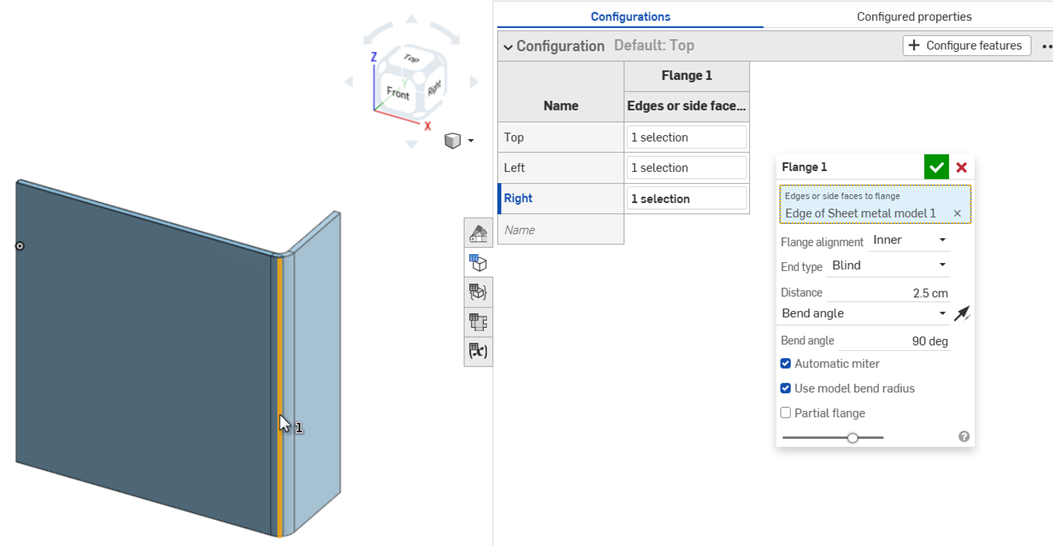
- 要编辑某个值,请双击该值并输入新值。
- 完成配置定义后,请单击黄色横幅中的“完成”按钮
- 要向输入中添加另一个参数(列),请重复步骤 4-7。
- 要添加其他列表输入,请单击配置面板底部的“添加配置输入”按钮,然后选择“列表”。
- 要使用模型测试输入,请在左侧面板的“配置”下,使用向下箭头从菜单中进行选择:
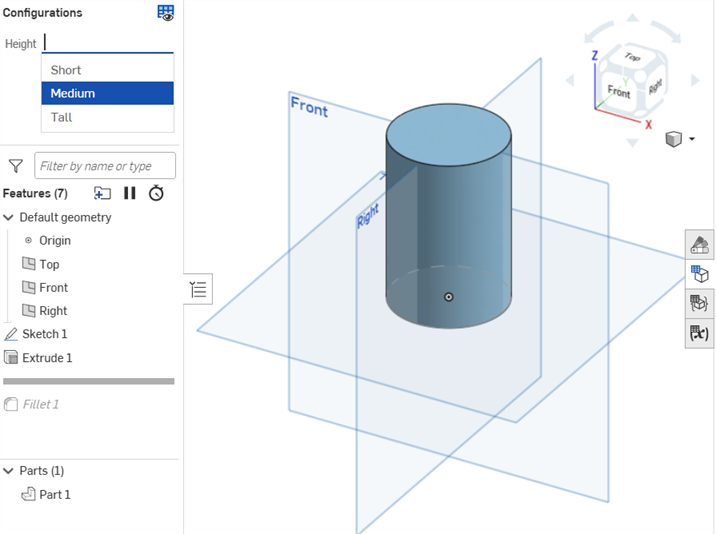
模型应该相应地更新。如果未更新,请检查设计意图的模型和配置定义以进行精确选择。
创建复选框输入
创建一个复选框以开启或关闭选项(例如圆角或倒角),并抑制或取消抑制特征。这会在插入时的“插入”对话框中显示一个复选框。
-
单击配置面板底部的“添加配置输入”按钮,然后选择“复选框”:
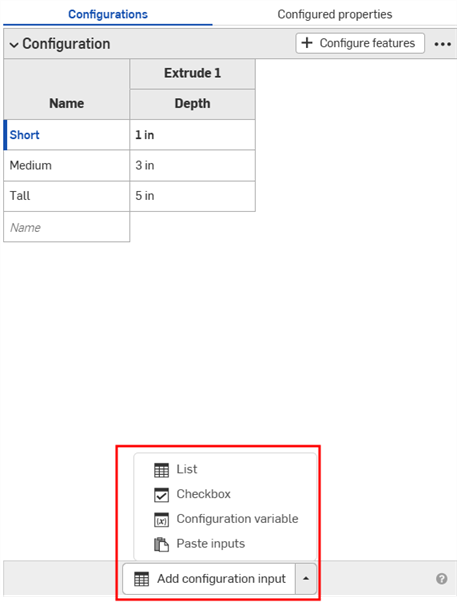
- “复选框输入”对话框打开。为输入项输入一个名称。
-
配置输入项包含一列,其中有一个未勾选的复选框行和一个已勾选的复选框行。单击“+ 配置特征”(或“+ 配置装配体特征”)。
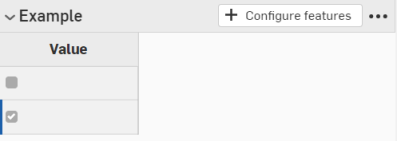
- 在特征列表中,单击以打开包含参数的特征并选择该参数。该参数随后以黄色虚线表示,并为表格中的该参数创建一个新列。(在其他输入中配置的参数用黄色虚线表示,不可用于配置。)
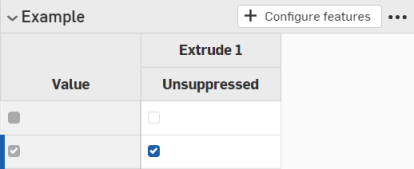
在此示例中,选中“取消抑制”作为配置参数。
- 单击 X 可关闭特征对话框。
- 取消选中第一列中的复选框以表示复选框应插入已取消抑制的特征:
创建配置变量输入
-
单击配置面板底部的“添加配置输入”按钮,然后选择“配置变量”:
- 在“变量输入”对话框中输入变量输入的名称。这成为系统中的实际变量,以 #variableName 的形式被参考。
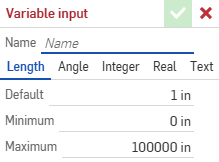
- 选择变量类型:长度、角度、整数、实数、文本。文本可以是可以在自定义 FeatureScript 中使用的任何类型的文本。
- 为您所选的变量类型,输入值。
- 单击复选标记以保存您的定义。
- 将变量应用于特征:
- 双击特征列表中的某个特征将其打开。
- 右键单击输入,然后单击“设置为 #variableName”。您也可以直接在任何表达式中键入变量名称(以 # 开头)。
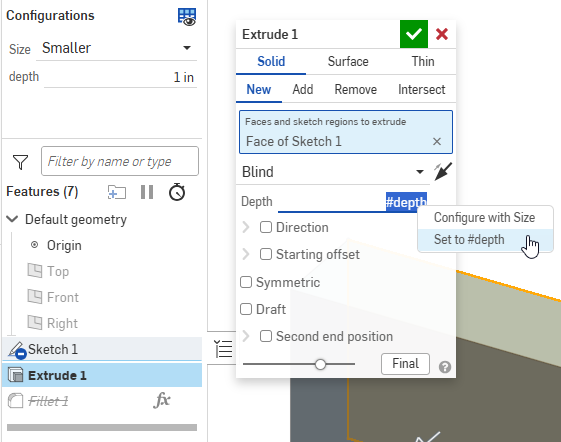
- 关闭特征对话框。变量输入的使用情况在“配置”面板中列出。
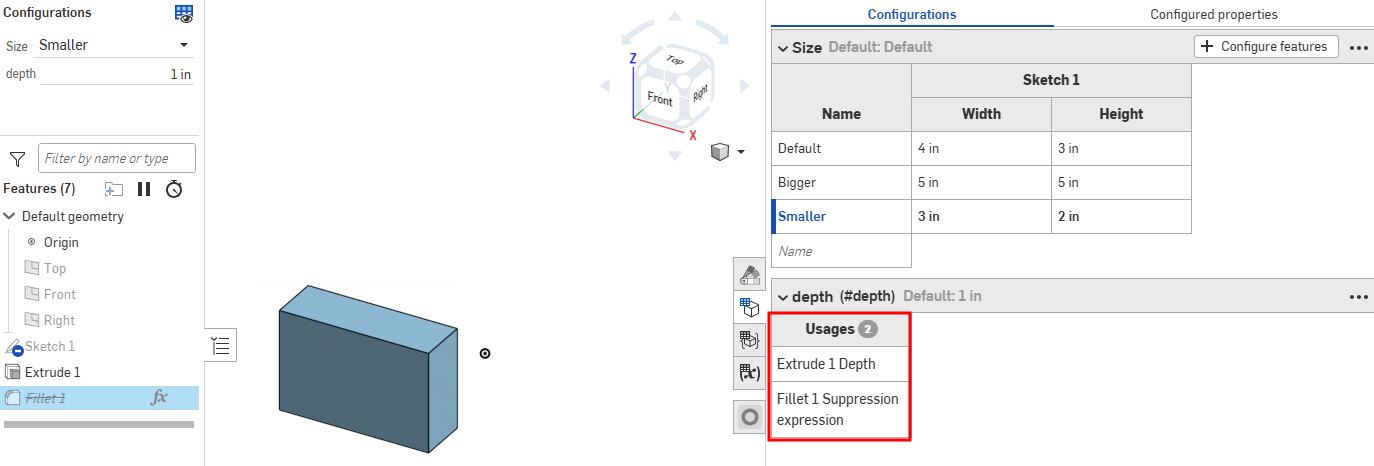
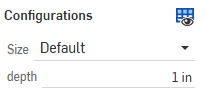
- 通过在页面左侧特征列表上方的配置列表中选中该值来测试该值:
使用配置
您可以使用直接在 Part Studio 或装配体中创建的配置输入来预览其设计。但是,创建配置输入的主要用途是选择特定的配置以插入到其他装配体、工程图、发布版本等之中。
预览配置
使用屏幕左上角的配置区域选择配置输入,以查看它们如何影响整体设计。设计会更新以匹配所选输入,因此您可以预览最终设计。可能的配置输入的每种排列都是一个配置。
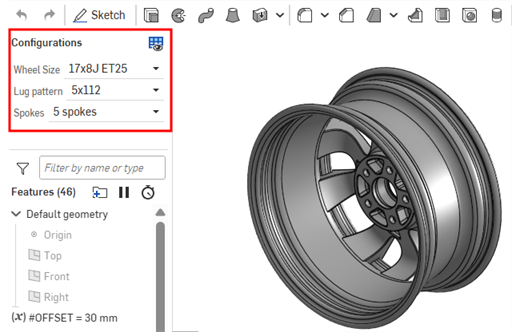
To open the Configuration visibility conditions dialog for all inputs, click the Manage visibility conditions ( ) button.
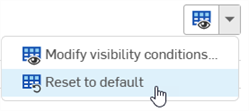
To reset a Part Studio or assembly back to its default configurations, click the Manage visibility conditions () dropdown and select Reset to default ( ) from the menu. If the default values are hidden due to visibility condition logic, they cannot be used, and the first visible option is used instead.
插入配置
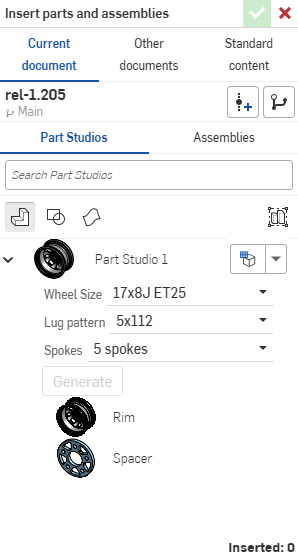
您可以通过“插入 Part Studio 和装配体”对话框将已配置的零件、Part Studio,或装配体插入到装配体、发布版本和工程图中
-
直接在“插入”对话框中选择所需的输入:
-
单击“设为上次查看的配置”图标 (
 ),选择在“Part Studio”或“装配体”选项卡中预览最后一个处于活动状态的配置,或单击箭头并选择“重置为默认值”以将所有输入设置为其默认值。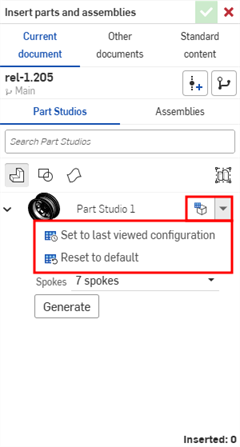
-
如您对配置感到满意,单击“生成”。
-
单击要插入的配置。
在装配体中,配置的零件和装配体由实例列表中的  图标指示:
图标指示:
更改配置
将已配置的零件或装配体插入到装配体中后,您可以更改配置:
- 右键单击实例列表中的零件或装配体,然后选择“更改配置”。
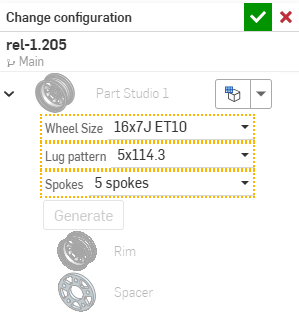
- 选择新的配置值。
- 当您对选择的内容满意时,请单击
 。(使用
。(使用  可取消操作。)
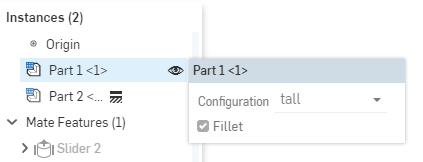
要查看装配体中当前有哪些配置处于活动状态,请将鼠标悬停在实例列表中的某个零件上,出现包含配置信息的工具提示:
配置:iOS 和 Android
iOS 和 Android 对配置的支持仅限于以下内容:
-
查看右侧的“配置”面板 (
)。 -
在左侧面板(功能列表上方)中的“配置”之间进行选择:
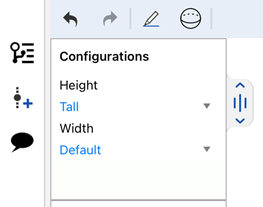
在 iOS 上选择“配置”
-
(仅限 iOS)如果配置中存在“可见性条件”,则应用这些条件。
您无法在 iOS 或 Android 平台上创建或编辑配置或可见性条件。这只能在桌面(浏览器)平台上完成。
有关其他学习中心资源,请参阅:自定进度课程 > 配置。您还可以在此处阅读学习路径课程:零件配置简介(需要 Onshape 帐户),以及此处的技术简报文章:参数变量与配置变量(需要 Onshape 帐户)。