 配置
配置


可用于:Part Studio、装配体、Variable Studio
创建零件、Part Studio、装配体或 Variable Studio 的变体。例如,您可以配置拉伸特征的深度、圆角的抑制、自定义特征的 FeatureScript、零件编号、颜色、材料等。
请参见以下内容,了解有关创建和使用配置的详细信息:
请参见以下内容,了解有关管理配置(包括重命名、复制/粘贴以及发布)的详细信息:
请参见以下内容,了解有关应用高级配置逻辑的详细信息:
当多个人在同一文档中工作时,每个人都会看到自己选择的配置,在“跟随模式”下工作时,跟随者会看到领导者选择的配置。

 视频示例
视频示例
视频字幕
Configurations create variations of a design, making it easy to build and manage multiple versions of the same part or assembly. They are also commonly referred to as part families, variants, or design tables.
A flange pipe fitting is a common example: outer and inner diameters, flange size, hole count, and hole diameter vary while the overall design remains consistent. When inserting a configured part into an assembly, select the required configuration during insertion. Configurations provide a quick workflow for creating a family of parts without modeling each unique permutation.
Older CAD systems use design tables to control permutations. Complex designs often require hundreds or thousands of rows to manage every possible combination. These large tables become difficult to maintain and increase the likelihood of errors.
Onshape reimagined configuration tables. Configurations use independent inputs such as lists, checkboxes, and configuration variables. Each configurable input is managed separately in its own, smaller, easier-to-manage configuration table. This modern approach eliminates the hassles of managing large tables, greatly simplifying configuration management.
术语
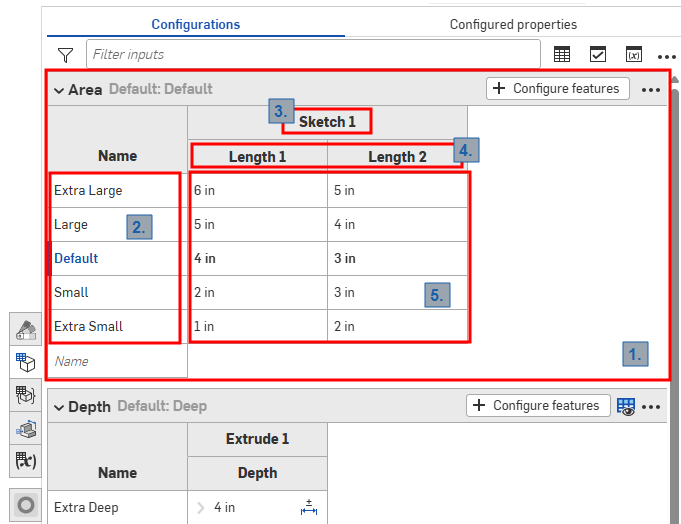
Part Studio 中的配置面板
Onshape 配置使用以下术语,如上图所示:
-
输入 - 每个配置输入都表示为一个可折叠的表格。每个 Part Studio、装配体和 Variable Studio 只有一个配置面板,但每个面板可以包含许多输入。
-
选项 - 输入表格中的每一行都成为选择配置时可用的选项。
-
已配置特征 - 正在配置的特征或变量。它们始终对应于现有特征或变量。名称无法更改。
-
参数 - 输入表格中的每一列代表正在配置的特定特征参数。
-
选项值 - 每个单元格表示要为指定选项的参数设置的值。
所有 Part Studio、装配体和 Variable Studio 都有一个配置面板,其中汇总了可用于该元素的配置。您可以在一个配置中创建多个配置输入。当您想要配置的特征或输入值彼此不一定相关时,这一点尤其有用。例如,当零件的长度和直径与是否应用圆角无关时,您可以使用两个配置输入。这样可以提供更大的灵活性,并有助于避免每个配置输入变得不必要的复杂。您定义的配置输入在插入已配置项时,会成为“插入”对话框中的选项。
配置:iOS 和 Android
iOS 和 Android 对配置的支持仅限于以下内容:
-
查看右侧的“配置”面板 (
 )。
)。 -
在左侧面板(功能列表上方)中的“配置”之间进行选择:
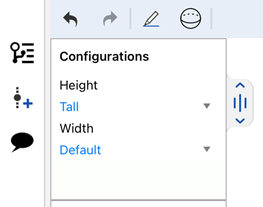
在 iOS 上选择“配置”
-
(仅限 iOS)如果配置中存在“可见性条件”,则应用这些条件。
您无法在 iOS 或 Android 平台上创建或编辑配置或可见性条件。这只能在桌面(浏览器)平台上完成。
有关其他学习中心资源,请参阅:自定进度课程 > 配置。您还可以在此处阅读学习路径课程:零件配置简介(需要 Onshape 帐户),以及此处的技术简报文章:参数变量与配置变量(需要 Onshape 帐户)。