 In-app Notifications

In-app notifications appear when the user clicks the bell icon ( ) in the Document toolbar and in the title bar of the Documents page. They keep the user informed about the progress and outcome of things the user has started in Onshape, such as an upload, an export, or a document upgrade.

A number beside the bell icon shows how many notifications are unread. Open a notification to read it, mark it as read, or delete it.
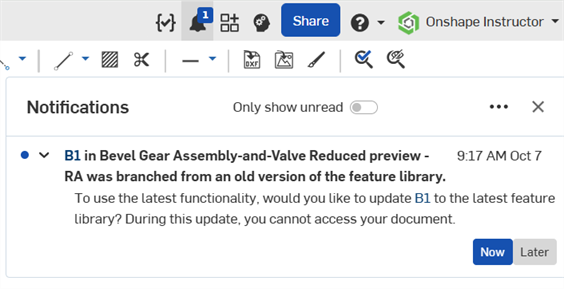
- In-app notifications are not affected by the user's notification preferences. Those settings control only email and mobile notifications.
- In-app notifications are deleted after 14 days, whether or not the user has read them.
- Some notifications, such as those for uploads, translations, document upgrades, workflows, and simulations, update as the activity progresses rather than adding a new notification each time. When a notification updates, it is marked unread again.
- Some notifications are scheduled and appear at a later time.
 Files: upload, import, translate, and export
These notifications go to the person who performed the action. The user is notified when:
- An upload starts, is cancelled, or finishes (including when a translation is still to come).
- An upload or import fails or is rejected. Reasons include lack of permission, a file that is too large, a malformed file, an unsupported version, a file name that does not meet the company's policy, or a library that cannot be upgraded.
- A translation or import finishes or fails (success, success with errors, unsupported file type, or timeout). The user also sees a notification while a unit change is in progress.
- An export runs, succeeds, fails, or has invalid parameters (for example, glTF, 3MF, or image resolution settings).
- An export that is emailed as a link succeeds or fails.
- An export to cloud storage (for example, Google Drive or OneDrive) succeeds, fails, or has no link available.
- The user connects to a cloud storage account (success or error).
- The user uploads a profile photo or company logo, or cropping the photo fails.
- An Enterprise administrator uploads SSO metadata (success or error).
- A translator crash occurred while processing the user's file. Onshape saves the file and asks whether it may use the file to help diagnose the problem.
Document upgrades
Onshape prompts the user to upgrade a document to the latest feature library version in these situations:
- The user opens a document that the user has write access to, that is on an older version, that was last changed more than 90 days ago, and that has no upgrade already scheduled. The user is prompted at most once every 20 days.
- The user restores a workspace to an earlier state that is on an older version.
- The user creates a branch from an older version, with edit access. (Onshape standard content documents are excluded.)
- The user restores a document from the trash that is on an older version.
After the user chooses to upgrade now or later, the user is notified that the upgrade is scheduled. The user is then notified when:
- The upgrade is retried because the document was open.
- The upgrade is cancelled after the retries.
- The upgrade succeeds or fails, or the document or workspace was deleted or is no longer accessible.
Release management, workflows, and tasks
- A workflow transition occurs on a release package or task (moving between states, a comment, a discard, a reassignment, or a transition that starts or fails). The creator, approvers, and observers are notified, and this can include the person who made the change.
- Approvers of the target state, and their delegates, receive a needs your approval notification.
- Onshape tasks have their own notifications for assign, complete, discard, comment, and reassign.
- A release finishes, but the part number or revision description could not be applied to some workspaces. This notification goes to the person who released it.
- The user, or a team the user belongs to, is made someone's substitute approver.
Invitations
When the user invites someone who is not yet registered with Onshape and their invitation is approved, the user is notified with their email address and told that Onshape emailed them. This applies to document, publication, and folder shares, and to friend invitations. The recipient does not receive an in-app notification.
Other notifications
- PLM jobs - The user is notified when a job the user started begins, completes, or fails. A single notification updates as the job progresses.
- Simulation - The user is notified when a simulation run is queued or in progress, succeeds, fails, is cancelled, or has its results deleted. A run that finishes with only warnings is reported as a success.
- Make personal copies - Notifications are created:
- When an administrator makes personal copies of documents (an education-enterprise off-boarding feature), a notification is shown for each document, followed by a summary.
When a user makes a personal copy, an in-app notification is shown when the document copy is created, showing whether the copy succeeded or failed. If more than one copy is created, a notification shows a final summary when the batch completes; for example, 8 of 10 personal copies completed. 2 failed.
What does not appear as an in-app notification
Comments, @mentions, task assignments, and documents shared with the user do not produce an in-app notification. These are sent by email and mobile notification, according to the user's notification preferences.