


La barre d'outils Document est disponible dans tous les documents Onshape (alignée horizontalement avec le logo Onshape).
 Options de la barre d'outils Document
Vous trouverez ci-dessous un aperçu des fonctionnalités disponibles :

- Onshape or company logo - Click the Onshape logo (or your company logo if you are part of an enterprise account) to return to the Documents page from anywhere in the system.
- Menu Document
 - Cliquez sur cette icône pour ouvrir un menu des commandes disponibles pour l'espace de travail actif ou la version active du document.
 - Nom du document (en gras) ; Miroir (dans l'image d'exemple ci-dessus) - Le nom en gras est le document dans lequel vous travaillez actuellement.
Vous pouvez modifier le nom du document en cliquant sur le nom actuel et en saisissant un nouveau nom.
- Nom de l'espace de travail (gris clair) ; Principal (dans l'image d'exemple ci-dessus) - Le nom de l'espace de travail dans lequel vous travaillez actuellement.
- Copier le lien
 - Copiez le lien vers le document, y compris la configuration active, la vue en mode rendu, la vue éclatée, les états du panneau et l'orientation de la vue.
 - Nom du dossier
 - Si le document se trouve dans un dossier, le nom du dossier est indiqué à droite de l'icône du dossier. Le dossier est également un lien. Cliquez sur le lien pour ouvrir le dossier dans un nouvel onglet du navigateur.
 - Notifications FeatureScript
 - Cliquez pour voir les notifications envoyées par le compilateur FeatureScript.
 - Notifications
 - Displays in-app notifications alerting you to document changes. See In-app notifications for more information.
 - App Store
 - Cliquez pour accéder (et vous connecter, si nécessaire) à l'App Store Onshape pour acheter des applications partenaires d'Onshape.
 - Centre d'apprentissage
 - Cliquez pour accéder au centre d'apprentissage Onshape (dans un nouvel onglet de fenêtre) qui propose des webinaires enregistrés, des briefings techniques et des parcours autoguidés.
 - Partager - Cliquez pour ouvrir la boîte de dialogue Partager et rendre le document actif accessible à un autre utilisateur ou à une autre équipe et sélectionnez les autorisations que ces utilisateurs peuvent avoir sur ce document.
- Menu Aide
 - Ouvrez le menu Aide pour accéder : au système d'aide en ligne, au centre d'apprentissage (identique au bouton du centre d'apprentissage), à la documentation FeatureScript, à la liste des raccourcis clavier des produits, à la liste des nouveautés de cette version, aux forums, aux informations pour contacter l'assistance, parrainer un ami pour s'abonner à Onshape, vérifier la compatibilité de votre système avec les exigences d'Onshape et des informations sur cette version d'Onshape.
 - Menu du compte utilisateur - Accédez aux préférences de votre compte et à d'autres paramètres via ce menu. Pour plus d'informations, voir Gestion des comptes Onshape.
Si le document actuel est public, des icônes supplémentaires sont disponibles :

-
Document public
 - Indique que le document actif est public.
 -
Copies
 - Indique le nombre total de copies du document actif. Voir Partager des documents pour plus d'informations.
 -
Liens
 - Indique le nombre total de liens vers le document actif. Un lien se produit lorsque le document actuel est inséré dans d'autres documents. Voir Lier des documents pour plus d'informations.
 -
J'aime
 - Indique le nombre total de mentions « J'aime ». Cliquez sur l'icône pour aimer le document actuel.
Barre d'outils Document : iOS
Vous trouverez ci-dessous un aperçu des fonctionnalités disponibles :

-
> - En appuyant dessus, l'utilisateur revient à la page Documents.
-
Noms du document et de l'espace de travail - Le nom du document figure en haut, suivi du nom de l'espace de travail en bas. Dans l'image d'exemple, le nom du document est Bevel Gear Assembly-and-Valve Reduced preview - RA, et celui de l'espace de travail est Main.
-
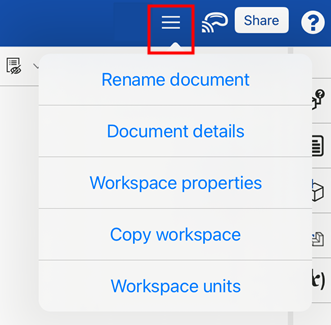
Menu des options - Appuyez sur le menu des options en haut à droite pour ouvrir une liste déroulante proposant des options supplémentaires relatives aux documents et à l'espace de travail :
-
Renommer le document - Ouvre une boîte de dialogue pour mettre à jour le nom du document actif.
-
Détails du document - Ouvre une boîte de dialogue pour mettre à jour la description du document actif.
-
Propriétés de l'espace de travail - Ouvre une boîte de dialogue pour afficher le nom, la description et la catégorie de l'espace de travail actif.
-
Copier l'espace de travail - Ouvre une boîte de dialogue pour copier l'espace de travail actif vers un nouveau document.
-
Unités de l'espace de travail - Ouvre une boîte de dialogue pour modifier les unités de l'espace de travail actuellement sélectionné.
-
-
Apple Vision Pro - Se connecte à l'Apple Vision Pro. Voir Affichage de modèles avec Apple Vision Pro pour plus d'informations.
-
Partager - Ouvre la boîte de dialogue Paramètres de partage, qui permet à l'utilisateur de définir les paramètres de partage pour le document actif. Voir Partager des documents pour plus d'informations.
-
Menu Aide - Ouvre un menu déroulant permettant d'accéder à l'Aide sur mobile, Examiner le contrôle des gestes, Contacter l'Assistance et d'obtenir des informations sur Onshape. Consultez la section Commentaires et Aide pour plus d'informations sur ces options.
Sur les téléphones mobiles, les boutons Versions et historique, Créer une version, Commentaires et Partager se trouvent dans une barre d'outils horizontale en bas de l'application.