
Disponible dans : Feature Studio
Un Feature Studio est un onglet Onshape qui permet de travailler avec FeatureScript, un langage de programmation permettant de définir des fonctions personnalisées.
FeatureScript est un langage conçu par Onshape pour créer des fonctions et travailler avec des modèles paramétriques en 3D. Intégré à Onshape, ce langage constitue la base de la modélisation dans Part Studio, notamment pour la définition des fonctions standard d'Onshape (comme Extruder, Appliquer un congé et Coque).
Cette page est consacrée à l'utilisation de l'interface utilisateur du Feature Studio.
- Pour plus d'informations sur l'écriture de code FeatureScript afin de créer des fonctions personnalisées, consultez la documentation FeatureScript.
- Pour savoir comment ajouter ces fonctions personnalisées à un Part Studio, consultez la section Fonctions personnalisées.
 Feature Studio toolbar

The Feature Studio toolbar includes the following:
- Undo (
 ; ctrl/cmd+z ) - Undo the most recent change.
 - Redo (
 ; ctrl+y/shift+cmd+z ) - Repeat or redo the most recent change.
 - New feature (
 ) - Insert the basic framework for a new feature, which consists of a function declaration with the precondition and body within it. See the FeatureScript Docs for more information.
 - Parameters and functions lists - Insert the basic framework for parameters, queries, evaluations, math functions, sketch functions, and operations. On some screens, this option is collapsed into one list (as shown above); on other screens, each list is individual:
 - Insert feature parameters
 - Insert query functions
 - Insert evaluation functions
 - Insert math functions
 - Insert sketch functions
 - Insert operation functions
- Import (
 ) - Import a file, Part Studio, other Feature Studio, or Variable Studio from the current or another document. See Imports.
- You can also create a version (
 ) and view the version graph (
 ) from this dialog. See Versions and History.
- You can also create a version (
- Format Studio (
 ) - Automatically format the current FeatureScript code. If this option is not visible on the toolbar, click the Import dropdown and select it from the menu.
 - Commit - Commit the current code changes. See Committing FeatureScript changes on this page.
- Search tools ( alt/option+c ) - Search for any of the parameters and functions available in the Parameters and functions lists, including their descriptions. To close the search box, click Close search, press the escape key, or click outside the box.
- Co-complete (
 ) - Use AI to help write FeatureScript code. See FeatureScript Co-Complete.
 - Monitor Part Studio (
 ) - Monitor a Part Studio's execution. See Debugging in Feature Studios.
- Click the dropdown and select Profile Part Studio (
 ) to profile a Part Studio's execution. See Debugging in Feature Studios.
- Click the dropdown and select Profile Part Studio (
- Module outline (
 ) - Navigate through your FeatureScript code. See Navigating the outline on this page.
 - Back reference (
 ; ctrl/cmd+[ ) - Return your cursor to its previous position in your navigation history.
 - Forward reference (
 ; ctrl/cmd+] ) - Return your cursor to the next position in your navigation history.
 - Line - The line number of the current cursor location.
- Column - The column number of the current cursor location.
Commiter des modifications FeatureScript
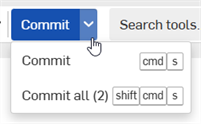
Comme pour tous les onglets dans Onshape, les modifications apportées à FeatureScript sont enregistrées automatiquement au fur et à mesure de la saisie. Pour commiter les modifications et appliquer le nouveau code FeatureScript à l'ensemble du document, cliquez sur le bouton Commiter.
-
Pour commiter les modifications uniquement dans le Feature Studio actuel, cliquez sur le bouton Commiter.
-
Vous pouvez également cliquer sur la liste déroulante et sélectionner Commiter dans le menu.
-
Vous pouvez également appuyer sur cmd/ctrl + s
-
-
Pour commiter toutes les modifications apportées à tous les Feature Studios du document, cliquez sur la liste déroulante du bouton Commiter et sélectionnez Commiter tout.
-
Le nombre de Feature Studios dont les modifications n'ont pas été commitées est indiqué entre parenthèses dans le menu déroulant.
-
Vous pouvez également appuyer sur cmd/ctrl + maj + s
-
Searching, replacing, and renaming FeatureScript
-
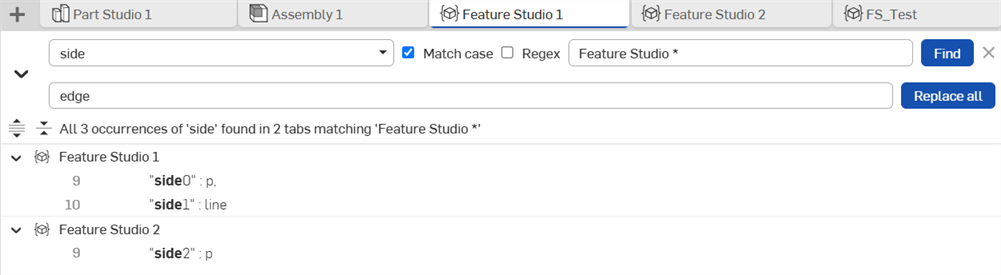
Cliquez sur le bouton Rechercher dans les Feature Studios (
 ) dans la barre de menu pour ouvrir le volet de recherche de texte, illustré ci-dessus.
-
Vous pouvez également ouvrir le volet de recherche de texteavec ctrl/cmd + maj + f.
-
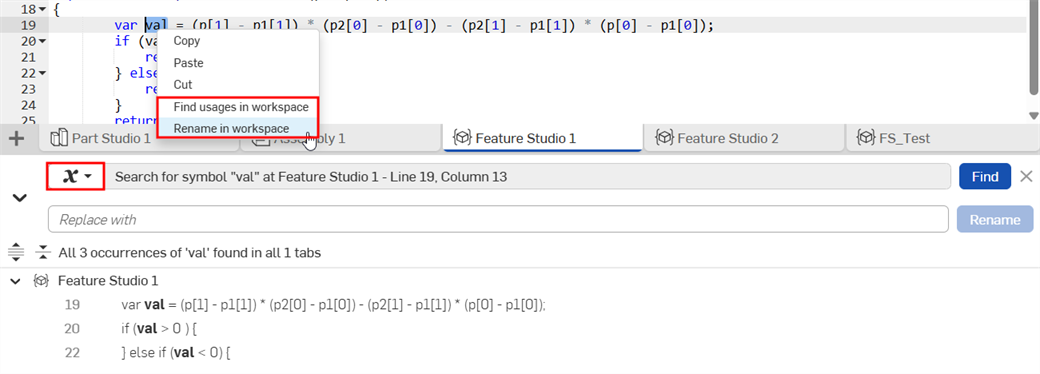
Vous pouvez ouvrir le volet de recherche de symbole en cliquant avec le bouton droit sur un symbole et en choisissant Trouver des usages dans l'espace de travail ou Renommer dans l'espace de travail dans le menu contextuel.
-
-
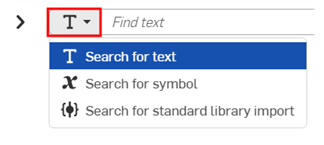
Cliquez sur le menu déroulant du mode de recherche pour basculer entre recherche de texte, de symbole et d'importation de la bibliothèque standard.
-
(Recherche de texte uniquement) Saisissez votre texte de recherche dans le champ Rechercher du texte. Spécifiez les paramètres de recherche facultatifs :
-
Sensible à la casse - Cochez cette case pour effectuer une recherche sensible à la casse.
-
Regex - Cochez cette case pour effectuer une recherche d'expression régulière.
-
Filtre du nom du Feature Studio - Filtrez les résultats de recherche en fonction des onglets correspondant au texte saisi.
-
-
(Recherche par importation de bibliothèque standard uniquement) Entrez les options de recherche pour trouver l'importation de bibliothèque standard correspondante :
-
Inclure et exclure - Saisissez les versions et les plages de versions sous forme de listes séparées par des virgules. Les importations apparaissent dans les résultats de recherche uniquement si leur version est renvoyée dans la liste Inclure et non dans la liste Exclure.
-
Incluez une version mineure (par exemple, 3081.2) pour ne renvoyer que cette version exacte (3081.2). Excluez la version mineure (par exemple, 3081) pour renvoyer toutes les versions mineures de la version principale (3081.0, 3081.1, 3081.2, 3081.3).
-
Les plages de versions (par exemple, 3081.0 à 3081.2) sont inclusives.
-
Utilisez un tiret pour faire correspondre toutes les versions antérieures à une version donnée et incluant celle-ci (par exemple, -3081.2) ou postérieures à une version donnée et incluant celle-ci (par exemple, 3081.2-).
-
Les recherches séparées par des virgules renvoient l'union des correspondances (par exemple, 3079 - 3080, 3081.2 renvoie toutes les versions mineures de 3079, toutes les versions mineures de 3080 et 3081.2).
-
Laissez le champ Inclure vide pour tout faire correspondre. Laissez le champ Exclure vide pour ne rien exclure.
-
-
Filtre du nom du Feature Studio - Filtrez les résultats de recherche en fonction des onglets correspondant au texte saisi.
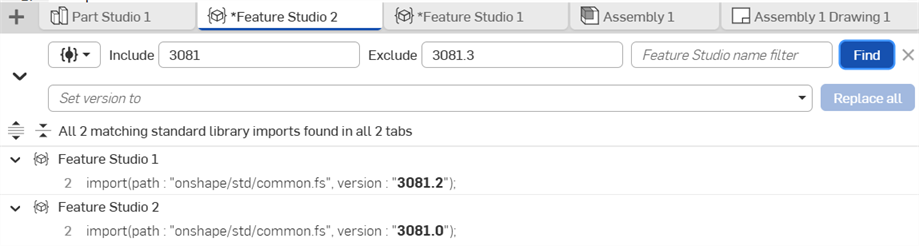
-
-
Cliquez sur Rechercher.
- Les résultats de la recherche sont surlignés dans le code FeatureScript.
-
Utilisez les boutons Développer (
 ) et Réduire (
 ) pour afficher les résultats par onglet Feature Studio.
 -
Utilisez les boutons Étendre les résultats de recherche (
 ) et Réduire les résultats de recherche (
 ) pour développer ou réduire tous les résultats.
 -
Cliquez sur un résultat de recherche pour accéder à son emplacement dans le Feature Studio.
-
(Facultatif) Pour remplacer le texte de recherche, renommer un symbole ou mettre à jour la version standard d'importation de la bibliothèque :
-
Cliquez sur la flèche Activer/Désactiver Remplacer (
) située à gauche du bouton Mode de recherche. -
Saisissez votre texte de remplacement dans le champ Remplacer par (recherche de texte ou de symbole), ou saisissez le numéro de version souhaité dans le champ Définir la version sur (recherche de bibliothèque standard). Vous pouvez également sélectionner une version compatible dans la liste déroulante Définir la version sur.
-
Cliquez sur Tout remplacer (recherche de texte ou de bibliothèque standard) ou sur Renommer (recherche de symbole).
-
Navigation dans le plan
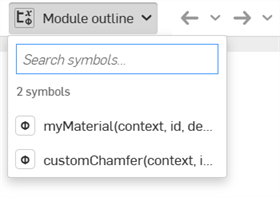
Cliquez sur la flèche Plan du module dans la barre d'outils de Feature Studio pour afficher le plan. Vous pouvez également :
-
Cliquer sur un résultat de recherche pour accéder à cette partie du code FeatureScript.
-
Saisir le texte à rechercher dans le champ Rechercher des symboles pour affiner les résultats.
For an additional Learning center resource, follow the instructor-led training course here: FeatureScript Fundamentals (Onshape account required).