FeatureScript Co-Complete

Disponible pour tous les forfaits sauf Onshape Government.
FeatureScript Co-complete est un module Onshape Lab qui utilise l'IA pour suggérer et compléter le code FeatureScript en fonction du contexte, au fur et à mesure que vous développez des fonctions personnalisées dans Feature Studio.
Voir aussi :
 Utilisation de FeatureScript Co-Complete
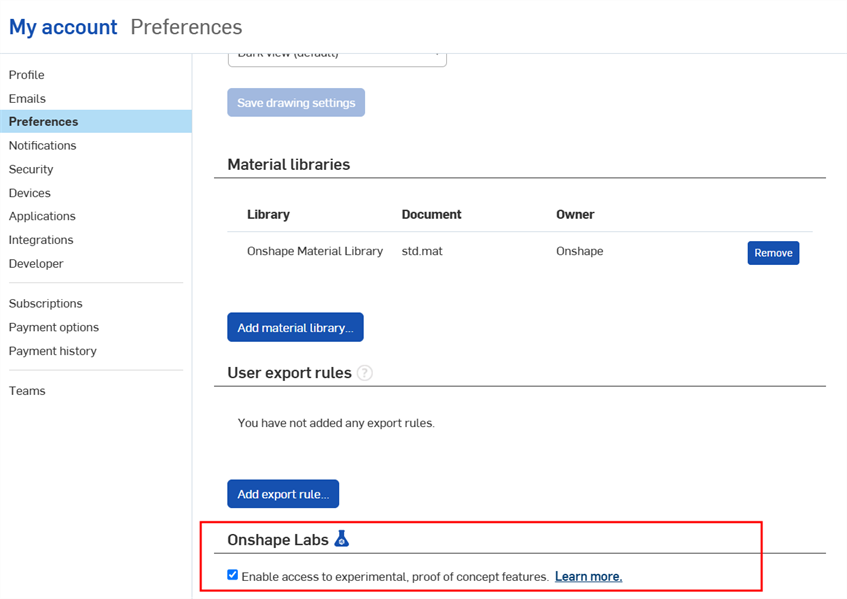
- Activez Onshape Labs dans les préférences de votre compte.
-
Ouvrez un Feature Studio dans Onshape, puis cliquez sur l'option Co-Complete, si nécessaire.

Si le bouton n'est pas disponible, activez d'abord Onshape Labs dans les préférences de votre compte.
- Commencez à taper votre code FeatureScript. L'IA suggère du code de manière contextuelle au fur et à mesure que vous tapez.
- Pour accepter une suggestion, appuyez sur Entrée
- Pour rejeter une suggestion, continuez à taper ou appuyez sur Échap.
Options de configuration
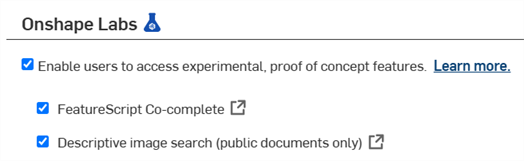
Lorsque l'option FeatureScript Co-Complete est cochée dans les préférences de votre compte, l'option Co-complete est activée par défaut pour toutes les nouvelles sessions de Feature Studio.
Lorsque l'option FeatureScript Co-Complete est décochée dans les préférences de votre compte, l'option Co-complete est désactivée pour toutes les nouvelles sessions de Feature Studio.
Pour modifier ce paramètre :
-
Cliquez sur votre icône d'utilisateur (
 ) dans le coin supérieur droit de la fenêtre Onshape, puis sélectionnez Mon compte.
 -
Cliquez sur Préférences dans la barre latérale gauche, puis accédez à la section Onshape Labs.
-
Cochez la case pour activer Onshape Labs si ce n'est pas déjà fait.
-
Cochez la case Suggestion automatique FeatureScript pour que toutes les nouvelles sessions de Feature Studio démarrent avec la fonction Co-Complete activée.