


Available in: Assembly
Use the Onshape Bill of Materials (BOM) functionality to automatically create a BOM from any workspace Assembly. You can insert parts and assemblies into an Assembly post-release, from an Onshape version, or assemble the parts and sub-assemblies and then release the Assembly all at once. For more information on Release management, see Release Management.
Onshape BOMs include a set of default properties as columns, and you can add or remove columns as needed. For details on setting and managing properties, see: Properties (Metadata)
Administrators can also define custom properties and include them in the BOM, provide display names for all default Onshape properties, and create a default Bill of Materials template. For details, see: Company/Classroom/Enterprise Settings: Custom Properties.
See the Working with the BOM table, BOM table formatting, and BOM table templates for additional information.
On the iOS and Android platforms, BOM tables can be viewed and changed between types; flattened and structured.

 Video example
Video transcript
Onshape automatically creates a Bill of Materials (BOM) for all assemblies.
The table is interactive and updates simultaneously as the assembly changes or properties are updated.
Hover over a row in the table to see the component highlighted in the graphics area. Select an item number in the table to see it cross-highlighted in the Instances list and graphics area. This makes it easy to identify where it is used in the assembly.
The table item order is reflective of the Instances list order. Reorder by dragging an instance in the list to a new location.
Double-click column headers to sort the table either alphabetically or numerically by the selected column.
The table has two view options: Structured and Flattened. Structured lists the top-level instances and expandable subassemblies. Double-click on the subassembly Item number cell to expand or collapse. When expanded, the subassembly instances are visible. Flattened lists all the instances as though they were inserted on the top level without the subassembly indicators.
Set how a specific subassembly is displayed in the table by navigating to its properties. Right-click the subassembly in the list, select Properties, and click Subassembly BOM behavior. Show assembly and components lists the subassembly in the BOM, and its indented components. This is the default BOM Structured view. Show assembly only lists the subassembly item, excluding its components. This can be useful for imported or purchased assemblies that should be identified with one vendor part number. Show components only lists the subassembly components, excluding the subassembly itself, as though the components were inserted in the top-level assembly. This allows additional grouping and organizational tools without impacting the BOM.
Click Add column to include any additional properties in the table. Remove columns by right-clicking the column header and selecting Remove column. Use the same context menu to Reorder columns with Move left and Move right.
Click Apply template, and select one of the available templates. To define a new BOM table, save the table as a template for future use. Access the overflow menu and select Save as template.
Use the overflow menu to Copy table or Export to CSV. Copy table saves it to your clipboard, so you can paste it in external locations. Export to CSV downloads the table as a CSV file for use in external spreadsheet programs.
Suppress items in a Structured BOM by right-clicking on the row and selecting Suppress from this BOM. This hides the row in the table. Include an item by first turning on the visibility of suppressed items. Access the overflow menu and select Show excluded/suppressed. Suppressed items are shown with a dash for their item number. Right-click the row and select Unsuppress in this BOM. Access the overflow menu and select Hide excluded/suppressed to no longer see them in the table.
If the company administrator has set up aggregated assembly properties, the overflow menu shows an additional option: Show top-level assembly row. When shown, the aggregated values display at the bottom of the BOM. This line item can be hidden again from the same overflow menu.
The BOM properties are editable within the table and update simultaneously to the properties without navigating to individual property dialogs. Select the cell and enter a value. Double-click in the material cell and select the material.
If the company or Enterprise Number scheme settings are set to Sequential part number generation, right-click the Part number column header to Generate missing part numbers for the entire BOM.
Inputting or editing any properties in the table automatically updates the properties at the part or subassembly level, and updating any properties at the part or subassembly level also automatically updates the table.
Accessing the BOM table
All Onshape Assemblies have a BOM table icon on the far right of the graphics area, below the View tools icon.
- In an Assembly, click the BOM table icon on the right edge of the graphics area.

- When the table opens, Onshape retrieves the data for the Assembly and populates the table (if there are parts or assemblies present, see the top example below). If no parts or assemblies are present, Onshape opens with default column names (properties) displayed (see the bottom example below):
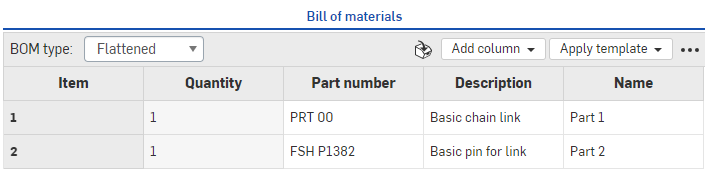
Bill of materials with parts listed shown on a browser, above
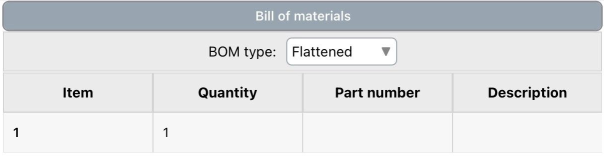
Bill of materials with a part listed shown on iOS, above
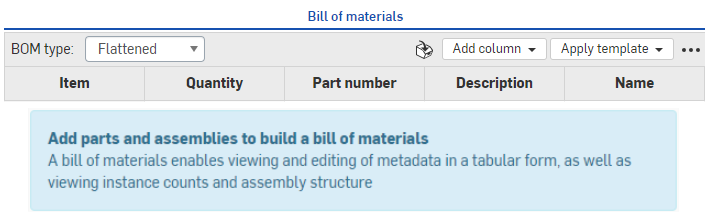
Bill of materials with no parts listed shown on a browser, above
- To populate an empty BOM, simply create your assembly in the Assembly tab, following the instructions in Insert Parts and Assemblies.
- In the BOM panel, select how to view the information (through the BOM type menu):
- Flattened - This view provides a simple list of parts by item number, with no indication of subassemblies.
Structured - This view provides a list of parts including indication of expandable subassemblies. Subassemblies are indicated with small right-facing caret; for example:

When viewing in Structured format, double-click the cell with the caret (the subassembly) to expand the list below the cell and see the parts included in the subassembly, labeled with the subassembly item number followed by a dot and then the part item number (9, 9.1, 9.2, and 9.3 in the example below):
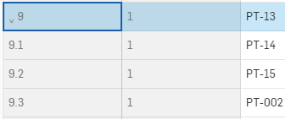
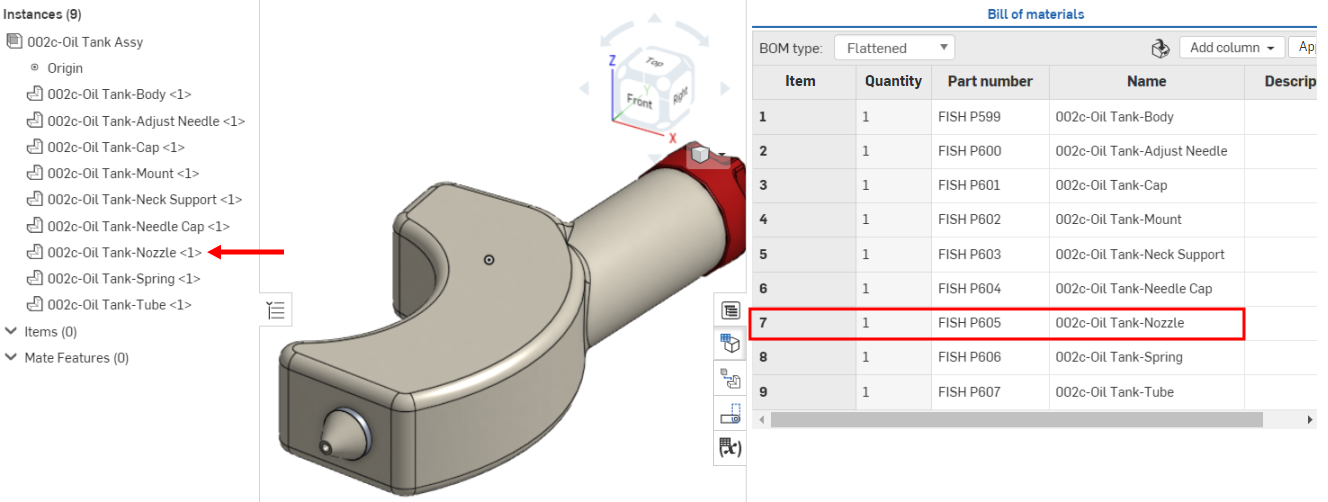
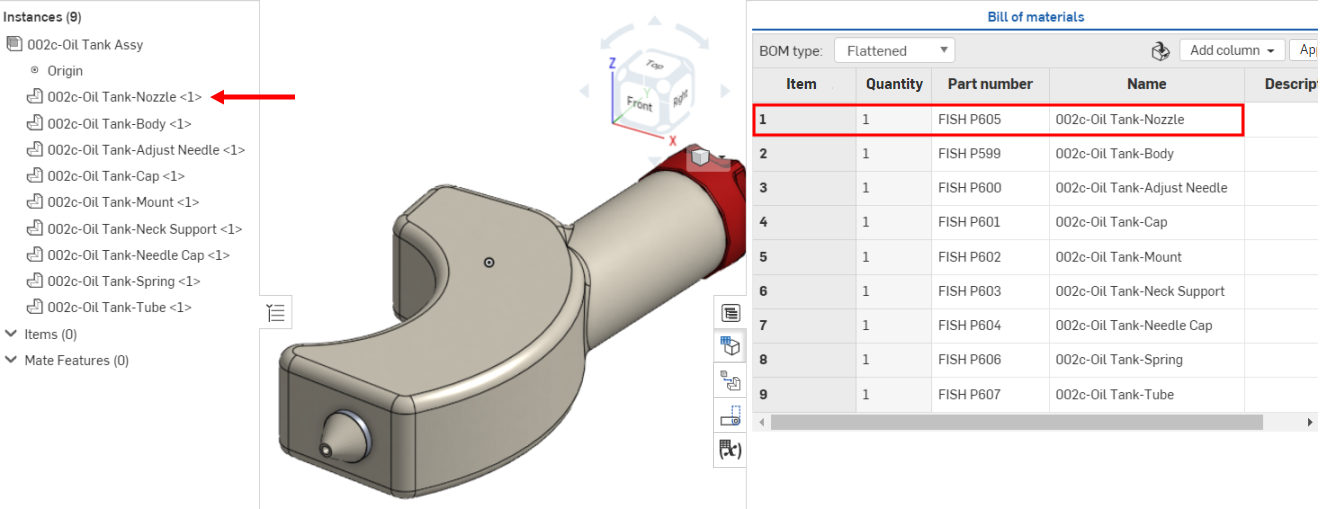
The item numbers assigned to the subassemblies and parts reflect the order of the instances in the Instances list. If you reorder the instances in the list, the BOM table updates to reflect that new order.
Before, 002c-Oil Tank Nozzle is seventh in the Instances list and item number 7 in the BOM table:
After the part is moved to first place in the Instances list, it is updated to item number 1 in the BOM table:
BOM table Interface
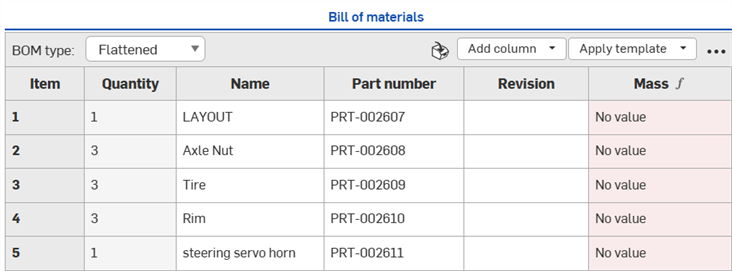
Once opened, the BOM table shows the following features:
-
BOM type - Select from Flattened or Structured BOM types:
-
Flattened - This view provides a simple list of parts by item number, with no indication of subassemblies.
-
Structured - This view provides a list of parts including indication of expandable subassemblies. Subassemblies are indicated with small right-facing caret.
-
-
Insert items - Insert non-geometric items (items not modeled in CAD, like glue, tape, paint, thread locker, etc) into the BOM. See Insert a non-geometric item.
-
Add column - Add columns to the BOM table. See Add or remove a column.
-
Apply template - Available only for Enterprise, Professional, and Educator subscriptions. Selects a BOM template to be applied to the current BOM table. See BOM table templates for more information.
-
Overflow menu - Menu with additional table options. See BOM table overflow menu.
See the Working with the BOM table and BOM table formatting topics for additional information about the BOM table interface.
BOM table overflow menu
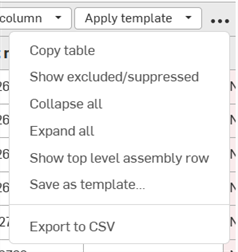
Click the Overflow menu icon ( ) at the top right corner to access additional BOM table options:
-
Copy table - Copies the BOM table to the clipboard so it can be pasted into external programs such as Microsoft Excel or Google Sheets
-
Show/hide excluded/suppressed - Shows or hides both excluded and suppressed row data in the BOM table. See Suppressing or showing excluded BOM data locally and Excluding and including BOM data globally.
-
Collapse all - Available from a Structured BOM view only, this collapses all subassembly rows so that each subassembly takes up a single row in the BOM table.
-
Expand all - Available from a Structured BOM view only, this expands all subassembly rows in the BOM table.
-
Show/hide top level assembly row - Shows or hides the top level assembly row. This row is displayed at the bottom of the BOM table.
-
Save as template - Available only for Enterprise and Professional subscriptions, this saves the current BOM table format as a template. See BOM templates.
-
Export to CSV - Exports the BOM table to a comma-separated file format so it can be imported into an external spreadsheet program such as Microsoft excel or Google sheets. See Export to CSV.
Notes
-
Horizontal scrolling - If the BOM table is wider than the panel in which it sits, a horizontal scrollbar is displayed along the bottom, and the first column (Item) remains frozen as you scroll.
-
Considerations around releasing and released parts
-
When using imported or released parts in an Assembly, the properties will display in the BOM table as read-only. To create a BOM with editable fields, you can branch from the version to create a new workspace. The fields in the BOM will be editable per the settings for each property (through the account settings).
-
When you insert released (revisioned) parts into the Assembly and then create the BOM table, the state property will be Released.
-
-
Inserting a BOM into a Drawing - To insert a BOM table into a drawing, see BOM table.
-
Cross-highlighting BOM table items - To locate items from your Instances list in your model, click the item name in the Instances list and the selected item is highlighted in the model. Concurrently, in the BOM table, the associated item row is highlighted and scrolls into focus. Alternately, click the item name in the BOM table, and the selected item is highlighted in the model and Instances list.