 구성
구성


이용 가능 플랫폼: Part Studio, 어셈블리, Variable Studio
파트, Part Studio, 어셈블리 또는 Variable의 변형을 생성할 수 있습니다. 예를 들어 돌출 피처의 깊이, 필렛 제외하고 보기, 사용자 지정 피처의 FeatureScript, 파트 번호, 색상, 재질 등을 구성할 수 있습니다.
구성 생성 및 사용에 대한 자세한 내용은 다음을 참조하십시오.
구성 이름 변경, 복사/붙여넣기, 릴리스를 포함한 구성 관리에 대한 자세한 내용은 다음을 참조하십시오.
고급 구성 논리를 적용하는 방법에 대한 자세한 내용은 다음을 참조하십시오.
둘 이상의 사람이 동일한 통합문서에서 작업하는 경우, 각 사람은 자신이 선택한 구성을 보게 됩니다. 팔로우 모드에서 작업할 때 팔로어는 리더가 선택한 구성을 보게 됩니다.
 용어 해설
용어 해설
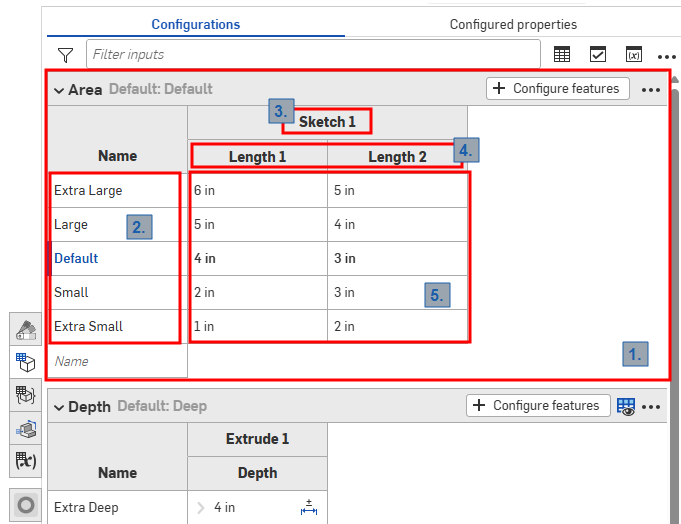
Part Studio의 구성 패널
Onshape 구성에서는 위 이미지에 표시된 것과 같이 다음 용어를 사용합니다.
-
입력 - 각 구성 입력은 접을 수 있는 테이블 형태로 표시됩니다. 각 Part Studio, 어셈블리, Variable Studio에는 하나의 구성 패널만 있지만, 각 패널에는 여러 입력이 포함될 수 있습니다.
-
옵션 - 입력 테이블의 각 행은 구성을 선택할 때 사용할 수 있는 옵션이 됩니다.
-
구성된 피처 - 구성 중인 피처 또는 변수입니다. 이는 항상 기존 피처 또는 변수에 해당합니다. 이름은 변경할 수 없습니다.
-
매개변수 - 입력 테이블의 각 열은 구성 중인 특정 피처 매개변수를 나타냅니다.
-
옵션 값 - 각 셀은 표시된 옵션에 대한 매개변수에 설정할 값을 나타냅니다.
모든 Part Studio, 어셈블리, Variable Studio에는 요소에 사용할 수 있는 구성을 요약하는 하나의 구성 패널이 있습니다. 하나의 구성 내에 여러 개의 구성 입력을 생성할 수 있습니다. 이는 구성하려는 피처 또는 입력 값이 서로 반드시 관련이 있는 것은 아닌 경우에 특히 유용합니다. 예를 들어, 파트의 길이와 지름이 필렛 적용 여부와 관련이 없는 경우 두 개의 구성 입력을 사용할 수 있습니다. 이를 통해 유연성을 높이고 각 구성 입력이 불필요하게 복잡해지는 것을 방지할 수 있습니다. 정의한 구성 입력은 구성된 항목을 삽입할 때 삽입 대화상자의 옵션이 됩니다.
구성: iOS 및 Android
구성에 대한 iOS 및 Android 지원은 다음과 같이 제한됩니다.
-
오른쪽에 있는 구성 패널(
 )을 봅니다.
 -
왼쪽 패널(피처 리스트 위)에서구성 선택:
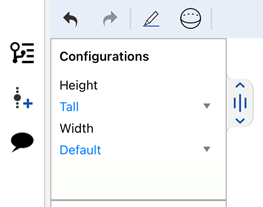
iOS에서 구성 선택하기
-
(iOS만 해당) 가시성 조건이 구성에 있는 경우, 해당 조건이 적용됩니다.
iOS 또는 Android 플랫폼에서는 구성이나 가시성 조건을 생성하거나 편집할 수 없습니다. 데스크톱(브라우저) 플랫폼에서만 가능합니다.
추가 학습 센터 리소스는자습형 과정 > 구성을 참조하십시오.학습 경로 과정은파트 구성 소개 (Onshape 계정 필요)에서, 기술 브리핑 기사는파라메트릭 변수와 구성 변수( Onshape 계정 필요)에서 확인할 수 있습니다.