
アクションアイテムダッシュボードは、特定のユーザーのコメントとタスク、および Enterprise 内のすべてのユーザーの概要を、特定の期間内で要約します。
ダッシュボードに変更を加えた場合 (フィルターを編集したり、カスタマイズした場合)、これらの変更は新しいダッシュボードに保存できます。詳しくは、ダッシュボードの保存を参照してください。
ダッシュボードのビジュアルデータをエクスポートするには、ビジュアルデータを CSV または Excel ファイルにエクスポートするを参照してください。
さらに詳しくは、アナリティクスダッシュボードの操作とアナリティクスダッシュボードのビジュアルの操作を参照してください。
 アクションアイテムダッシュボードへのアクセス
左側のドキュメントパネルからアナリティクス ( ) をクリックします。次に、アナリティクスナビゲーションパネルの [アクションアイテム] フィルターをクリックします。
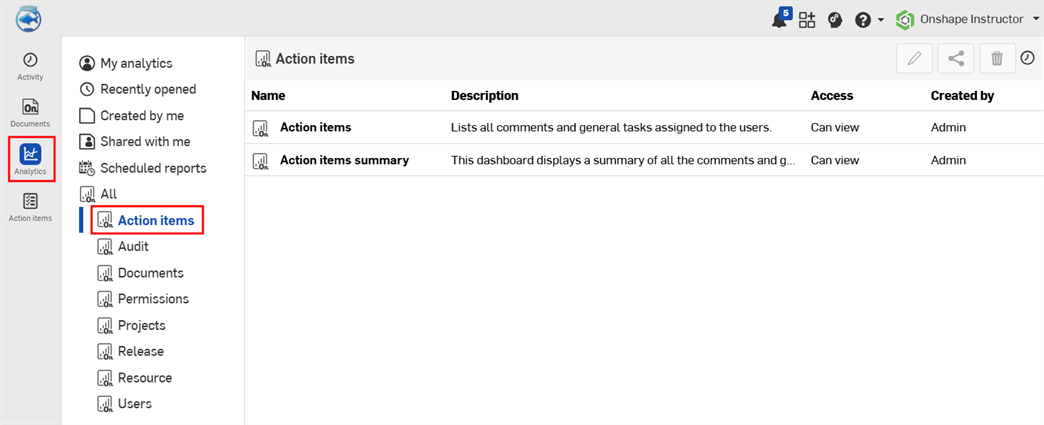
既定のアクションアイテムのダッシュボード
- アクションアイテム - ユーザーに割り当てられたすべてのコメントと一般タスクのリスト。
- アクションアイテムの概要 - Enterprise で割り当てられたすべてのコメントと一般タスクの概要。
アクションアイテム
このダッシュボードには、Enterprise で利用できるすべてのコメントと一般的なタスクをリストする単一のテーブルが表示されます。

フィルターコントロール
- 作成済み - アクションアイテムを検索する日付、日付範囲、または期間
- 作成者 - アクションアイテムを作成したユーザーのメールアドレス。
- 割り当て先 - アクションアイテムが割り当てられているユーザーのメールアドレス
- 状態 - アクションアイテムの状態: オープン、完了済み、破棄済み
- タイプ-アクションアイテムの種類: コメントまたは全般
- 期限 - アクションの期限: はいまたはいいえ。
- プロジェクト - プロジェクト名
- チーム - チーム名
ビジュアル列
- 割り当て先 - アクションアイテムが割り当てられているユーザーのメールアドレス
- 名前 - アクションアイテム名
- 説明 - アクションアイテムの簡単な説明
- タイプ - アクションアイテムのタイプ: 全般またはコメント。
- 作成日 - アクションアイテムを作成した日付
- 作成者 - アイテムを作成したユーザーの名前
- 期限日 - アクションアイテムを完了すべき日付
- 解決日 - アクションアイテムを解決した日付
- パーツの参照 - アクションアイテムで参照しているすべてのパーツ。
- 優先度 - アクションアイテムに付けられた優先度
アクションアイテムの概要
過去 365 日間の Enterprise でのすべてのコメントと一般的なタスクのリスト。
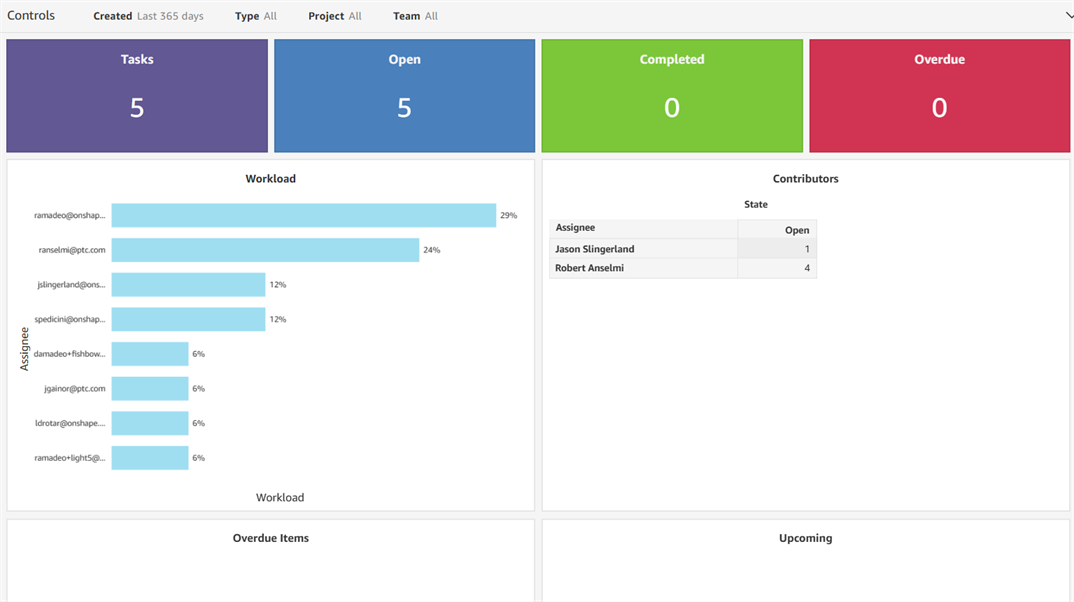
フィルターコントロール
- 作成済み - 検索する日付、日付範囲、または期間
- タイプ-アクションアイテムの種類: コメントまたは全般
- プロジェクト - プロジェクト名
- チーム - チーム名
ビジュアル
- タスク - 未処理のタスク数を表示するカウントビジュアル
- オープン - オープン状態のタスク数を表示するカウントビジュアル
- 完了 - 完了状態のタスク数を表示するカウントビジュアル
- 期限切れ - 期限切れ状態のタスク数を表示するカウントビジュアル
- ワークロード - 担当者の名前 (Y 軸) に対して、ワークロードのパーセンテージ (X 軸) を表示する横棒グラフのビジュアル
- コントリビューター - 割り当て先と、それぞれの完了済みおよびオープンのタスク数をリストしたテーブルビジュアル
- 期限超過アイテム - 期限切れのタスクを表示するテーブルビジュアル。名前、説明、期限日、割り当て先を含みます。
- 予定 - 今後のタスクを表示するテーブルビジュアル。割り当て先、名前、期限日、ワークロードのパーセンテージを含みます。