 コンフィギュレーション


利用可能: Part Studio、アセンブリ、Variable Studio
パーツ、Part Studio、アセンブリ、または Variable Studio のバリエーションを作成します。たとえば、押し出しフィーチャーの深さ、フィレットの抑制、カスタムフィーチャーの FeatureScript、パーツ番号、色、マテリアルなどを設定できます。
コンフィギュレーションの作成と使用の詳細については、以下を参照してください。
名前の変更、コピー/貼り付け、リリースなどのコンフィギュレーションの管理の詳細については、以下を参照してください。
高度なコンフィギュレーションのロジックの適用の詳細については、以下を参照してください。
同じドキュメントで 1 人または複数のユーザーが作業している場合、各ユーザーが選択したコンフィギュレーションが表示されます。フォローモードで作業している場合、フォロワーは引出線で選択されたコンフィギュレーションを確認します。
 用語
用語
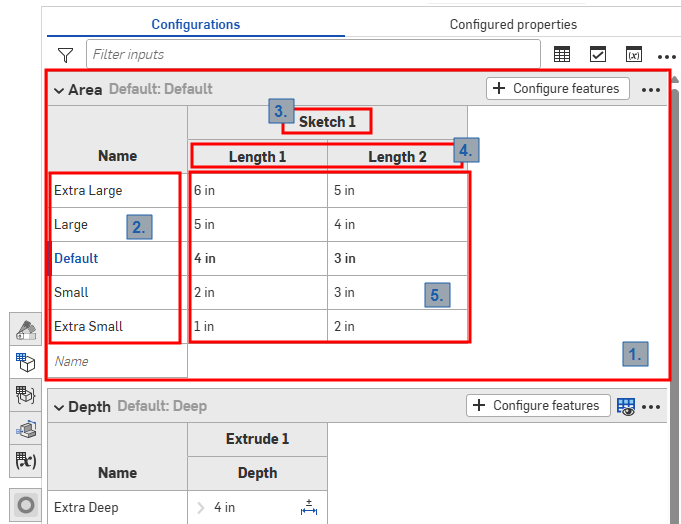
Part Studio のコンフィギュレーションパネルのスクリーンショット
Onshape コンフィギュレーションでは、上の画像に示すように、次の用語を使用します。
-
入力 - コンフィギュレーションの各入力は折りたたみ可能なテーブルとして表示されます。Part Studio、アセンブリ、および Variable Studio にはコンフィギュレーションパネルが 1 つずつしかありませんが、各パネルには多数の入力を含めることができます。
-
オプション - 入力テーブルの各行は、コンフィギュレーションの選択時に使用できるオプションになります。
-
構成済みのフィーチャー - 構成中のフィーチャーまたは変数。これらは常に既存のフィーチャーまたは変数に対応しています。名前は変更できません。
-
パラメータ - 入力テーブルの各列は、構成中の特定のフィーチャーパラメータを表します。
-
オプション値 - 各セルは、指定されたオプションのパラメータに設定する値を示しています。
すべての Part Studio、アセンブリ、Variable Studio は、利用可能なコンフィギュレーションをまとめたコンフィギュレーションパネルがあります。1 つのコンフィギュレーション内に複数のコンフィギュレーション入力を作成できます。これは、構成するフィーチャーまたは入力値が必ずしも相互に関連していない場合に特に役立ちます。たとえば、パーツの長さと直径がフィレットが適用されているかどうかに関係しない場合は、2 つのコンフィギュレーション入力を使用できます。これにより、柔軟性が向上し、各コンフィギュレーション入力が不必要に複雑にならないようにすることができます。選択したコンフィギュレーション入力は、構成したアイテムを挿入する際に挿入ダイアログのオプションとなります。
コンフィギュレーション: iOS と Android
iOS および Android でのコンフィギュレーションのサポートは、次に制限されます。
-
右側のコンフィギュレーションパネル (
 ) を表示する
 -
左側のパネル (フィーチャーリストの上) でのコンフィギュレーションの選択を切り替える:
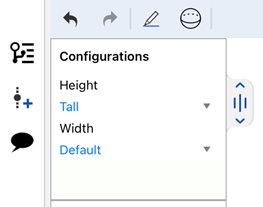
iOS でコンフィギュレーションを選択する
-
(iOS のみ) コンフィギュレーションに可視性条件が存在する場合は、その条件が適用されます。
iOS または Android プラットフォームからコンフィギュレーションや可視性条件を作成または編集することはできません。これはデスクトップ (ブラウザ) プラットフォームからのみ実行できます。
ラーニングセンターのその他のリソースについては、自習コース: コンフィギュレーションをご覧ください。また、学習経路コース: パーツコンフィギュレーションの入門 (Onshape アカウントが必要です) や、技術説明の記事: パラメトリック変数とコンフィギュレーション変数 (Onshape アカウントが必要です) も参照できます。