


ドキュメントツールバーは、すべての Onshape ドキュメント (Onshape ロゴに水平に揃える) で使用できます。
 ドキュメントツールバーのオプション
以下に、使用可能な機能の概要を示します。

- Onshape or company logo - Click the Onshape logo (or your company logo if you are part of an enterprise account) to return to the Documents page from anywhere in the system.
- ドキュメントメニュー
 - このアイコンをクリックすると、アクティブなドキュメントやワークスペースまたはバージョンで使用できるコマンドのメニューが開きます。
 - ドキュメント名 (太字、上の図の例ではミラー)- 太字で示されている名前は、現在作業中のドキュメントです。
ドキュメント名を変更するには、現在の名前をクリックして新しい名前を入力します。
- ワークスペース名 (ライトグレー、上の例の図ではメイン) - 現在作業中のワークスペースの名前。
- リンクをコピー
 - アクティブコンフィギュレーション、レンダリングモード、分解ビュー、ウィンドウの状態、ビューの方向などのリンクをドキュメントにコピーします。
 - フォルダ名
 - フォルダ内にドキュメントがある場合は、フォルダアイコンの右側にフォルダ名が表示されます。フォルダはリンクでもあります。リンクをクリックすると、新しいブラウザタブにフォルダが開きます。
 - FeaturesScript 通知
 - これをクリックすると、FeatureScript のコンパイラから送信された通知が表示されます。
 - 通知
 - ドキュメントの変更を警告する通知を表示します。
 - App Store
 - クリックすると、[Onshape App Store] が開きます。必要に応じてサインインしてください。ここでは、Onshape と提携するアプリを購入できます。
 - ラーニングセンター
 - クリックすると、Onshape ラーニングセンターが (新しいウィンドウタブに) 開きます。ここには、録画されたウェビナー、技術ブリーフィング、自習パスウェイがあります。
 - 共有 - クリックして共有ダイアログを開き、アクティブなドキュメントに別のユーザーやチームがアクセスできるようにし、これらのユーザーがこのドキュメントに対して持つアクセス許可を選択します。
- ヘルプメニュー
 - ヘルプメニューが開きます。オンラインヘルプシステム、ラーニングセンター (ラーニングセンターボタンと同じ)、FeatureScript ドキュメント、製品のキーボードショートカットのリスト、このリリースの新機能のリスト、フォーラム、サポートへのお問い合わせ、Onshape への友達の紹介、Onshape の要件に対するシステムの互換性チェック、およびこのバージョンの Onshape に関する情報にアクセスできます。
 - ユーザーアカウントメニュー - このメニューからアカウントの環境設定やその他の設定にアクセスします。詳しくは、Onshape プランの管理を参照してください。
現在のドキュメントがパブリックの場合、追加のアイコンが表示されます。
![Onshape の [ドキュメント] ツールバー](../Resources/Images/icons/titleTB-enterprise2-doc-public-01.png)
-
パブリックドキュメント
 - 現在のドキュメントがパブリックであることを示します。
 -
部数
 - 現在のドキュメントの部数の総数を示します。詳細は、ドキュメントの共有を参照してください。
 -
リンク
 - 現在のドキュメントのリンクの総数を示します。リンクとは、現在のドキュメントが他のドキュメントに挿入されることです。詳細は、ドキュメントのリンクを参照してください。
 -
いいね
 - いいねの総数を示します。現在のドキュメントに「いいね」を付けるには、アイコンをクリックします。
ドキュメントツールバー: iOS
以下に、使用可能な機能の概要を示します。

-
> - これをタップすると、ドキュメントページに戻ります。
-
ドキュメントとワークスペースの名前 - 上にドキュメントの名前、下にワークスペースの名前が表示されます。この例の画像では、ドキュメントの名前は Bevel Gear Assembly-and-Valve Reduced-preview-RA で、ワークスペースは Main です。
-
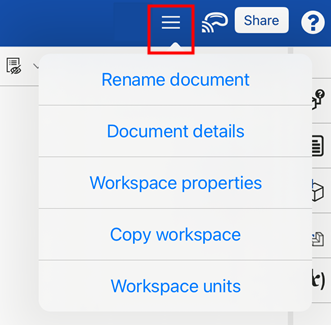
オプションメニュー - 右上のオプションメニューをタップすると、ドキュメントとワークスペースの追加オプションを含むドロップダウンが開きます。
-
ドキュメント名を変更 - 現在のドキュメントの名前を更新するダイアログが開きます。
-
ドキュメントの詳細 - 現在のドキュメントの説明を更新するダイアログが開きます。
-
ワークスペースのプロパティ - 現在のワークスペースの名前、説明、カテゴリを表示するダイアログが開きます。
-
ワークスペースをコピー - アクティブなワークスペースを新しいドキュメントにコピーするダイアログが開きます。
-
ワークスペースの単位 - 現在選択されているワークスペースの単位を変更するダイアログが開きます。
-
-
Apple Vision Pro - Apple Vision Pro に接続します。詳細は、Apple Vision Pro によるモデルの表示 を参照してください。
-
共有 - 共有設定ダイアログを開きます。ユーザーは、現在のドキュメントの共有を設定できます。詳しくは、ドキュメントの共有を参照してください。
-
ヘルプメニュー - モバイル版のヘルプ、ジェスチャー制御をレビュー、サポートへのお問い合わせ、Onshape に関する情報にアクセスできるドロップダウンが開きます。これらのオプションについては、フィードバックとヘルプを参照してください。
モバイルデバイスでは、[バージョンと履歴]、[バージョンを作成]、[コメント]、[共有] の各ボタンは、アプリケーション下部の水平ツールバーにあります。