


Die Dokument-Symbolleiste ist in allen Onshape-Dokumenten verfügbar (horizontal am Onshape-Logo ausgerichtet).
 Optionen der Dokument-Symbolleiste
Nachstehend finden Sie eine Übersicht über die verfügbaren Funktionen:

- Onshape or company logo - Click the Onshape logo (or your company logo if you are part of an enterprise account) to return to the Documents page from anywhere in the system.
- Dokumentmenü
 : Klicken Sie auf dieses Symbol, um ein Menü mit Befehlen für den aktuell aktiven Dokument-Arbeitsbereich oder die derzeit aktive Version zu öffnen.
 - Dokumentname (fett; Spiegel-Feature im obigen Beispielbild): Der fettgedruckte Name ist das Dokument, an dem Sie gerade arbeiten.
Sie können den Dokumentnamen ändern, indem Sie auf den aktuellen Namen klicken und einen neuen Namen eingeben.
- Arbeitsbereichname (hellgrau; Hauptarbeitsbereich im obigen Beispielbild): der Name des Arbeitsbereichs, an dem Sie gerade arbeiten.
- Link kopieren
 : Kopieren Sie den Link zum Dokument, einschließlich aktiver Konfiguration, Rendering-Modus, Explosionsansicht, Paletten-Status und Ansichtsausrichtung.
 - Ordnername
 : Befindet sich das Dokument in einem Ordner, steht der Ordnername rechts neben dem Ordnersymbol. Der Ordner ist zugleich ein Link. Wenn Sie auf den Link klicken, wird der Ordner in einem neuen Browser-Tab geöffnet.
 - FeatureScript-Hinweise
 : Klicken Sie auf diese Option, um Mitteilungen vom FeatureScript-Compiler anzuzeigen.
 - Benachrichtigungen
 : zeigt Benachrichtigungen an, die auf Dokumentänderungen hinweisen.
 - App Store
 : Klicken Sie hier, um auf den Onshape App Store zuzugreifen (und sich ggf. anzumelden). Dort können Sie Apps kaufen, die sich mit Onshape verwenden lassen.
 - Learning Center
 : Klicken Sie hier, um (in einer neuen Registerkarte) auf das Learning Center von Onshape zuzugreifen. Dort finden Sie u. a. aufgezeichnete Webinare, technische Informationen und Kurse zum Selbststudium im eigenen Tempo.
 - Teilen: Klicken Sie auf diese Option, um das Dialogfenster Teilen zu öffnen. Sie können dann das aktive Dokument einem anderen Benutzer oder Team zugänglich machen und Benutzerrechte für dieses Dokument auswählen.
- Hilfemenü
 : Hierüber haben Sie Zugriff auf das Online-Hilfesystem, das Learning Center (das Sie auch über die gleichnamige Schaltfläche erreichen), die FeatureScript-Dokumentation, eine Liste der Tastaturbefehle, eine Liste der „Neuen Funktionen“ für die aktuelle Release, Foren, Support-Kontakt, die Möglichkeit, Onshape Freunden zu empfehlen, Kompatibilitäts-Checks Ihres Systems für Onshape sowie Informationen über diese Onshape-Version.
 - Benutzerkonto-Menü: Greifen Sie über dieses Menü auf Ihre Kontoeinstellungen und andere Einstellungen zu. Weitere Informationen unter: Ihr Onshape-Konto verwalten.
Wenn das aktuelle Dokument öffentlich ist, sind zusätzliche Symbole verfügbar:

-
Öffentliches Dokument
 : zeigt an, dass das aktuelle Dokument öffentlich ist.
 -
Kopien
 : zeigt die Gesamtzahl der aktuellen Dokumentenkopien an. Weitere Informationen finden Sie unter Dokumente teilen.
 -
Links
 : zeigt die Gesamtzahl der Links zum aktuellen Dokument an. Ein Link liegt vor, wenn das aktuelle Dokument in andere Dokumente eingefügt wird. Weitere Informationen finden Sie unter Dokumente verknüpfen.
 -
Likes
 : zeigt die Gesamtzahl der Likes an. Klicken Sie auf das Symbol, um für das aktuelle Dokument einen Like zu geben.
Dokument-Symbolleiste: iOS
Nachstehend finden Sie eine Übersicht über die verfügbaren Funktionen:

-
>: Wenn Sie darauf tippen, kehren Sie zur Dokumentenseite zurück.
-
Dokument- und Arbeitsbereichsnamen: Name des obigen Dokuments, mit dem Namen des Arbeitsbereich darunter. In dem Beispielbild lautet der Name des Dokuments Bevel Gear Assembly-and-Valve Reduced preview - RA, und der Arbeitsbereich ist Main.
-
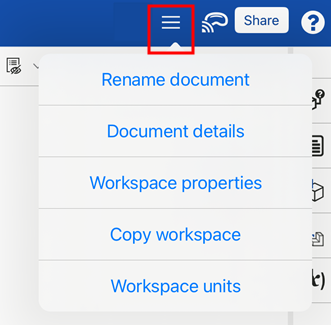
Optionsmenü: Tippen Sie oben rechts auf das Optionsmenü, um eine Dropdown-Liste mit zusätzlichen Dokument- und Arbeitsbereichsoptionen zu öffnen:
-
Dokument umbenennen: öffnet ein Dialogfenster, in dem Sie den Namen des gerade verwendeten Dokuments aktualisieren können.
-
Dokumentendetails: öffnet ein Dialogfenster, in dem Sie die Beschreibung des gerade verwendeten Dokuments aktualisieren können.
-
Arbeitsbereich-Eigenschaften: öffnet ein Dialogfenster, in dem Sie den Namen, die Beschreibung und die Kategorie des aktuellen Arbeitsbereichs anzeigen können.
-
Arbeitsbereich kopieren: öffnet ein Dialogfenster, um den aktiven Arbeitsbereich in ein neues Dokument zu kopieren.
-
Arbeitsbereich-Einheiten: öffnet ein Dialogfenster, um die Einheiten für den aktuell ausgewählten Arbeitsbereich zu ändern.
-
-
Apple Vision Pro: stellt eine Verbindung zur Apple Vision Pro her. Weitere Informationen finden Sie unter Modelle mit Apple Vision Pro anzeigen.
-
Teilen: öffnet das Dialogfenster „Teilen-Einstellungen“, in dem der Benutzer die Teilen-Einstellungen für das aktuelle Dokument festlegen kann. Weitere Informationen finden Sie unter Dokumente teilen.
-
Hilfemenü: öffnet ein Dropdown-Menü, um auf die mobile Hilfe zuzugreifen, die Gestensteuerung zu überprüfen, den Support zu kontaktieren und Informationen über Onshape zu erhalten. Weitere Informationen zu diesen Optionen finden Sie unter Feedback und Hilfe.
Auf Mobilgeräten befinden sich die Schaltflächen Versionen und Historie, Version erstellen, Kommentare und Teilen auf einer horizontalen Symbolleiste am unteren Rand der Anwendung.