
可用于:Feature Studio
Feature Studio 是 Onshape 中用于处理 FeatureScript 的页签,FeatureScript 是一种用于定义自定义特征的编程语言。
FeatureScript 由 Onshape 设计,用于创建特征和处理 3D 参数化模型。该语言内置于 Onshape 中,为 Part Studio 建模提供了基础,包括定义标准 Onshape 特征(如拉伸、圆角和抽壳)。
本页重点介绍如何使用 Feature Studio 用户界面。
——有关编写 FeatureScript 以创建自定义特征的信息,请参见“FeatureScript 文档”。
——有关将这些自定义特征添加到 Part Studio 的说明,请参见“自定义特征”。
有关使用 AI 帮助编写 FeatureScript 代码的信息,请参见“FeatureScript Co-Complete”。
 提交 FeatureScript 更改
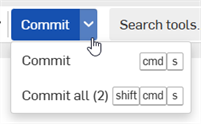
与 Onshape 中的所有页签一样,您的 FeatureScript 更改会在您键入时自动保存。要提交更改并在整个文档中应用新的 FeatureScript 代码,请单击“提交”按钮。
-
要仅在当前 Feature Studio 中提交更改,请单击“提交”按钮。
-
您也可以单击下拉列表并从菜单中选择“提交”。
-
You can also press cmd/ctrl + s
-
-
To commit all changes in all Feature Studios in the document, click the Commit button dropdown and select Commit all.
-
下拉菜单中会在括号内显示有未提交更改的 Feature Studio 数量
-
You can also press cmd/ctrl + shift + s
-
搜索、替换和重命名
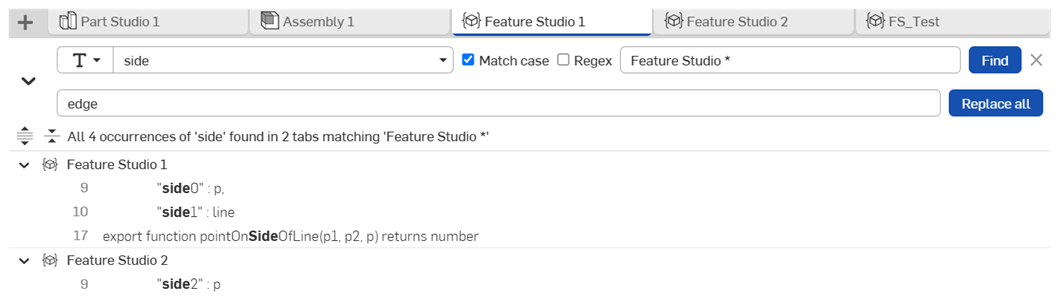
-
单击菜单栏上的“搜索 Feature Studio”按钮 (
 ) 以打开“文本搜索”窗格,如上所示。
-
您也可以使用 ctrl/cmd + shift + f 打开“文本搜索”窗格。
-
您可以通过右键单击符号,然后从环境菜单中选择“在工作区中查找用法”或“在工作区中重命名”来打开“符号搜索”窗格。
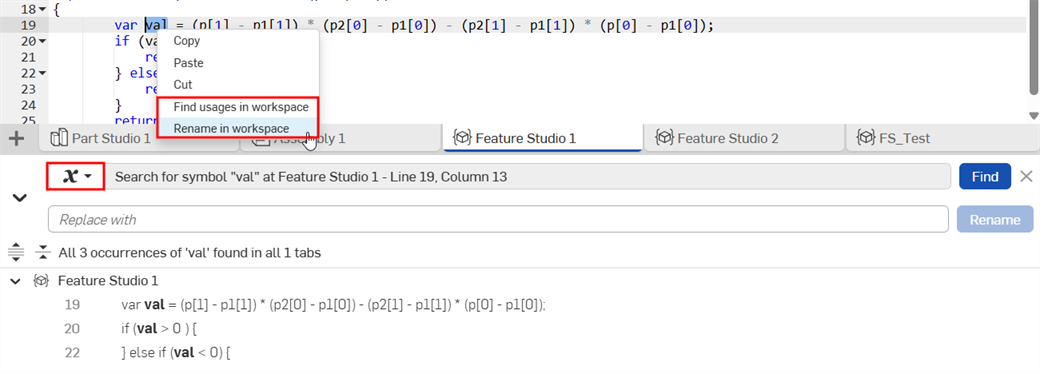
-
-
Click the Search mode dropdown to switch between text, symbol, and standard library import search.
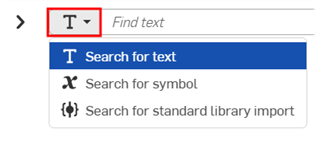
-
(Text search only) Enter your search text into the Find text field. Specify optional search parameters:
-
匹配大小写——勾选复选框以执行区分大小写的搜索。
-
正则表达式——勾选复选框以执行正则表达式搜索。
-
Feature Studio 名称筛选器——将搜索结果筛选为与输入文本匹配的页签。
-
-
(Standard library import search only) Enter the search options to find the matching standard library import:
-
Include and Exclude: - Enter versions and version ranges as comma-separated lists. Imports appear in the search results only if their versions is returned in the Include list and not the Exclude list.
-
Include a minor version (e.g., 3081.2) to return only that exact version (3081.2). Exclude the minor version (e.g., 3081) to return all minor versions within the major version (3081.0, 3081.1, 3081.2, 3081.3).
-
Version ranges (e.g., 3081.0-3081.2) are inclusive.
-
Use a dash to match all versions before and including (e.g., -3081.2) or after and including (e.g., 3081.2- a version).
-
Comma-separated searches return the union of matches (e.g., 3079 - 3080, 3081.2 returns all minor versions in 3079, all minor versions in 3080, and 3081.2).
-
Leave Include empty to match everything. Leave Exclude empty to exclude nothing.
-
-
Feature Studio 名称筛选器——将搜索结果筛选为与输入文本匹配的页签。
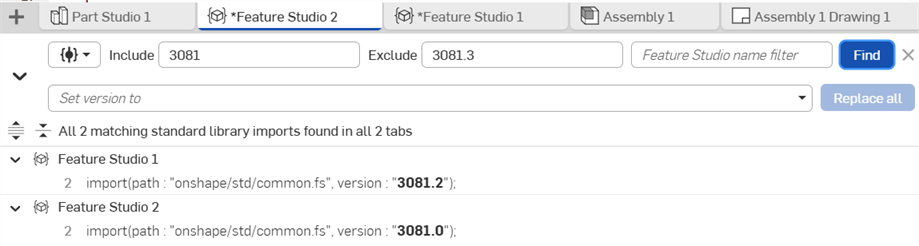
-
-
单击 “查找”。
- 搜索结果会在 FeatureScript 代码中亮显。
-
使用展开 (
 ) 和折叠 (
 ) 按钮按 Feature Studio 页签查看结果。
 -
使用展开搜索结果 (
 ) 和折叠搜索结果 (
 ) 按钮来展开或折叠所有结果。
 -
Click a search result to jump to its location in the Feature Studio.
-
(Optional) To replace the search text, rename a symbol, or update the standard library import version:
-
Click the Toggle Replace arrow (
) to the left of the Search mode button. -
Type your replacement text in the Replace with field (text or symbol search), or type the desired version number in the Set version to field (standard library search). You can also select a supported version from the Set version to dropdown list.
-
Click Replace all (text or standard library search) or Rename. (symbol search).
-
浏览大纲
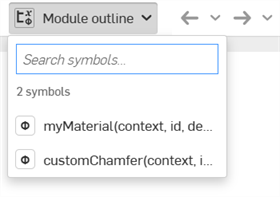
单击 Feature Studio 工具栏上的模块大纲箭头以查看大纲。您还可以:
-
单击搜索结果可导航到 FeatureScript 代码的相应部分。
-
在“搜索符号”输入框中输入搜索文本以优化结果。
要获取其他学习中心资源,请遵循此处讲师指导的培训课程:Featu resScript 基础知识(需要 Onshape 帐户)。