MBD 状态

可用于:工程图
MBD 状态面板会列出在工程图中不可见的、已插入零件的基于模型的定义数据(标注和尺寸)。如果从工程图视图中删除了任何可见数据,这些数据也会显示在此面板中,并且可以再次显示。
 打开 MBD 状态面板
下图显示了 MBD 状态图标 ( ),位于工程图窗口的右侧。单击此图标可访问该面板:
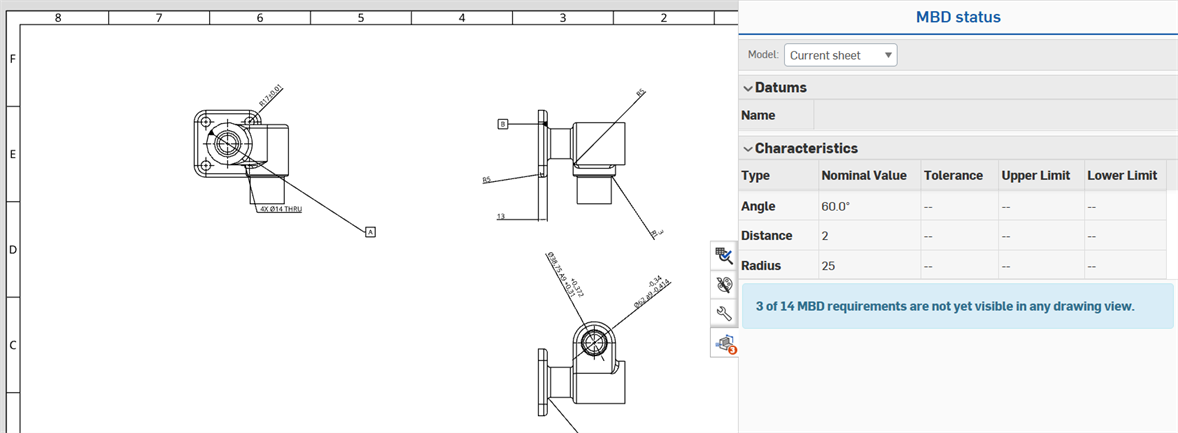
使用 MBD 状态面板
可以为 Part Studio 中的多个零件创建工程图,每张图纸参考特定的零件及其缺失的 MBD 数据。
When views are inserted in the drawing, there may be MBD data on other views that qualify as missing from the panel. In this case, a badge is placed on the MBD status panel icon to indicate the number of missing references (annotations or dimensions):

In the panel, a blue message below the tables alerts the user to the number of missing references for the inserted part:
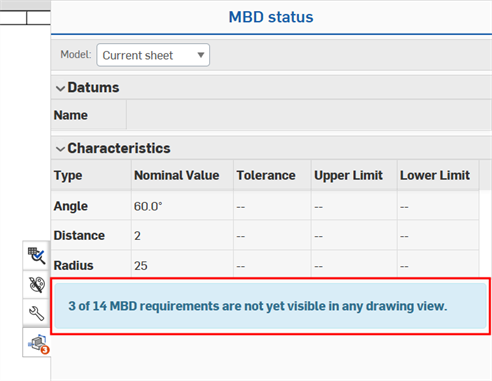
如果参考不可见,用户可以切换回模型以确定其位置,并决定如何在工程图中显示它,例如通过创建剖视图、辅助视图或局部视图。
如果所有 MBD 数据都出现在工程图视图中,则 MBD 状态面板图标会显示一个复选标记:
已删除标注和尺寸
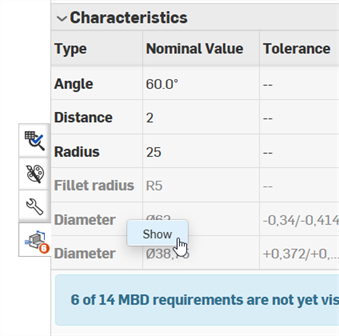
在工程图视图中删除参考(标注或尺寸)后,表格中的相应参考会变为灰色。右键单击该行并选择“显示”可将其还原在工程图视图中: