スケジュールされたレポート

Enterprise とアナリティクスの管理者は、保存された Onshape ダッシュボードのレポートを受信者のリストにメールで送信するようにスケジュールできます。
 レポートのスケジュール
ダッシュボードが保存されると、管理者およびアナリティクス管理者のグローバル権限を持つユーザーは、そのダッシュボードのレポートを定期的に受信者にメールで送信するようにスケジュールできます。
- ダッシュボードを保存します。
- 保存したダッシュボードを開きます。
- 右上のレポートをスケジュールアイコン (
 ) をクリックします (下の最初の画像)。レポートの配信をスケジュールダイアログが開きます (下の2番目の画像)。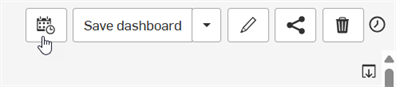
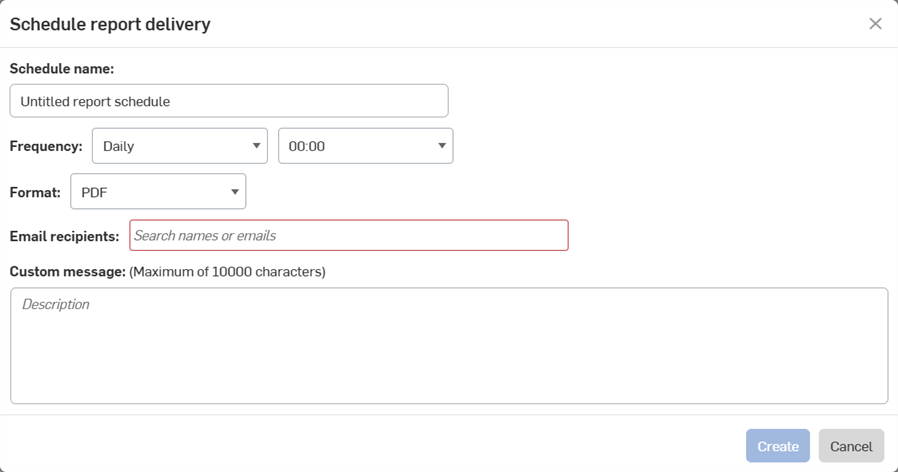
- スケジュール名を入力します。
- レポートを生成する頻度を指定します。
- レポートの形式を選択します。現在は PDF のみです。
- レポートの送信先のメールアドレスを入力します。
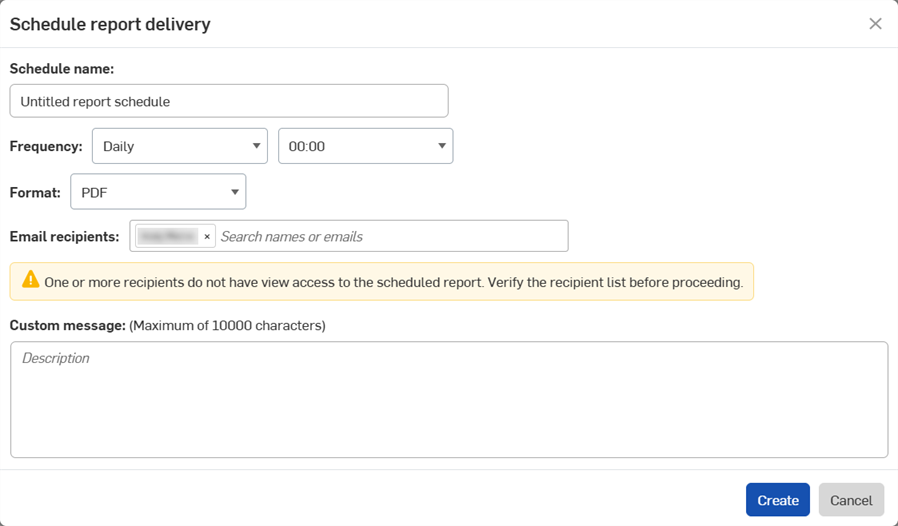
ダッシュボードにアクセスできないユーザーのメールアドレスを入力すると、以下の警告が表示されます。詳しくは、ダッシュボードの共有を参照してください。
- 必要に応じて、レポートと一緒にメールで送信するカスタムメッセージを追加します。
- [作成] をクリックします。
スケジュールされたレポートを表示する
定期レポートをすべて表示するには、アナリティクスナビゲーションパネルで[スケジュールされたレポート] をクリックします。
- Enterprise 管理者は、Enterprise でスケジュールされているすべてのレポートを表示できます。
- アナリティクス管理者は自分のスケジュールレポートを見ることができます。
- 他の Enterprise ユーザーは、スケジュールされたレポートを作成することも表示することもできません。
![[マイアナリティクス] ページのスケジュールされたレポート](../Resources/Images/enterprise/analytics/scheduled-reports-list.png)