 Aligned Section View


Available in: Drawing
Create a section view in which some portions of the view have been cut on a plane not parallel to the view plane and those portions have been rotated onto the view plane. This view type is most commonly used on cylindrical parts with some symmetry but not fully symmetrical.
To edit a view, right-click on the view and select Edit to open the dialog for editing. Editing a view may become necessary if the drawing updates and reveals dangling entities. The dangling entities are show by red markings in the dialog.
When cutting an aligned section from a section or aligned section view, Cut from section is selected by default.
 Steps
Steps
-
Click
 .
.
-
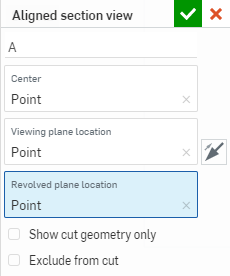
Specify a label for the view.
-
For the Center field, click the center of the section cutting line.
-
For the Viewing plane location field, click on a point from which to project the view.
-
For the Revolved plane location field, click on a point from which the view is revolved to align with the rest of the view.
-
Optionally select Show cut geometry only to display a view with only the geometry that has been cut for this view, and not show background geometry:
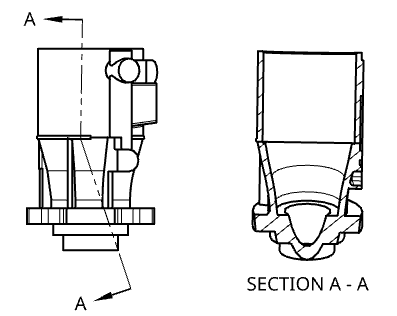
Above, an example with all geometry showing.
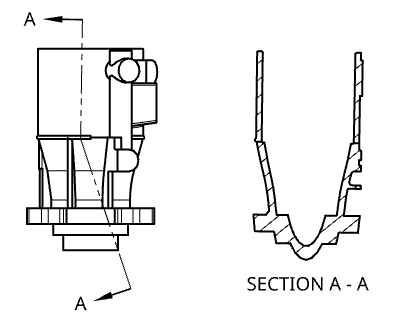
Above, the same example with only cut geometry showing.
-
Optionally, select Exclude from cut (Assembly views only) to select parts to not include in the cut:
-
Place the section cut line.
-
Check Exclude from cut in the dialog.
-
Click any additional parts to exclude in the drawing.
-
-
Click on the drawing to place the view. As you drag to place the view, moving from one side of the original view to the other flips the viewing plane arrows.
You can also double-click on the view to open the View properties dialog.
Aligned section view creation table
This table illustrates the types of views from which the Aligned section view can be created:
| Aligned section view | |
| Can be created from: | Cannot be created from: |
|
Auxiliary views Crop views Detail views Positions in base views Positions in isometric views Positions in projected orthographic views Section views and aligned section views Views with broken-out sections Flat pattern views |
Cut line tangent to cylindrical face |