 貝茲
貝茲

在草圖中提供此功能
使用沿著貝茲曲線控制多邊形上的點來繪製多點的貝茲曲線。貝茲曲線會隨著其控制多邊形的路徑。
 步驟
步驟
- 按一下
 。
。 - 按一下來開始,再按一下來設定點,連按兩下來結束。
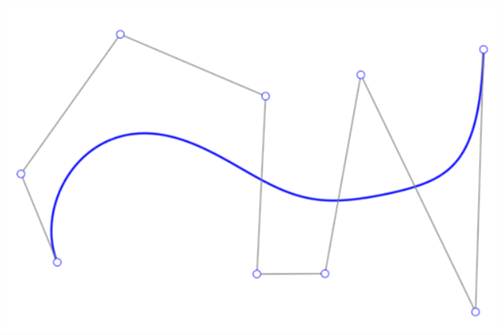
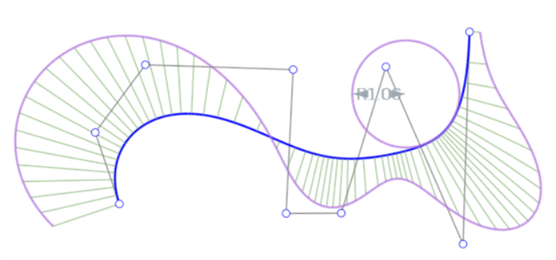
貝茲曲線 (藍色)、控制多邊形 (黑色) 與控制點 (白色圓圈) 的範例。
調整貝茲曲線
- 請確定已取消選取「草圖」工具列中的「貝茲曲線」草圖工具。
- 按一下並拖曳貝茲曲線控制多邊形上的任何控制點 (白色點) 來調整曲線。
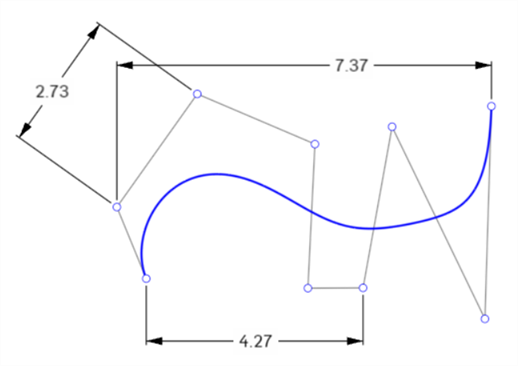
您可以使用貝茲控制點來標註尺寸:
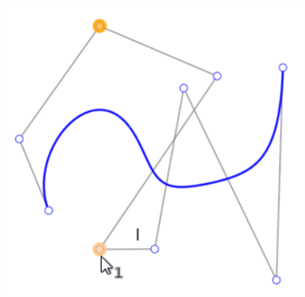
您可以將貝茲控制點與限制條件一起使用。例如,下方圖片中的兩個橘色強調顯示點是限制為垂直的:
修剪與分割貝茲曲線
修剪貝茲曲線會移除被修剪的部分,曲線的其餘部分會保留原有的度數和控制點數:
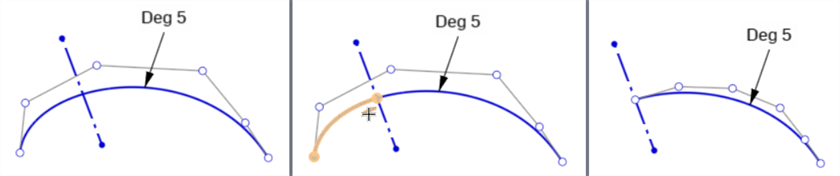
原始曲線 (左圖)、在建構線上修剪 (中圖)、修剪的結果 (右圖)
分割貝茲曲線會將原始曲線在分割點兩側分割成兩條新曲線。每條曲線有相同的度數和控制點。原始曲線的形狀和長度保持不變。.

原始曲線 (左圖)、分割曲線 (中圖)、分割的結果 (右圖)
兩條新曲線是互為重合的。移動一條曲線同時會移動另一條。不過,每條曲線的控制點是互相獨立的。
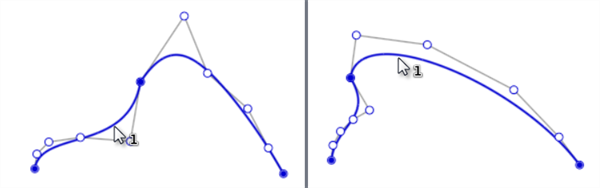
移動其中一條曲線會同時移動兩條曲線,因為它們在分割點上是重合的。
詳細資訊請參考「學習中心」的 Introduction to Sketching (Onshape account required) 課程。