 軟性 PCB 模型

在 Part Studio 中提供此功能
藉由轉換現有零件,擠出草圖或是加厚面或草圖來建立軟性的 PCB 零件。在 PCB 模型上的所有操作都會自動呈現為展開圖樣, 且接合與彎折會列在表格中。
 軟性 PCB 模型步驟:轉換
封閉現有的零件來建立軟性 PCB 模型:
- 在 Part Studio 中按一下特徵工具列上的 軟性 PCB 模型圖示 (
 ) 。
) 。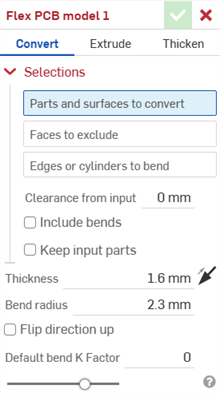
- 選擇軟性 PCB 模型操作的類型:轉換。
- 選擇要轉換的零件和曲面。
- 選擇要排除在操作之外的面。
- 選擇要用來建立彎折的邊線或圓柱;未選取的邊線會變為裂口,在弧與樣條的狀況中則會變為相切的接合。
- 指定適用的選項:
- 來自輸入的餘隙 - 軟性 PCB 與選擇來被軟性 PCB 所封閉的零件間的相對偏移。
- 包含彎折 - 核取這個選項來將彎折包括在餘隙值之間。
- 保留輸入零件 - 保留所選的零件 (被軟性 PCB 所封閉) 或是不保留。
- 厚度 - 軟性 PCB 的厚度。按一下相反方向箭頭圖示 (
 ) 來將軟性 PCB 反轉到另一邊。
 - Bend radius - Sets the inside radius of the bends created.
- 反轉方向朝上 - 反轉軟性 PCB 模型與展開視圖的方位。當定義彎折相對於模型是朝上還是朝下時是相當有用的。
- Default bend K Factor - The fraction of material thickness on which the neutral axis lies on a bend. (Default is 0 for models created in a Part Studio tab and 0.5 for models created in a PCB Studio tab).
- 按一下核取記號圖示 (
 ) 來接受特徵;軟性 PCB 模型會列在「特徵」清單中。
 - 請於此時套用任何其他特定的軟性 PCB 特徵 (例如,彎折、接合或摺邊)。
- 按一下完成軟性 PCB 模型,然後根據在建立軟硬結合 PCB 以匯出 IDX 檔案中說明的步驟繼續操作。
軟性 PCB 模型步驟:擠出
擠出草圖曲線來建立軟性 PCB 模型:
- 在 Part Studio 中按一下軟性 PCB 模型圖示 () 。
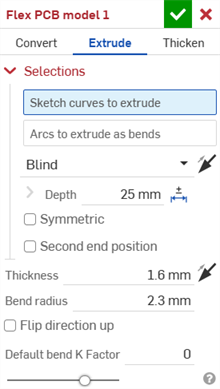
- 選擇軟性 PCB 模型操作的類型:擠出
- 選擇要擠出的草圖曲線。
- 選擇「擠出為彎折的弧」。
- 指定適用的選項:
- 終止類型 - 選擇下列選項之一:「給定深度」、「成形至下一幾何」、「成形至面」、「成形至零件」、「成形至一頂點」。按一下相反方向箭頭圖示 () 來反轉終止方向。
- 深度 - 拖曳或設定深度數值。
- 對稱 - 選擇這個選項,僅能在「給定深度」終止類型中使用。指定總距離,會相對於草圖平面在兩個方向上各以一半的距離擠出。
- 第二結束位置 - 核取來相對於草圖平面在第二結束位置擠出。
對第二結束位置上的擠出提供所有相同的終止形態與個別的深度欄位,以及產生拔模的選項 (草圖平面做為中立面),並將拔模反轉至相反的方向。
- 厚度 - 軟性 PCB 的厚度。按一下相反方向箭頭圖示 () 來將軟性 PCB 反轉到另一邊。
- Bend radius - Sets the inside radius of the bends created.
- Flip direction up - Check to reverse the orientation of the flex PCB model and flat view. This is useful when defining whether bends are up or down, relative to the model.
- Default bend K Factor - The fraction of material thickness on which the neutral axis lies on a bend. (Default is 0 for models created in a Part Studio tab and 0.5 for models created in a PCB Studio tab).
- 終止類型 - 選擇下列選項之一:「給定深度」、「成形至下一幾何」、「成形至面」、「成形至零件」、「成形至一頂點」。按一下相反方向箭頭圖示 (
- 按一下核取記號圖示 ( ) 來接受特徵;軟性 PCB 模型會列在「特徵」清單中。
- 請於此時套用任何其他特定的軟性 PCB 特徵 (例如,彎折、接合或摺邊)。
- 按一下完成軟性 PCB 模型,然後根據在建立軟硬結合 PCB 以匯出 IDX 檔案中說明的步驟繼續操作。
軟性 PCB 模型步驟:加厚
藉由加厚面、曲面或草圖區域來建立鈑金模型:
- 在 Part Studio 中按一下軟性 PCB 模型圖示 () 。
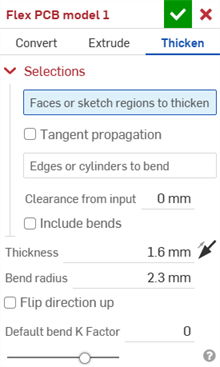
- 選擇軟性 PCB 模型操作的類型:加厚
- 選擇要加厚的面或草圖區域。
- 核取沿相切面進行來將軟性 PCB 區域延伸至至周圍邊線。
- 選擇要用來建立彎折的邊線或圓柱;未選取的邊線會變為裂口,在弧與樣條的狀況中則會變為相切的接合。
- 指定適用的選項:
- 來自輸入的餘隙 - 軟性 PCB 與選擇來被軟性 PCB 所封閉的零件間的相對偏移。
- 包含彎折 - 核取來為彎折包含餘隙。
- 厚度 - 軟性 PCB 的厚度。按一下相反方向箭頭圖示 () 來將軟性 PCB 反轉到另一邊。
- Bend radius - Sets the inside radius of the bends created.
- Flip direction up - Check to reverse the orientation of the flex PCB model and flat view. This is useful when defining whether bends are up or down, relative to the model.
- Default bend K Factor - The fraction of material thickness on which the neutral axis lies on a bend. (Default is 0 for models created in a Part Studio tab and 0.5 for models created in a PCB Studio tab).
- 按一下核取記號圖示 ( ) 來接受特徵;軟性 PCB 模型會列在「特徵」清單中。
- 請於此時套用任何其他特定的軟性 PCB 特徵 (例如,彎折、接合或摺邊)。
- 按一下完成軟性 PCB 模型,然後根據在建立軟硬結合 PCB 以匯出 IDX 檔案中說明的步驟繼續操作。