


所有 Onshape 文档中都有“文档”工具栏(与 Onshape 徽标水平对齐)。
 文档工具栏选项
下面是可用功能的概览:

- Onshape or company logo - Click the Onshape logo (or your company logo if you are part of an enterprise account) to return to the Documents page from anywhere in the system.
- 文档菜单
 ——单击此图标可打开命令菜单,其中包含针对当前文档工作区或版本的可使用命令。
 - 文档名称(粗体;上方示例图片中的镜像) - 粗体名称是您当前正在使用的文档。
您可以更改文档名称,只需单击当前名称,再键入一个新名称即可。
- 工作区名称(浅灰色;上方示例图像中的 Main) - 是您当前在其中工作的工作区名称。
- 复制链接
 ——复制文档的链接,包括活动配置、渲染模式、爆炸视图、面板状态和视图方向。
 - 文件夹名称
 ——如果文档位于文件夹中,则文件夹名称会列在文件夹图标的右侧。文件夹也是一个链接。单击该链接可在一个新的浏览器页签中打开文件夹。
 - FeatureScript 通知
 ——单击以查看 FeatureScript 编译器发送的任何通知。
 - 通知
 ——显示提醒您文档更改的通知。
 - 应用商店
 ——单击以访问(并在必要时登录)Onshape 应用商店,以购买与 Onshape 合作的应用。
 - 学习中心
 ——单击以(在新的窗口页签中)访问 Onshape 学习中心,其中提供了录制的网络研讨会、技术简报和自定进度的学习路径。
 - 共享 - 单击此项可打开“共享”对话框,并使处于激活状态的文档可供其他用户或团队访问,而且可以选择这些用户对此文档拥有的权限。
- 帮助菜单
 ——打开帮助菜单,可访问:在线帮助系统、学习中心(与“学习中心”按钮相同)、FeatureScript 文档、产品键盘快捷键列表、此发布的“新增功能”列表、论坛、联系技术支持、推荐朋友使用 Onshape、检查您的系统是否符合 Onshape 的要求,以及有关此版本 Onshape 的信息。
 - 用户帐户菜单 - 通过此菜单访问您的帐户首选项和其他设置。有关更多信息,请参阅管理 Onshape 帐户。
如果当前文档为 “公开”,则有其他图标可用:

 ——表示当前文档是公开文档。
 ——表示当前文档副本的总数。请参见“
 ——表示当前文档链接的总数。链接是指当前文档被插入到其他文档中。请参见“
 - 表示点赞的总数。单击该图标可点赞当前文档。文档工具栏:iOS
下面是可用功能的概览:

-
>——轻按此按钮可将用户带回到文档页面。
-
文档和工作区名称——上方为文档名称,下方为工作区名称。在示例图中,文档名称为“Bevel Gear Assembly-and-Valve Reduced preview - RA”,工作区为 Main。
-
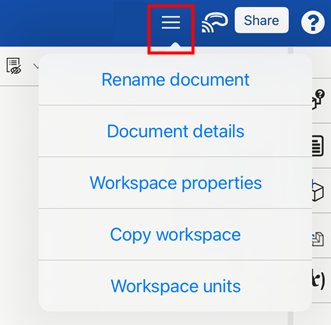
选项菜单——轻按右上角的选项菜单可打开包含其他文档和工作区选项的下拉列表:
-
重命名文档——打开更新当前文档名称的对话。
-
文档详细信息——打开更新当前文档说明的对话。
-
工作区属性——打开显示当前工作区的名称、说明和类别的对话。
-
复制工作区——打开将活动工作区复制到新文档的对话。
-
工作区单位——打开更改当前所选工作区单位的对话。
-
-
Apple Vision Pro——连接到 Apple Vision Pro。请参见 使用 Apple Vision Pro 查看模型 了解更多信息。
-
共享——打开“共享设置”对话,允许用户为当前文档设置共享设置。请参见“共享文档”了解更多信息。
-
帮助菜单——打开下拉菜单以访问移动帮助、查看手势控制、联系技术支持以及关于 Onshape 的信息。有关这些选项的信息,请参见“反馈和帮助”。
在移动电话设备上,“版本和历史记录”、“创建版本”、“评论”和“共享”按钮位于应用程序底部的水平工具栏上。