Company/클래스룸/엔터프라이즈 설정 - 넘버링 체계

다음 용도로만 사용 가능
릴리스 개체(파트, 어셈블리, 도면, 파일), 표준 콘텐츠 및 아이템에 대해 수동 또는 순차적 번호 생성을 선택합니다.
Onshape에서 넘버링 체계 설정으로 이동하려면 Onshape 창의 오른쪽 상단 코너에 있는 계정 사용자 아이콘  을 클릭합니다. 이렇게 하면 드롭다운 메뉴가 열립니다. Company/클래스룸/엔터프라이즈 설정을 클릭합니다.
페이지 왼쪽의 목록에서 번호 매기기 구성을 클릭합니다.
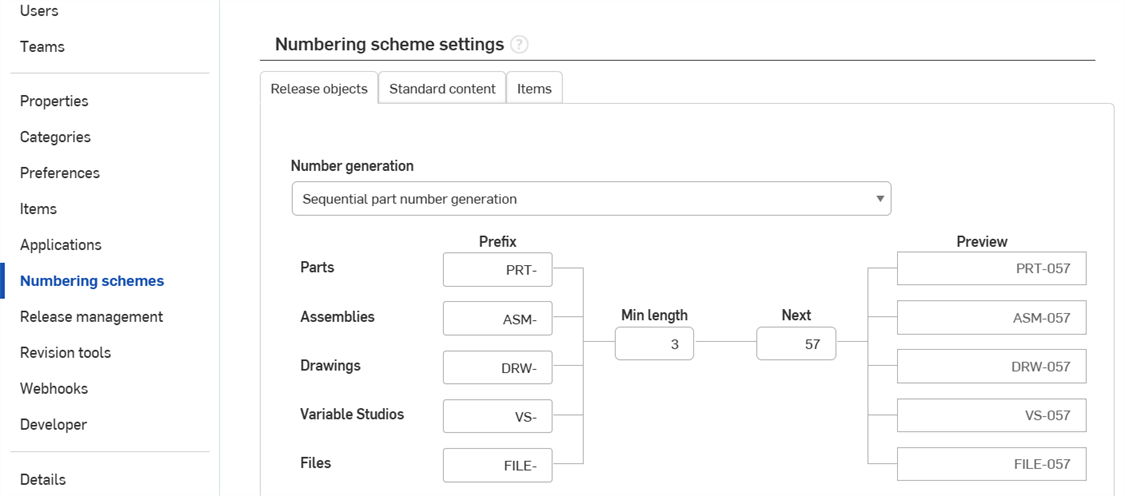
Company 설정 > 번호 매기기 구성
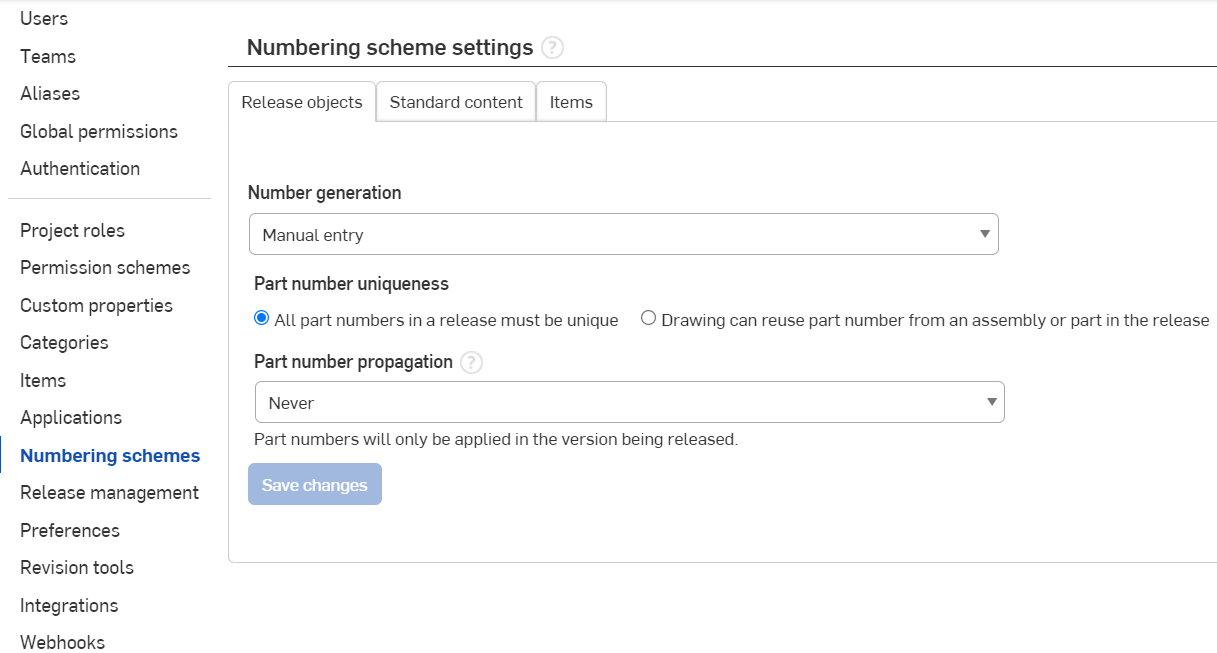
엔터프라이즈 설정 > 번호 매기기 구성
 번호 매기기 구성 설정
다음 개체 유형에 대한 수동 또는 순차적 번호 생성을 설정합니다.
-
개체 릴리스 - 파트, 어셈블리, 도면, Variable Studios 및 가져온 파일(번역 여부에 관계 없음)의 리비전을 통합문서로 릴리스합니다.
-
표준 콘텐츠 - Onshape 표준 콘텐츠는 Onshape에서 제작하고 Onshape의 데이터베이스에 보관하며 Onshape에서 유지 관리하는 콘텐츠입니다. 사용자는 어셈블리에 표준 컨텐츠를 삽입할 수 있습니다. 표준 내용에는 ANSI, DIN, ISO 및 PEM ® 볼트, 나사, 너트, 와셔 등이 포함됩니다.
-
아이템 - BOM에 추가할 수 있지만(자세한 내용은 자재명세서 참조) 모델링이 필요하지 않은 비형상 요소(비-지오메트리 요소). 일부 아이템의 예로는 접착제, 그리스, 페인트 및 에폭시가 있습니다.
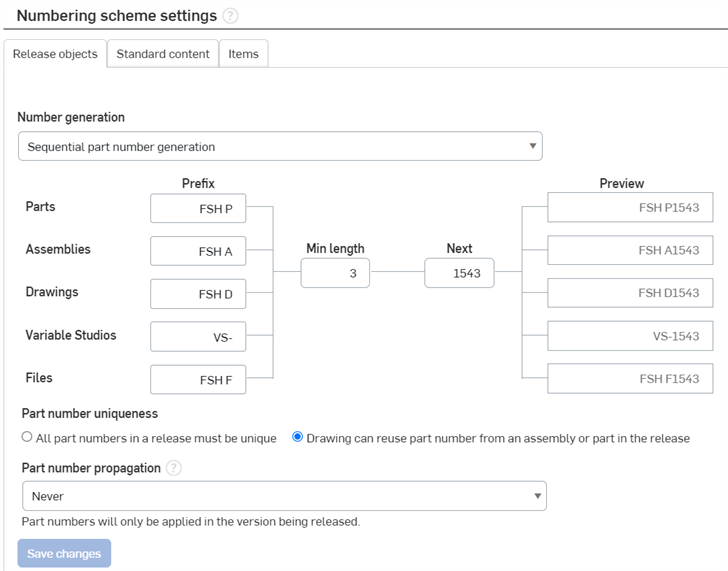
파트 번호 생성에 대해 원하는 방법을 선택합니다.
- 수동 입력 - 자체 파트 번호를 수동으로 입력합니다.
- Onshape는 중복 리비전 라벨 또는 파트 번호를 자동으로 차단하고, 이전에 릴리스된 리비전에서 기존 파트 번호를 사용할 경우 오류 메시지를 표시합니다. 예를 들어, 파트 번호 01에 대해 리비전 A를 릴리스하면 해당 파트 또는 다른 파트에 대해 파트 번호 01에 리비전 A를 릴리스할 수 없습니다.
- Onshape는 이 구성에 대한 번호 순서를 추적하지 않으며, 번호 건너뛰기를 허용합니다.
- 순차적 파트 번호 생성 - 요청 시 Onshape가 파트 번호를 생성합니다.
- 플로우차트의 필드를 사용하여 각 개체 유형에 대한 접두어, 최소 길이 및 시작 시퀀스에서 다음 숫자를 정의합니다.
- 다음 필드는 연속해서 증가하는 순차적 파트 번호를 사용해 생성될 다음 번 파트 번호를 나타냅니다. 번호를 건너뛰거나 릴리스가 취소 또는 거부된 경우라도 번호가 감소하지 않습니다.
- 이 옵션을 선택하면 이전에 시스템에 수동으로 입력한 파트 번호가 변경되니다. 변경 내용은 새로 만든 파트 번호에만 적용됩니다.
- 이 옵션을 선택하면 원하는 경우, 수동으로 파트 번호를 입력하지 못하게 할 수 있습니다.
- 이 옵션을 선택하면 파트 번호를 포함할 수 있는 개체의 모든 속성 대화상자에서 자동 파트 번호 생성을 사용할 수 있습니다.
- 접두사 필드는 선택 항목입니다.
- 아레나 파트 번호 생성( Onshape Arena 커넥션 사용 시에만 사용 가능) - 아레나는 파트 번호를 생성하며, 이 번호는 Onshape에 다시 동기화되어 해당 파트의 Onshape 메타데이터에 사용됩니다.
- 파트 번호 고유성(릴리스 개체만 해당) - 도면에 대해 중복 파트 번호 사용을 허용할지를 선택합니다(도면에 나타나는 파트 또는 어셈블리의 중복).
- 릴리스의 모든 파트 번호는 고유해야 함 - 파트 또는 어셈블리의 파트 번호를 도면의 파트 번호로 사용할 수 없습니다.
- 도면은 릴리스에 포함된 어셈블리 또는 파트의 파트 번호를 재사용할 수 있음 - 파트 또는 어셈블리의 파트 번호를 도면의 파트 번호로 사용할 수 있습니다.
- 파트 번호 전파(릴리스 개체만 해당) - 버전에서 릴리스된 아이템의 파트 번호를 관련 작업공간 내에서 해당하는 아이템으로 전파할지를 선택합니다. 선택:
- 안 함 - 릴리스된 아이템의 파트 번호를 작업공간 내의 해당 아이템으로 절대 전파하지 않습니다.
- 하나의 작업공간 - 항목이 릴리스된 버전이 해당하는 작업공간을 하나만 포함할 때 작업공간 내에서 해당 항목으로 릴리스된 항목의 파트 번호를 전파합니다. 버전에 해당 작업공간이 둘 이상일 경우, 파트 번호를 전파하지 않습니다.
- 모든 작업공간 - 아이템이 릴리스된 버전에 하나 이상의 작업공간이 포함된 경우, 릴리스된 항목의 파트 번호를 모든 작업공간 내에서 해당하는 아이템으로 전파합니다.
변경사항 저장을클릭하여 변경한 내용이 모두 저장되도록 합니다.
변경 사항 저장은 편집 중인 현재 탭 (릴리즈 객체, 표준 컨텐츠 또는 항목) 의 변경 사항만 저장합니다.각 탭의 변경 사항은 독립적입니다.
파트 번호 생성 참고 사항
-
구성된 어셈블리가 아닌 항목의 경우, 파트 번호가 작업공간(존재할 경우)에서 동일한 내부 ID를 가진 항목에 적용됩니다.
-
파트의 경우, 해당 파트가 작업공간에서 정확히 하나의 파트로 발견된 경우에만 파트 번호가 적용됩니다.
-
구성된 Part Studio 및 어셈블리의 경우, 구성 매개변수가 버전과 작업공간 사이에 동일하면 파트 번호만 적용됩니다. 매개변수가 추가되거나 제거된 경우, 파트 번호가 적용되지 않습니다.
-
파트 번호 속성은 릴리스 관리가 활성화되지 않은 버전에서만 편집할 수 있습니다.
-
릴리스 패키지의 최초 전환, 즉 제출 동작에서 파트 번호가 전파됩니다.