


이용 가능 플랫폼: 어셈블리
iOS 및 Android 플랫폼에서는 BOM 테이블을 볼 수 있고 뷰를 평면형에서 구조화된 뷰로 변경할 수 있습니다.
Onshape 재료 명세서 (BOM) 기능을 사용하면 모든 작업공간 어셈블리에서 BOM을 자동으로 생성할 수 있습니다.Onshape 버전에서 릴리즈 후 어셈블리에 파트 및 어셈블리를 삽입하거나 파트 및 하위 어셈블리를 어셈블한 다음 어셈블리를 모두 한 번에 릴리즈할 수 있습니다. 릴리스 관리에 대한 자세한 내용은 릴리스 관리를 참조하십시오.
Onshape BOM에는 기본 속성 세트가 열로 포함되어 있으며 필요에 따라 열을 추가하거나 제거할 수 있습니다. 속성 설정 및 관리에 대한 자세한 내용은 속성(메타데이터)을 참조하십시오.
관리자는 사용자 정의 속성을 정의하고 이를 자재명세서(BOM)에 포함시킬 수도 있고, 모든 기본 Onshape 속성에 대한 표시 이름을 제공할 수도 있고, 기본 BOM 템플릿을 만들 수도 있습니다. 자세한 내용은 Company/교실/엔터프라이즈 설정: 사용자 정의 속성을 참조하십시오.

 동영상 예
동영상 예
동영상 트랜스크립트
Onshape는 모든 어셈블리에 대한 자재명세서(BOM)를 자동으로 생성합니다.
테이블은 상호 작용이 가능하며 어셈블리가 변경되거나 속성이 업데이트됨에 따라 동시에 업데이트됩니다.
테이블의 행 위에 마우스를 올리면 그래픽 영역에서 해당 구성 요소가 강조 표시됩니다. 테이블에서 항목 번호를 선택하면 부품 목록과 그래픽 영역에서 해당 번호가 교차 강조 표시됩니다. 이렇게 하면 어셈블리에서 해당 번호가 어디에 사용되는지 쉽게 파악할 수 있습니다.
테이블 항목 순서는 부품 목록 순서를 따릅니다. 목록에서 부품을 새 위치로 끌어서 순서를 변경하십시오.
열 머리글을 두 번 클릭하면 선택한 열을 기준으로 표를 알파벳순이나 숫자순으로 정렬할 수 있습니다.
이 테이블에는 정형화와 펼쳐진 항목이라는 두 가지 뷰 옵션이 있습니다. 정형화는 최상위 인스턴스와 확장 가능한 서브 어셈블리를 나열합니다. 서브 어셈블리 항목 번호 셀을 두 번 클릭하면 확장하거나 축소할 수 있습니다. 확장하면 서브 어셈블리 인스턴스가 표시됩니다. 펼쳐진 항목은 모든 인스턴스를 최상위에 삽입된 것처럼 서브 어셈블리 표시 없이 나열합니다.
특정 서브 어셈블리가 표에 표시되는 방식을 설정하려면 해당 속성으로 이동합니다. 목록에서 서브 어셈블리를 마우스 오른쪽 버튼으로 클릭하고 속성을 선택한 다음, 서브 어셈블리 BOM 동작을 클릭합니다. 어셈블리 및 구성 요소 표시는 BOM의 서브 어셈블리와 들여쓰기된 구성 요소를 나열합니다. 이는 기본 자재명세서(BOM) 정형화 뷰입니다. 어셈블리 표시는 서브 어셈블리 항목만 나열하고 해당 구성 요소는 나열하지 않습니다. 이는 하나의 공급업체 부품 번호로 식별해야 하는 수입/구매 어셈블리에 유용할 수 있습니다. 구성 요소 표시는 구성 요소가 최상위 어셈블리에 삽입된 것처럼 서브 어셈블리 구성 요소만(서브 어셈블리 자체를 제외하고) 나열합니다. 이를 통해 자재명세서(BOM)에 영향을 주지 않고 추가적인 그룹화 및 구성 도구를 사용할 수 있습니다.
열 추가를 클릭하여 테이블에 추가 속성을 포함합니다. 열 머리글을 마우스 오른쪽 버튼으로 클릭하고 열 제거를 선택하여 열을 제거합니다. 동일한 컨텍스트 메뉴에서 왼쪽 이동 및 오른쪽 이동을 사용하면 열 순서를 변경할 수 있습니다.
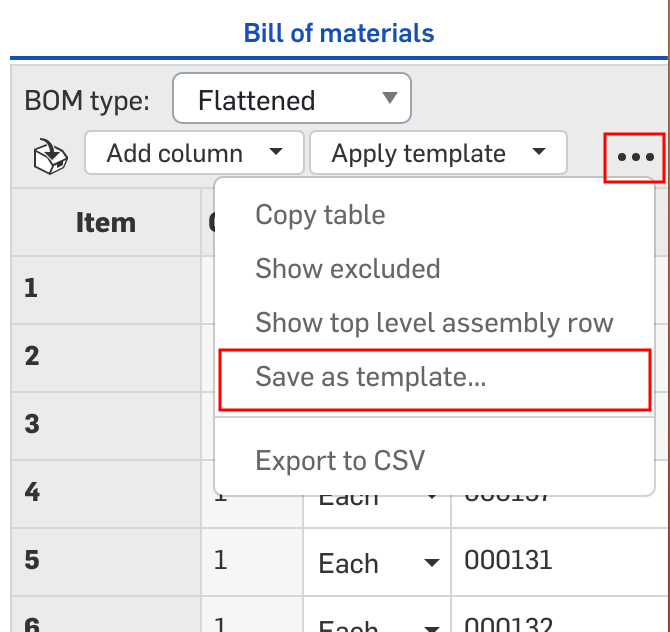
템플릿 적용을 클릭하고 제공되는 템플릿 중 하나를 선택합니다. 새 BOM 테이블을 정의하려면 테이블을 나중에 사용할 수 있도록 템플릿으로 저장합니다. 오버플로 메뉴에서 템플릿으로 저장을 선택합니다.
오버플로 메뉴를 사용하여 테이블 복사 또는 CSV로 내보내기를 수행할 수 있습니다. 테이블 복사를 사용하면 테이블을 클립보드에 저장하여 외부 위치에 붙여넣을 수 있습니다. CSV로 내보내기를 사용하면 테이블을 CSV 파일로 다운로드하여 외부 스프레드시트 프로그램에서 활용할 수 있습니다.
정형화 BOM에서 항목을 제외하고 보려면 행을 마우스 오른쪽 버튼으로 클릭하고 이 자재명세서(BOM)에서 제외하고 보기를 선택합니다. 이렇게 하면 테이블에서 행이 숨겨집니다. 항목을 포함하려면 먼저 제외하고 보기 항목의 유형을 켭니다. 오버플로 메뉴에 액세스하여 제외 항목/제외하고 보기 항목 표시를 선택합니다. 제외하고 보기 항목은 항목 번호에 대시(-)가 표시됩니다. 행을 마우스 오른쪽 버튼으로 클릭하고 이 자재명세서(BOM)에서 제외하고 보기 취소를 선택합니다. 오버플로 메뉴에 액세스하여 제외 항목/제외하고 보기 항목 숨기기를 선택하면 테이블에서 해당 항목이 더 이상 표시되지 않습니다.
회사 관리자가 집계된 어셈블리 속성을 설정한 경우, 오버플로 메뉴에 최상위 어셈블리 행 표시라는 추가 옵션이 표시됩니다. 이 옵션이 표시되면 집계된 값이 자재명세서(BOM) 하단에 표시됩니다. 이 항목은 동일한 오버플로 메뉴에서 다시 숨길 수 있습니다.
BOM 속성은 테이블 내에서 편집 가능하며, 개별 속성 대화상자로 이동하지 않고도 속성에 동시 업데이트됩니다. 셀을 선택하고 값을 입력한 후, 재질 셀을 두 번 클릭하고 재질을 선택하십시오.
Company/엔터프라이즈 번호 체계 설정이 순차적 파트 번호 생성으로 설정된 경우, 파트 번호 열 머리글을 마우스 오른쪽 버튼으로 클릭하여 전체 BOM에 대한 누락된 파트 번호를 생성합니다.
테이블에서 속성을 입력하거나 편집하면 파트 또는 서브 어셈블리 수준의 속성이 자동으로 업데이트되고, 파트 또는 서브 어셈블리 수준의 속성을 업데이트하면 테이블도 자동으로 업데이트됩니다.
표 로드 및 보기
모든 Onshape 어셈블리에는 뷰 도구 아이콘 아래의 그래픽 영역 맨 오른쪽에 BOM 표 아이콘이 있습니다.
- 어셈블리에서 그래픽 영역의 오른쪽 모서리에 있는 BOM 표 아이콘을 클릭합니다.

- 표가 열리면 Onshape가 어셈블리에 대한 데이터를 검색하여 표를 채웁니다(파트 또는 어셈블리가 존재할 경우, 다음에서 위쪽 예시를 참조). 파트 또는 어셈블리가 없을 경우, Onshape가 기본 열 이름(속성)이 표시된 상태로 열립니다(다음에서 아래쪽 예시 참조).
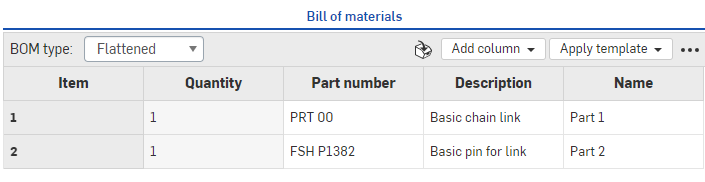
브라우저에서 파트가 나열된 BOM, 위
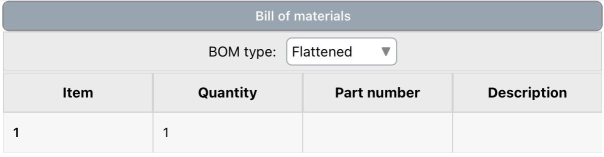
iOS에서 파트가 나열된 BOM, 위
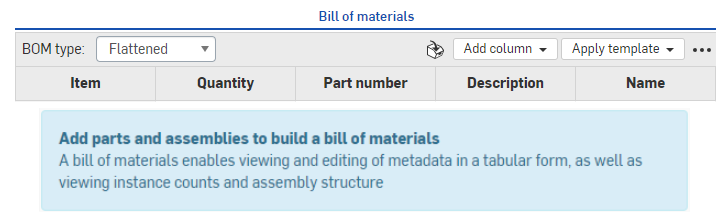
브라우저에서 파트가 나열되지 않은 BOM, 위
- 빈 BOM을 채우려면 다음 지침에 따라 어셈블리 탭에서 어셈블리를 생성하기만 하면 됩니다. 파트 및 어셈블리 삽입.
- 자재명세서(BOM) 패널에서 정보를 표시할 방법을 선택합니다(자재명세서(BOM) 유형 메뉴를 통해).
- 펼쳐진 항목 - 이 뷰는 하위 어셈블리를 표시하지 않고, 아이템 번호별로 간단한 파트 목록을 제공합니다.
정형화 - 이 뷰는 확장 가능한 하위 어셈블리 표시를 포함해 파트 목록을 제공합니다. 하위 어셈블리는 오른쪽을 향해 있는 작은 캐럿이 함께 표시됩니다. 예를 들면, 다음과 같습니다.

정형화 형식을 사용 중일 때, 캐럿이 있는 셀(하위 어셈블리)을 두 번 클릭하면 셀 아래에 목록을 확장하고 해당 하위 어셈블리에 포함된 파트를 볼 수 있습니다. 이러한 파트는 하위 어셈블리 아이템 번호 다음에 점, 그리고 파트 아이템 번호로 라벨이 지정됩니다(아래의 예에서 9, 9.1, 9.2, 9.3).
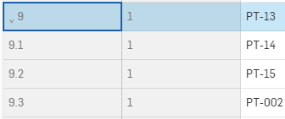
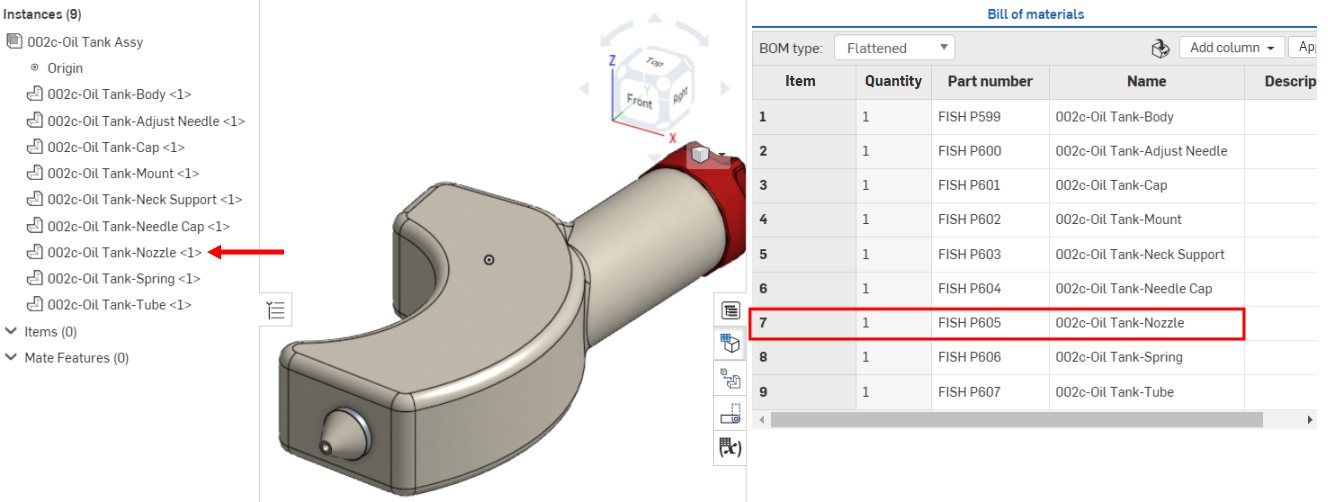
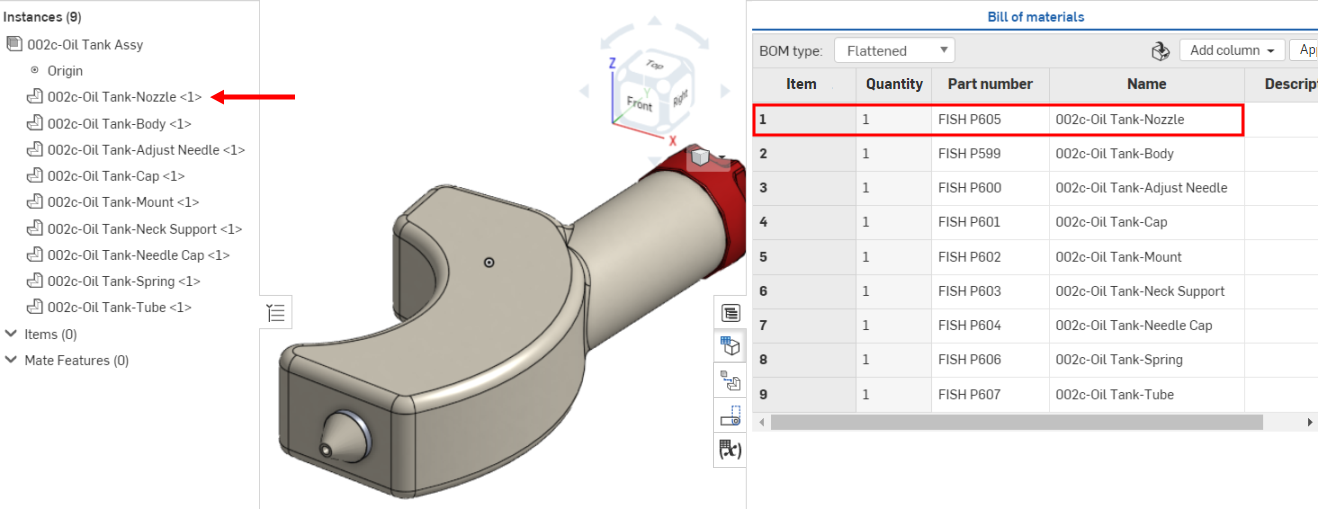
하위 어셈블리 및 파트에 지정된 아이템 번호는 파트 목록에서 파트의 순서를 반영합니다. 목록에서 파트의 순서를 다시 지정하면 새로운 순서를 반영하여 BOM 표가 업데이트됩니다.
이전에는 002c-오일 탱크 노즐이 파트 목록에서 7번째이고 BOM 표에서 아이템 번호 7에 해당되었습니다.
파트가 파트 목록의 첫 번째 위치로 이동되면 BOM 표에서 아이템 번호 1로 업데이트됩니다.
 모델 및 파트 목록에서 항목 찾기
모델의 파트에서 아이템의 위치를 찾으려면 파트 목록에서 해당 아이템 이름을 클릭합니다. 현재 BOM 테이블에서 관련 아이템 행이 강조 표시되고 스크롤되어 초점이 맞춰집니다. 또는 BOM 테이블에서 아이템 이름을 클릭하면 선택한 아이템이 모델 및 파트 목록에서 강조 표시됩니다.
파트 번호 생성
자재명세서(BOM)의 번호 매기기 구성 설정에서 자동 파트 번호 매기기 기능을 켠 경우, 다음을 할 수 있습니다.
- 특정 파트에 대한 파트 번호 생성 - 파트의 파트 번호 셀을 마우스 오른쪽 버튼으로 클릭하고 다음 파트 번호 생성을 선택합니다.
- 표에서 파트 번호가 누락된 모든 파트의 파트 번호 생성 - 파트 번호 열 제목을 마우스 오른쪽 버튼으로 클릭하고 누락된 파트 번호 생성을 선택합니다.
BOM 항목의 Part Studio, 어셈블리로 전환하거나 링크된 문서 열기
자재명세서(BOM) 아이템의 행을 마우스 오른쪽 버튼으로 클릭하고 다음을 선택합니다.
-
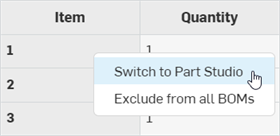
Part Studio/어셈블리로 전환 - 자재명세서(BOM) 아이템이 현재 통합문서의 탭에 있을 때 표시됩니다. 자재명세서(BOM) 아이템의 Part Studio 또는 어셈블리 탭이 현재 브라우저 탭에서 열립니다.
-
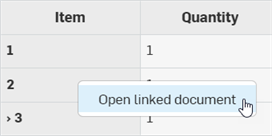
연결된 통합문서 열기 - 자재명세서(BOM) 아이템이 현재 통합문서 바깥에 있는 연결된 통합문서에 있을 때 표시됩니다. 자재명세서(BOM) 아이템의 연결된 통합문서가 새 브라우저 탭에서 열립니다.
제외된 자재명세서(BOM) 데이터를 로컬에서 제외하고 보기 또는 표시
레코드에서 삭제하지 않고 현재 자재명세서(BOM) 테이블에서만 특정 파트 또는 하위 어셈블리와 해당 데이터를 제외하고 보기로 설정하는 방법:
-
BOM 유형 드롭다운에서 구조적 보기를 선택합니다. 펼쳐진 항목 보기에서는 파트 또는 하위 어셈블리를 제외하고 보기로 설정할 수 없습니다.

-
자재명세서(BOM)에서 부품 또는 하위 어셈블리 행을 마우스 오른쪽 버튼으로 클릭하고 이 자재명세서(BOM)에서 제외하고 보기를 선택합니다.

-
데이터 행은 테이블에서 완전히 제거되지만 부품/하위 어셈블리는 여전히 어셈블리에 있습니다. 나머지 항목은 그에 따라 번호가 다시 매겨집니다.
-
자재명세서(BOM) 테이블에서 제외된 부품/하위 어셈블리를 보려면 자재명세서(BOM) 테이블 오른쪽 상단에 있는 오버플로 메뉴(
 )를 클릭하고 제외된 항목 보기를 선택합니다.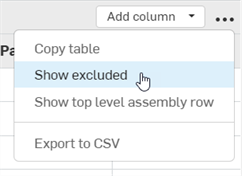
-
제외하고 보기로 설정된 모든 부품/하위 어셈블리가 자재명세서(BOM) 테이블에 표시되고 아이템 번호는 대시와 별표 (--*) 로 대체됩니다.

-
부품/하위 어셈블리를 자재명세서(BOM) 테이블에 다시 포함하려면 해당 행을 마우스 오른쪽 버튼으로 클릭하고 이 자재명세서(BOM)에서 제외하고 보기 취소를 선택합니다.

하위 어셈블리를 제외하면 그 모든 부품도 제외됩니다.
팁
-
파트/어셈블리가 모든 자재명세서(BOM)에서 전체적으로 제외되면 집계 속성이 업데이트됩니다. 파트/어셈블리가 로컬 자재명세서(BOM)에 포함되거나 제외될 때 업데이트되지 않습니다. 즉, 전체 자재명세서(BOM)에서 파트를 제외한 다음 로컬에서 해당 파트를 자재명세서(BOM)에 포함시키는 경우 로컬 자재명세서(BOM)에 대한 집계 등록 정보가 됩니다. 여전히 파트는 제외됩니다(글로벌 자재명세서(BOM)의 제외 설정이 우선 적용됨). 이 로컬 자재명세서(BOM)의 집계 속성은 더 이상 정확하지 않습니다.
-
제외하고 보기는 어셈블리의 직계 하위 항목에만 허용됩니다. 서브 어셈블리의 하위 항목을 제외하고 보려면 해당 자재명세서(BOM)에서 제외하고 보기를 수행해야 합니다.
-
부품 또는 하위 어셈블리를 제외하고 보기로 설정하면 현재 부품에만 영향을 줍니다. 동일한 자재명세서(BOM)에 있는 중첩된 부품은 제외하고 보기로 설정되지 않습니다.
-
파트나 하위 어셈블리가 제외하고 보기로 설정된 경우, 해당 어셈블리가 다른 어셈블리에 삽입되면 해당 파트나 하위 어셈블리의 모든 부품이 제외하고 보기로 설정됩니다.예를 들어, 어셈블리 A에서 파트 1이 제외하고 보기로 설정되고 어셈블리 A가 어셈블리 B에 삽입되면 파트 1도 어셈블리 B에서 제외하고 보기로 설정됩니다.
-
전체적으로 제외된 부품은 로컬에서 제외하고 보기로 설정된 파트보다 우선합니다.
-
버전의 자재명세서(BOM)에는 파트 또는 하위 어셈블리를 포함하거나 제외할 수 없습니다.
전 세계 자재명세서(BOM) 데이터 제외 및 포함
파트 또는 하위 어셈블리를 전체 BOM에서 제외할지 여부를 지정할 수 있습니다.제외된 파트를 어셈블리에 삽입하면 해당 파트과 모든 해당 데이터가 어셈블리의 BOM에서 제외됩니다.제외된 하위 어셈블리를 어셈블리에 삽입하면 하위 어셈블리, 모든 부품 및 해당하는 모든 데이터가 전체 BOM에서 제외됩니다.
파트 또는 하위 어셈블리 제외
다음 중 하나를 수행합니다.
-
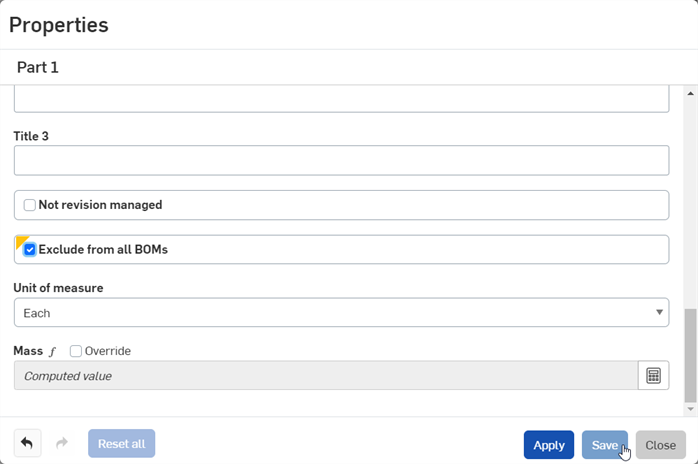
모든 BOM에서 하나 이상의 파트를 제외하려면 Part Studio의 파트 리스트에서 BOM에서 제외하려는 파트를 선택한 다음 마우스 오른쪽 버튼을 클릭하고 특성을 선택합니다. 모든 BOM에서 제외를 선택하고 저장을 클릭합니다.
-
모든 BOM에서 하위 어셈블리와 모든 해당 부품을 제외하려면 어셈블리 탭을 마우스 오른쪽 버튼으로 클릭하고 특성을 선택합니다. 모든 BOM에서 제외를 선택하고 저장을 클릭합니다.
-
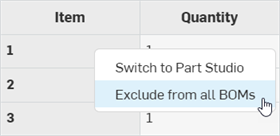
BOM 테이블에서 파트나 하위 어셈블리를 제외하려면 파트 또는 하위 어셈블리 행을 마우스 오른쪽 버튼으로 클릭하고 컨텍스트 메뉴에서 모든 BOM에서 제외를 선택합니다.
제외된 파트 또는 하위 어셈블리 보기
BOM의 어셈블리에 삽입된 글로벌 제외 파트를 보려면:
-
BOM 테이블의 오른쪽 상단에 있는 오버플로 메뉴 (
) 를 클릭하고 제외된 항목표시를선택합니다.
-
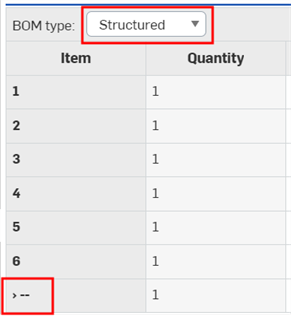
파트는 항목 열 아래에 대시 (--) 로 표시됩니다.
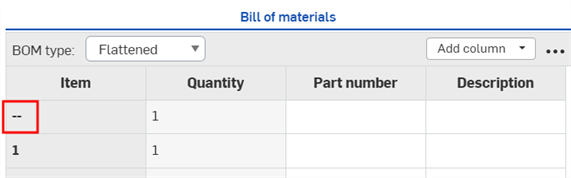
어셈블리에 삽입되어 전체적으로 제외된 하위 어셈블리를 보려면 BOM 유형 드롭다운에서구조적뷰를 클릭합니다.하위 어셈블리 항목 번호가 대시 (--) 로 바뀝니다.
파트 또는 하위 어셈블리 포함
파트 또는 하위 어셈블리를 모든 BOM에 다시 포함하려면 다음 중 하나를 수행하십시오.
-
해당 파트 속성 대화상자 또는 어셈블리 속성 대화상자에서 모든 BOM에서 제외 상자를 선택 취소하고 저장을 클릭합니다.
-
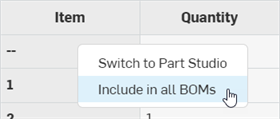
제외된 파트나 하위 어셈블리가 BOM 테이블에 표시되는지 확인합니다 ( 제외된 파트 또는 하위 어셈블리 보기참조).그런 다음 BOM 테이블에서 파트나 하위 어셈블리 행을 마우스 오른쪽 버튼으로 클릭하고 컨텍스트 메뉴에서 모든 BOM에 포함을 선택합니다.
제외된 데이터를 사용하여 질량 계산
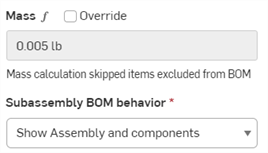
일부 데이터가 제외된 상태에서 질량을 계산하려면 속성 패널의 질량 섹션에서 값 계산 버튼을 클릭합니다. 제외된 부품이 일괄 계산에 포함되지 않았음을 나타내는 경고가 나타납니다.
하위 어셈블리 BOM 동작
어셈블리와 구성요소, 어셈블리만 또는 구성요소만 등과 같이 BOM에 하위 어셈블리가 나열되는 방식을 선택할 수 있습니다.
-
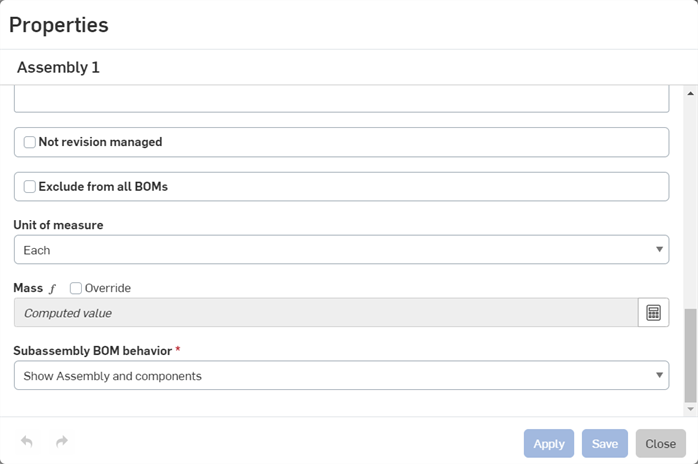
어셈블리(부품 목록에 나열된 탭 또는 서브 어셈블리)에 대한 속성 대화상자를 엽니다.
-
하위 어셈블리 BOM 동작 필드로 스크롤합니다.
-
옵션 중 하나를 선택합니다.
-
어셈블리와 구성요소 표시 - BOM의 정형화 뷰에 각 어셈블리 구성요소에 대한 개별 선 아이템과 함께 어셈블리가 나열됩니다.
-
어셈블리만 표시 - BOM의 정형화 뷰에 어셈블리만 나열됩니다(구성요소 없음).
-
구성요소만 표시 - BOM의 정형화 뷰에 구성요소만 나열됩니다(어셈블리 선 아이템 없음).
-
-
적용을 클릭하여 변경 내용을 등록하거나 저장을 클릭하여 변경 내용을 등록하고 대화상자를 닫습니다. 아니면 닫기를 클릭하여 변경 내용을 등록하지 않고 대화상자를 닫습니다.
어셈블리 속성의 변경 내용은 도면의 BOM을 포함하여 해당 어셈블리가 삽입된 모든 BOM에 영향을 줍니다.
추가 표 데이터
아이템 번호, 수량, 파트 번호 및 설명은 BOM 표에서 파트 및 하위 어셈블리에 대해 열로 표시되는 기본 속성입니다. 계정에 대해 정의된 속성에 따라 열을 더 추가할 수 있습니다.
- 열 추가 드롭다운을 클릭하고 속성 목록에서 삽입할 속성을 선택합니다. 추가 열이 표의 맨 오른쪽에 추가됩니다.
- 그 카테고리 속성이 다중 값인 경우 열을 추가할 수 없습니다.
- 특성 대화상자를 통해 편집할 수 있는 모든 범주는 열로 추가된 경우 BOM 테이블을 통해서도 편집할 수 있습니다.
- For properties marked as editable (in your account Properties), you can click in the cell and add data. This data is saved for the specific part, in the specific property and is available throughout your document and company for that part.
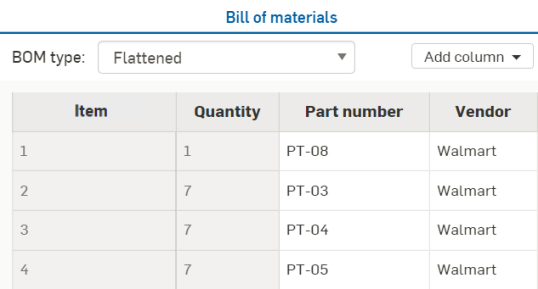
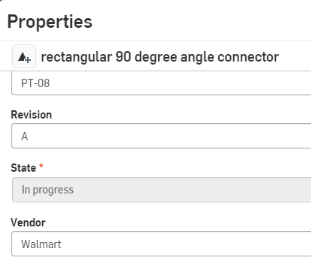
For example, you can enter information in the Vendor cell for each part. That information is saved in that part's Properties, Vendor field.
The Vendor cell with a value in a BOM table:
The Properties dialog for the part:
When creating a property (through the Properties tab in your account settings), you can mark it Edit value in workspace, Edit value in version or both. If you mark it Edit value in version only, you can edit that value in a BOM table for any released parts since released parts become part of a version. However if Edit value in version is not marked, you would have to branch a workspace from that version, edit the values, then either create a version, or re-release the parts.
A Standard content instance cannot be edited from the BOM table, and is grayed out. To edit a standard content instance, right-click on the instance in the Instances list and select Edit standard content instance. See Editing the standard content instance for more information.
Overriding an aggregated computed property
An aggregated computed property can be overridden from the BOM table:
-
Open the BOM table with the aggregated computed property.
-
Click the drop-down arrow from the top level assembly row's aggregate computed property table cell and select an alternative property:
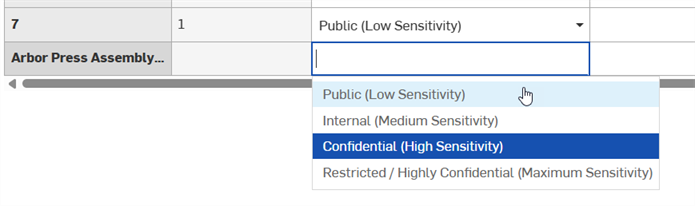
Overridden computed properties (and properties that are aggregated from overridden computed properties) are indicated by an icon next to the property, with a tooltip upon hovering over the icon:

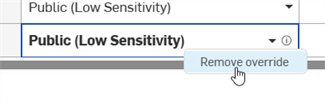
To remove the override, right-click on the aggregate computed property table cell once again and select Remove override:
Adding non-geometric items
어셈블리 탭의 BOM 패널을 통해 BOM에 비기하학 항목(글루, 테이프, 페인트, 나사산 로커 등 CAD에서 모델링되지 않은 항목)을 삽입할 수 있습니다. Onshape에서는 이러한 유형의 요소를 간단히 항목으로 지칭합니다.
BOM에 정보를 삽입할 수 있도록 하려면 몇 가지 설정이 필요합니다. 프로페셔널 회원계정이 있는 경우 Onshape 프로페셔널 회원계정 관리를, 또는 엔터프라이즈 서브스크립션이 있는 경우, Onshape 엔터프라이즈 서브스크립션 관리를 참조하십시오. Company/엔터프라이즈 설정 속성에서 가입에 항목을 추가한 후에는 다음 지침에 따라 어셈블리 탭의 BOM에 해당 항목을 삽입할 수 있습니다.
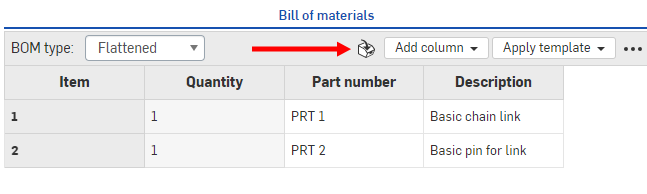
- BOM(Bill of Material) 패널에서 패널 상단에 있는 항목 삽입 아이콘을 선택합니다.
- 대화상자에서:
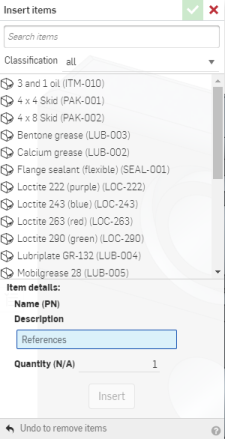
- BOM에 포함시킬 항목을 선택하고 수량을 선택합니다. 항목을 검색하고 분류별로 필터링할 수도 있습니다(분류 옆에 있는 아래쪽 화살표를 클릭).
- 선택한 항목을 BOM에 추가하려면 삽입을 클릭합니다.
- 삽입을 클릭하면 해당 항목이 먼저 파트 목록의 항목에 추가됩니다. 항목에 대한 마음이 바뀐 경우, 되돌리기를 클릭해서 항목을 제거할 수 있습니다.
- 체크마크를 클릭해서 작업을 수락하고 대화상자를 닫으면 해당 항목이 BOM 패널에 나타납니다.
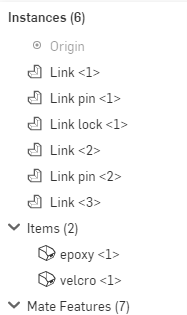
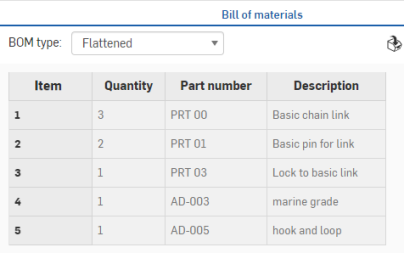
파트 목록을 통해 항목을 편집할 수 있습니다.
항목을 마우스 오른쪽 버튼으로 클릭해서 다음을 수행할 수 있습니다.
- 편집 - 수량을 변경합니다.
- 제외 - 항목을 BOM(및 어셈블리)에서 일시적으로 제거합니다.
- 설명 추가 - 어셈블리에 항목을 직접 참조하는 설명을 추가합니다.
- 삭제 - 어셈블리 및 BOM에서 항목을 삭제합니다.
BOM templates
BOM 형식을 편집한 후에는 이를 템플릿으로 저장하여 사용할 수 있습니다.
-
BOM 테이블 오른쪽 상단에 있는 점 3개 메뉴를 클릭하고 템플릿으로 저장...을 클릭합니다.
-
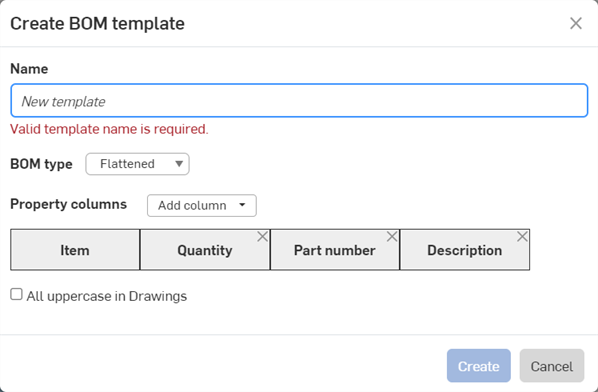
BOM 템플릿 만들기 대화상자가 열립니다. 템플릿의 이름을 제공합니다. 이는 필수입니다.
-
평면형 또는 구조형 중 자재명세서(BOM) 유형을 선택합니다. 이 템플릿을 사용하여 새 자재명세서(BOM)를 작성할 때 템플릿 기본값으로 사용됩니다.
-
속성 열 드롭다운 목록을 사용하여 필요한 열을 추가합니다. 항목 열은 필수이며 제거할 수 없습니다.
-
도면에서 이 템플릿을 사용하여 BOM 테이블을 삽입할 때 대문자 열 제목과 속성 문자열을 적용하려면 도면에서 모두 대문자를 선택합니다.
-
생성을 클릭하여 템플릿을 생성합니다. 템플릿을 생성하지 않고 대화상자를 닫으려면 취소를 클릭하십시오.
패널 상단에 있는 템플릿 적용 드롭다운을 클릭하고 목록에서 템플릿을 선택해서 생성한 새로운 템플릿을 적용할 수 있습니다.
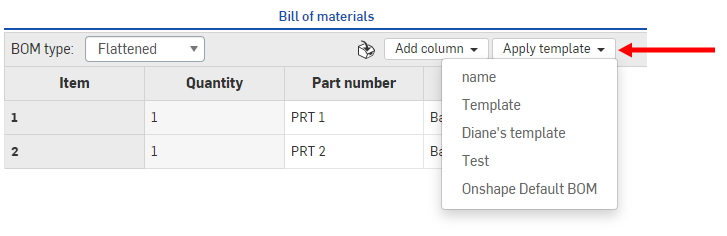
선택한 템플릿은 어셈블리의 BOM 테이블에 사용됩니다.
Company/클래스룸/엔터프라이즈 관리자가 만든 템플릿이 해당 목록에 있을 수도 있습니다.
CSV로 내보내기
Use the overflow menu's Export to CSV command to export the entire BOM table to a comma-separated file so it can be imported into an external spreadsheet program such as Microsoft excel or Google sheets.
If subassemblies are not expanded, the entire BOM is not exported.
표 서식 지정
다음 방법으로 표의 크기를 조정합니다.
- 패널을 더 크게 또는 더 작게 크기를 조정하려면 패널의 맨 왼쪽 모서리를 클릭해서 드래그합니다. 패널의 크기를 조정할 수 있는 방식에 대한 제한이 있습니다.
- 열 제목 테두리를 클릭해서 왼쪽 또는 오른쪽으로 드래그하여 행의 크기를 조정합니다. 첫 번째 행은 참조용으로 고정되어 있으며 이동하거나 크기를 조정할 수 없습니다.
- 열 이름의 컨텍스트 메뉴를 통해 열을 오른쪽 또는 왼쪽으로 이동하거나 표에서 제거할 수 있습니다.
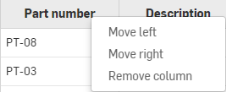
- 제거된 열을 다시 표에 추가하려면 패널의 상단 오른쪽에 있는 열 추가 드롭다운을 사용합니다.
BOM table overflow menu
Click the Overflow menu icon () at the top right corner to access additional BOM table options:
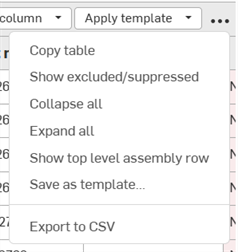
-
Copy table - Copies the BOM table to the clipboard so it can be pasted into external programs such as Microsoft Excel or Google Sheets
-
Show/hide excluded/suppressed - Shows or hides both excluded and suppressed row data in the BOM table. See Suppressing or showing excluded BOM data locally and Excluding and including BOM data globally.
-
Collapse all - Available from a Structured BOM view only, this collapses all subassembly rows so that each subassembly takes up a single row in the BOM table.
-
Expand all - Available from a Structured BOM view only, this expands all subassembly rows in the BOM table.
-
Show/hide top level assembly row - Shows or hides the top level assembly row. This row is displayed at the bottom of the BOM table.
-
Save as template - Available only for Enterprise and Professional subscriptions, this saves the current BOM table format as a template. See BOM templates.
-
Export to CSV - Exports the BOM table to a comma-separated file format so it can be imported into an external spreadsheet program such as Microsoft excel or Google sheets. See Export to CSV.
릴리스되거나 릴리스 중인 파트에 관한 고려 사항
어셈블리에 가져왔거나 릴리스한 파트를 사용할 경우, 해당 속성이 BOM 표에 읽기 전용으로 표시됩니다. 편집 가능한 필드를 사용해 BOM을 생성하기 위해 버전에서 분기를 만들어 새 작업공간을 생성할 수 있습니다. BOM의 필드는 각 속성의 설정마다 편집이 가능합니다(계정 설정을 통해).
릴리스(리비전)된 파트를 어셈블리에 삽입한 다음 BOM 표를 만들 때, 상태 속성은 릴리스됨이 됩니다.
도면에서 BOM 사용
Onshape BOM 테이블을 도면에 삽입할 수 있습니다. BOM 테이블 항목을 참조하십시오.