 Flow

利用可能: スケッチ
Create flow continuous transitions (G3) between sketch splines (and conics) and surrounding geometry. Position, tangency, curvature, and the rate of change of curvature all match where the curves join. Use Flow when you need a smoother transition than Curvature provides, for example on aesthetic surfaces or motion paths.
選択中に拘束をオンに切り替えます。選択したエンティティの各ペアは互いに拘束されます。クリックしてオフに切り替えるか、別のツールを選択して自動的にオフに切り替えます。
 手順
To make two curves G3 (flow) continuous, do either of the following:
- Select the two curves, and then click
the Flow icon (
 ).
- Click
the Flow icon ( ), and then select the two curves.
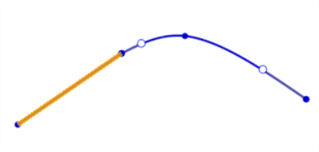
Before using the Flow constraint (line in yellow, spline in blue)
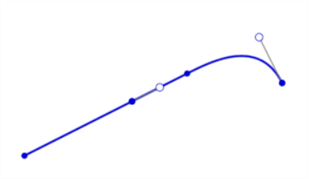
After using the Flow constraint
注記
- One of the two curves must be a spline or conic with enough control points to satisfy the constraint.
- You can constrain two curves in the current sketch, or a curve in the current sketch and an external edge.
- Flow cannot be applied to an offset spline.
- Flow constraints are listed in the Constraint manager as Flow 1, Flow 2, and so on.
詳細は、ラーニングセンターコースのスケッチ入門 (Onshape アカウントが必要です) を参照してください。