

利用可能: 図面
表面粗さ記号は、円形ビューのエッジ、パーツの面、またはエッジから離れて配置します。
 手順
- をクリックします。
- In the Surface finish dialog:


On the left, the Surface finish dialog. On the right, the corresponding Surface finish symbol in the graphics area.
Click the Type dropdown to select a Surface finish type:
Basic (
 )
Material removal required (
 )
Material removal prohibited (
 )
ISO Basic (
 )
ISO material removal required (
 )
ISO material removal prohibited (
 )
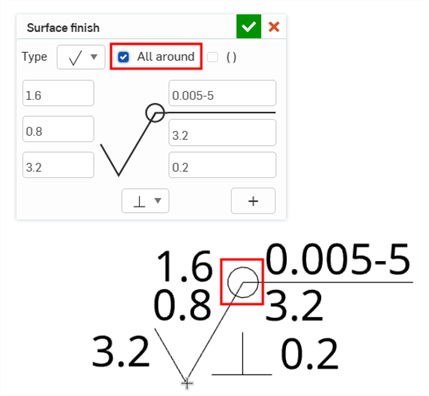
Optionally, select the All around checkbox to include an all around symbol.
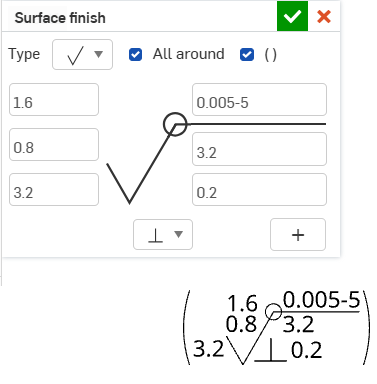
Optionally, select the Parenthesis checkbox add parentheses to the surface finish symbol.
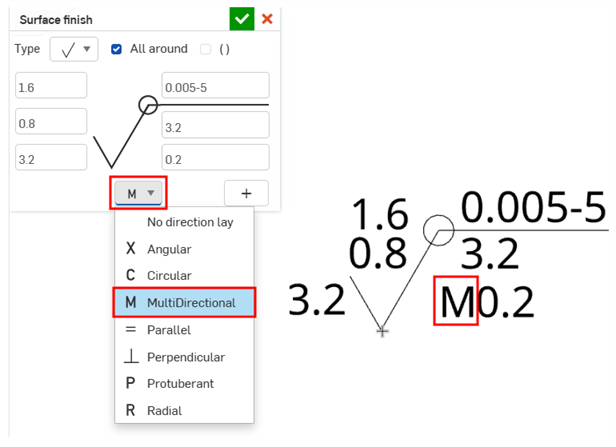
Optionally, click the Direction lay dropdown to select a direction lay symbol.
Enter your data into the cells.
(Optional) Click the Add row button (
 ) to add up to five additional rows to the dialog.
- 図面でクリックして、記号と表面粗さの説明を配置します。
- 図面の空白の任意の場所をクリックします。
- 円形ビューのエッジ上の点をクリックしてください
- パーツの面にあるビュー領域をクリックします。
- 必要に応じて、さらに説明を入力するか、ダイアログに記号を追加します。
-
終了したら
 をクリックします (キャンセルするには
 をクリック) 。
引出線を追加するには、記号を右クリックし、[引出線を追加] を選択します。クリックして引出線を配置します。複数の引出線を追加するには、同じ手順を繰り返します。
引出線には、水平セグメントに沿って移動可能なノードが含まれます。

ノードをクリックしてドラッグし、引出線の水平セグメントを延長または縮小します。
表面粗さ記号を寸法補助線に関連付けることができます。

引出線ノードの追加と削除
- 引出線を右クリックし、[ノードを追加] をクリックします。

引出線にノードが表示されます。別のノードを追加するには、引出線を右クリックし、[ノードを追加] を再度選択します。
- 引出線からノードを削除するには、ノードを右クリックし、[ノードを削除] を選択します。
- ノードを右クリックし、[引出線を追加] を選択することで、ノードに引出線を追加することもできます。これにより、そのノードから始まり、次にクリックした場所で終了する引出線が追加されます。
表面粗さ記号のスタイリング
表面粗さ記号のスタイルを設定するには:
-
スタイルを設定する表面粗さ記号をクリックし、ページの右側にある [スタイルパネル] アイコンをクリックします。
-
記号のフォント、テキストの高さ、色、矢印を編集します。

表面粗さコンテキストメニュー
表面粗さ記号を右クリックしてコンテキストメニューを開きます。
- 編集 - 表面粗さの仕様を編集するには、[表面粗さ] ダイアログを開きます。
- コピー - 表面粗さ記号をコピーします。
- 引出線を追加 - 引出線 (または別の引出線) を表面粗さに追加します。
- 引出線を削除 - 表面粗さ記号からすべての引出線を削除します。
- Move to - Move a surface finish symbol to a different layer of the drawing: Border frame, Border zones, or Title block. Once on another zone, you have the option of locking the layers (through Drawings properties, Formats tab), in order to stabilize the position of entities on that layer. When a surface finish symbol is moved to different layer, that layer's formats (for example, color, line thickness, and font) are applied to it.
- 選択解除 - 強調表示されたアイテムを選択キューから削除します。
- フィット - 図面全体を視野に収めるように適切に拡大縮小します。
- 削除 - 選択したエンティティを削除します。
表面粗さをコールアウトでグループ化できます。詳細は、吹き出し (バルーン) を参照してください。