Troubleshooting Sketch Geometry


Available in: Sketch
The status of constraint is indicated by the color of the sketch entities, and you can use the Profile inspector tool to easily identify issues with your sketch constraints.
 Constraint status and colors
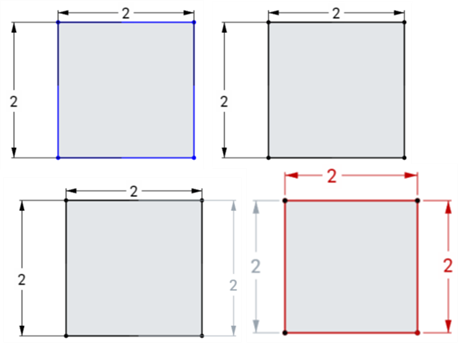
The color of sketch entities indicate its constrained status:
- Blue means underconstrained.
- Black means fully constrained.
- Red means a constraint problem (overconstrained).
The color of a constraint icon indicates its constrained status:
- Black on gray means well-defined.
- White on red indicates a problem.
- When selecting, non-fully constrained sketch points (blue and red) are prioritized over any overlapping, fully constrained sketch points (black).
Adding more dimensions or constraints will further constrain the sketch. Dragging entities may help you understand what constraints or dimensions you may want to add.
See also: Constraints.
Using the Profile inspector
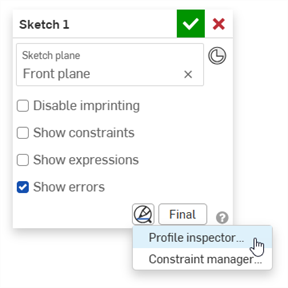
The sketch Profile inspector can help identify gaps in sketches, enabling you to close loops as needed. To open the Profile inspector:
- In the Sketch dialog, click the Show sketch diagnostic tools icon
 .
.
- Select Profile inspector from the menu.
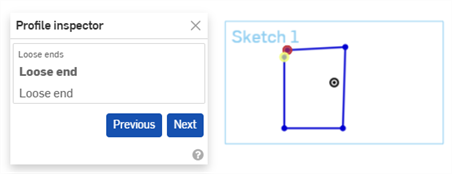
- In the Profile inspector, click each issue to highlight it in the sketch. You can also use the Previous and Next buttons to cycle through issues. The issue will disappear from the Profile inspector dialog once it is resolved.
Troubleshooting sketch geometry: iOS and Android
Constraint status and colors
The color of sketch entities indicate its constrained status:
- Blue means underconstrained.
- Black means fully constrained.
- Red means a constraint problem (overconstrained).
The color of a constraint icon indicates its constrained status:
- Black on gray means well-defined.
- White on red indicates a problem.
- When selecting, non-fully constrained sketch points (blue and red) are prioritized over any overlapping, fully constrained sketch points (black).
Adding more dimensions or constraints will further constrain the sketch. Dragging entities may help you understand what constraints or dimensions you may want to add.
See also: Constraints.
See the Learning center course Introduction to Sketching (Onshape account required) for more information.