


Available in: Sketch
Constrain a point to the midpoint of a line or arc.
Toggle on constraints while you make selections. Each pair of entities selected are constrained to each other. Click to toggle off, or select another tool to toggle off automatically.
Shortcut: shift+m
 Steps
Steps
- Select a line and a point, or select an arc and a point.
-
Click the Midpoint icon (
 ).
).
The point will be constrained to the midpoint of the line or arc.
To place a point at the midpoint of two other points on a line:
-
Select the start point.
-
Select the end point.
-
Select the point between the start and end points (the midpoint).
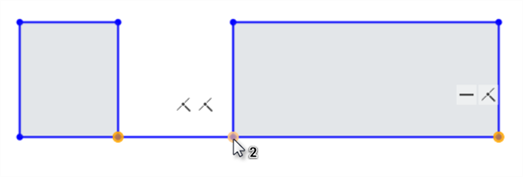
The start (left) and end (right) points are selected first, then the middle point is selected (shown under the cursor)
-
Click the Midpoint icon (
) on the toolbar.
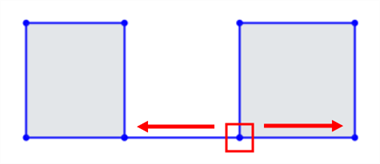
The third point is constrained to be equidistant between the start and end points:
See the Learning center course Introduction to Sketching (Onshape account required) for more information.