 Intersection


Available in: Sketch
Project (or convert) the intersection of a surface or face and the active sketch plane onto the sketch plane.
 Steps
Steps
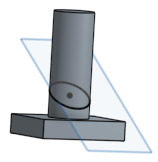
- Create a sketch using an intersecting plane as the sketch plane.
-
Select
 from the Use icon dropdown menu.
- Select the surface or face with which to create the new sketch.
The resulting sketch seen with the part, below.
Notes
- The sketch updates when the underlying geometry changes.
- The sketch is constrained with the Intersection and Pierce constraints where the sketch intersects the plane or surface/face of the original model.
See the Learning center course Introduction to Sketching (Onshape account required) for more information.