3 Point Arc


Available in: Sketch
Sketch an arc by defining the two end points and then the radius point.
Shortcut: a

 Video Example
Video transcript
The 3 point arc sketch tool allows you to sketch an arc by defining the two end points and then the radius point.
Click the Sketch feature on the feature toolbar to create a new sketch. Select a plane in the graphics area.
Click the 3 point arc sketch tool on the sketch toolbar. Click to establish the start point of the arc. Click to establish the end point of the arc. Click once more to establish the arc radius. Optionally, immediately after the arc is created, input a numerical value for the radius and press enter on your keyboard to dimension the arc.
Steps
-
Click
 to set start point.
-
Click
to set second point.
-
Click
to set radius (or click and drag to set start point, release to set second point and click to set radius).
- Optionally, immediately after the arc is created, input a numerical value (or type "=#" to input a variable) for the radius and press enter. This dimensions the arc without having to use the dimension tool.
To input a variable in any dimension field after the geometry is already sketched, the equal sign (=) is not required. Type "#" to input a variable.
Tips
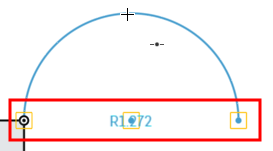
- To create a semicircle, click to create the arc endpoints, then move the cursor until the endpoints and midpoint snap into a straight line and the automatic inferencing appears. Click to finish creating the semicircle.