

Only available for
Available in: Render Studio
Located at the right of the page, the Scene panel displays an editable list of global parameters for the Scene list. Click the Scene panel icon ( ) to open the panel:
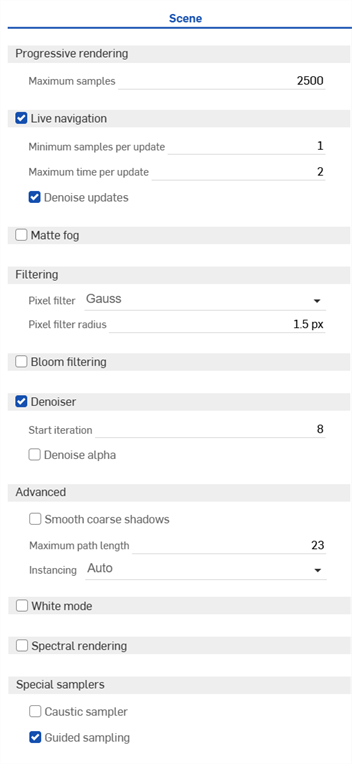
To adjust the Appearance/Selection panel width, hover the cursor over a panel edge. When the cursor turns into a double-sided arrow, click and drag to resize the panel.
 Scene panel parameters
- Progressive rendering
-
Max samples - Maximum number of samples after which rendering stops.
-
Adaptive resolution - Automatically adjusts rendering resolution to maintain interactivity during navigation. While the model is moved on-screen, the resolution is lowered (the model is pixelated) to speed up movement. Once you stop adjusting model movement, resolution is restored upward. Disable this option if you do not want the resolution lowered during navigation. Depending on the complexity of the model, this can cause model movement to be slow.
-
- Live navigation - Check to use local rendering to decrease latency while navigating.
Minimum samples per update - Minimum number of samples to generate before sending updates while navigating. More samples results in less frequent updates during navigation but higher quality.
Maximum time per update - Maximum time in seconds to wait before sending updates while navigating. More time results in less frequent updates during navigation but higher quality.
Denoise updates - When enabled, updates are denoised for smoother results at the cost of slightly less frequent updates.
-
Matte fog - Check to enable a distance-based matte fog effect.
-
Visibility range - The distance at which the contrast between bright and dark objects is still perceivable according to the Koschmieder equation.
-
Visibility tint - Varies the visibility range per color channel. Click the edit icon to select a color.
-
Brightness - Specifies the brightness of the in-scattered lighting, either as an absolute value or as a multiplier.
-
Brightness relative to environment (check to enable) - When checked, the brightness of the in-scattered lighting is automatically determined to be relative to the total illuminance of the environment.
-
Brightness tint - The color tint for in-scattered lighting. Click the edit icon to select a color.
-
-
Filtering
-
Pixel filter - Select from Box, Triangle, or Gauss filters for antialiasing. These filters affect the way multiple samples are combined into a single pixel. Gauss gives smoother results. Triangle gives sharper results. Box is usually only useful in specific situations.
-
Pixel filter radius - The radius of the filter kernel. Recommended values are 0.5 for the Box filter, 1 for the Triangle filter, and 1.5 for the Gauss filter.
-
-
Bloom filtering - Check to approximate glare and glow effects
-
Radius - Maximum radius of the blur used in the filter, specified as a fraction of the output size.
-
Threshold - Brightness at which glare starts to occur.
-
Brightness scale - Scaling factor for the glare regions.
-
-
Denoiser - Check to have the AI denoiser processes the rendered image.
-
Start iteration - Prevents denoising of the first few iterations, with the value specified in this option being the first denoised iteration. This can prevent the denoiser's performance overhead from impacting interactivity; for example, when moving the camera. Also, the first few iterations are often not suitable as input for the denoiser due to insufficient convergence, leading to unsatisfactory results.
-
Denoise alpha - Check to have the alpha channel of RGBA images denoised. Otherwise, it is left unchanged. Checking this setting approximately doubles the time needed for denoising.
-
-
Advanced
-
Smooth coarse shadows - Check to fix shadow terminator artifacts (jagged shadows) for poorly tessellated geometry. It is not recommended to always enable this parameter since it can lead to other shadowing problems in some geometric setups.
-
Maximum path length - Bounds the maximum number of vertices (bounces) of light paths to contribute to the result. Since this setting cuts off indirect lighting contributions (one example would be the headlight of a car that depends on a lot of indirect effects to look correct), it should only be applied when the rendering has to be accelerated at the expense of physical accuracy.
-
Instancing - Controls the handling of multiple instances of objects and whether they are duplicated in memory or not. Options are Auto, On, or Off.
-
-
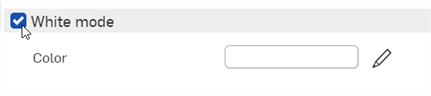
White mode - Check to have all scene objects use the same diffuse appearance.
-
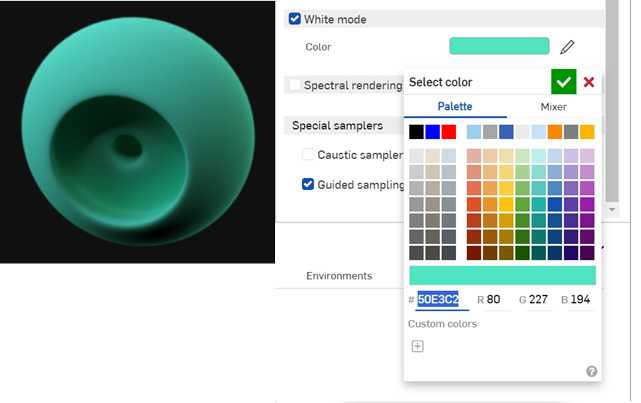
Color - Controls the color of the White mode's diffuse appearance. Click the edit icon to select a color.
-
-
Spectral rendering - Check to enable.
-
Conversion color space - For the conversion of color data to spectra, the rendering core needs to know the color space in which the data is defined. Supported color spaces are Rec.709/linear sRGB, CIE XYZ, Rec.2020, ACES2065-1, and ACEScg.
-
Conversion intent - Guides the color space conversions toward either a Neutral conversion where smoothness is preferred over reflectivity, or Faithful, where smoothness is traded off to yield greater compatibility with color rendering.
-
Observer - By default, the photometric rendering mode uses the CIE 1931 2 degree standard observer as color matching functions. Setting this option to CIE 1964 changes the color matching functions to the 10 degree standard observer.
-
-
Special samplers
-
Caustic sampler - Check to enable the caustic sampler, which is required for certain advanced light paths. For example, the light patterns cast by a drinking glass on a table.
-
Guided sampling - Check to enable guided sampling. Automatic guided sampling is used to improve both the quality of rendering (especially if the caustic sampler is disabled), as well as the rendering convergence speed (when rendering a complicated scene, such as large interiors). The default sampler is augmented with a dedicated guidance cache, designed to improve the convergence of complicated light transport scenarios.
The guided sampler does not improve convergence speed in all use cases, and thus can actually harm overall rendering performance. It also comes at the cost of a slightly reduced iteration throughput, typically below 10 percent. The actual benefit can vary a lot depending on the type of scene being rendered. Turntable-like scenes do not profit as much as architectural scenes that feature complicated lighting and appearances. In general, the number of iterations per time budget decreases, while image quality increases for the same budget.
-
Adding and adjusting a bloom filter
A bloom filter approximates the glare and glow around a bright light source.
-
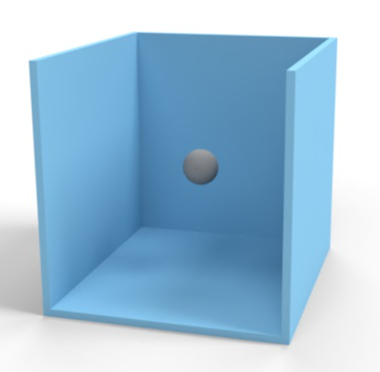
Create a model for the light source. Here, a hollowed out box is used to show light reflections, and a sphere at the center is used as a light source:
-
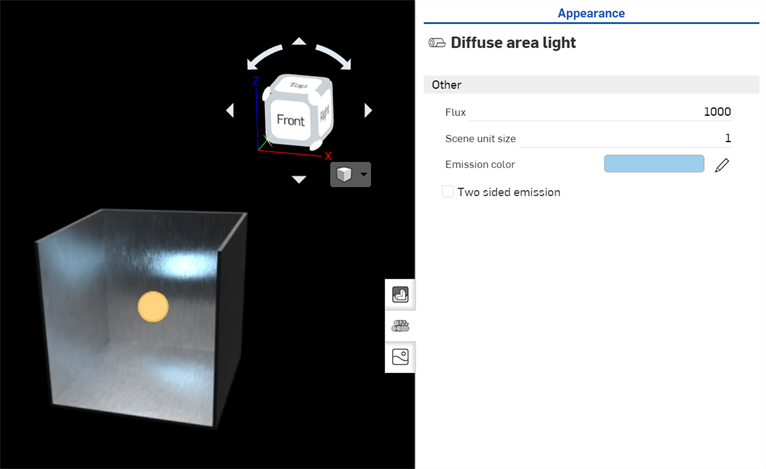
Import the model into a Render Studio scene. Add a metallic appearance for the box part (Brushed aluminum - Medium brushing).
-
Assign a light source for the spherical object (Diffuse area light). The background is changed to solid black, to better emphasize the lighting. The light Appearance panel parameters are updated to:
-
Flux - 1000.
-
Scene unit size - 1
-
Emmission color - #9DCFED (R: 157; G: 207; B: 237) light blue.
-
-
Deselect everything in the scene (or press the spacebar).
-
Click the Scene panel icon (
) to open the Scene panel. -
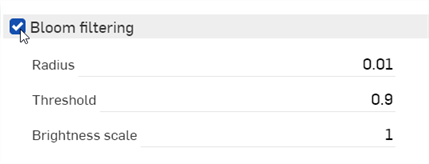
Check Bloom filtering:
-
Adjust the settings according to your desired results. These settings are outlined below:
-
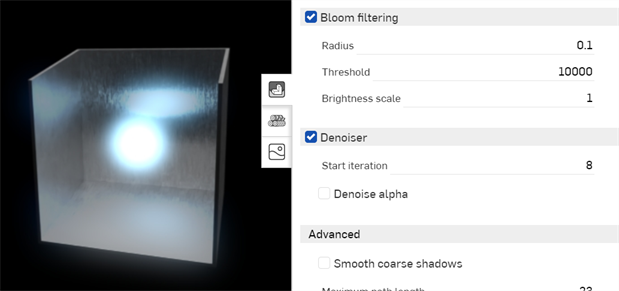
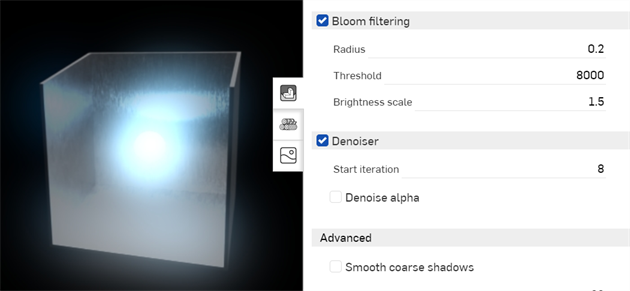
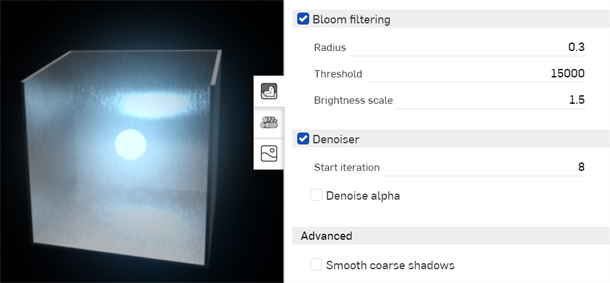
Radius - Controls the size of the bloom. The maximum distance from the bright area where the effect can spread as a percentage of the size of the image. A value of 0.01 (default) means that the maximum spread is 1% of the image size, which is a good starting point. To spread the bloom further outward, increase this value.
-
Threshold - Controls at what brightness the bloom starts. A value of 0.9 (default) is most likely far too low a setting for most use cases, since most of the model usually has a brightness above this value. This results in the model being extremely blurred. Increase the threshold to 8000 as a general starting point. Increase the setting until less blur is seen in the model. Any areas below the threshold are unaffected, while the bloom is applied to those areas above it.
-
Brightness scale - (Optional). Artificially intensifies the effect of the bloom filter in the bright regions. Leave this setting at the default 1.000.
-
The following displays three different bloom setups applied to the scene:
Using White mode
White mode is similar to viewing a clay form of the model, common in many manufacturing design processes. When White mode is enabled, all scene entities (parts and entities) are shaded using a white diffuse appearance. This allows the visualization of the parts' curves, without viewing the effects of any light transmission or emissions from the parts. Environment lighting still affects the parts in the scene.
-
Click the Scene panel icon (
) to open the Scene panel. -
Check White mode:
-
All scene entities have a diffused white appearance applied to them:
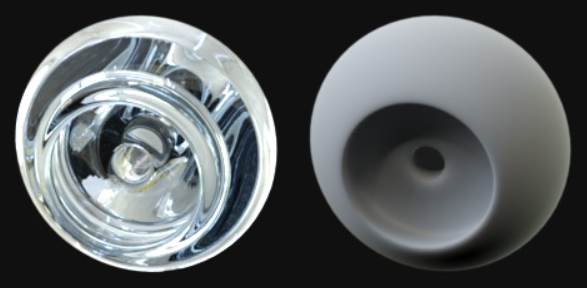
The image at left shows a part with a glass appearance. The image at right is the same part, with white mode enabled.
(Optional) Select an alternate color to use as the base:
See Render Studio Examples and Resources for more information.