Appearance Modifiers

Only available for
Available in: Render Studio
Modifiers are a special type of appearance that are used to modify other appearances. These modifiers do not overwrite the prior appearance. Instead, the modifier is associated to the Base material parameter of the new modifier appearance.
To apply an Appearance modifier, drag and drop a modifier appearance on the part or face in the scene, or drag and drop it on the Appearance parameter in the panel.
To instead overwrite the prior appearance with the new modifier appearance, select the part or part face in the Scene list or graphics area, right-click on the modifier appearance thumbnail in the Appearance library and select Assign from the context menu.
All modifiers are located in the top-level Modifiers folder. Additionally, modifiers are indicated by a modifier icon ( ) at the top left corner of the Appearance thumbnail:
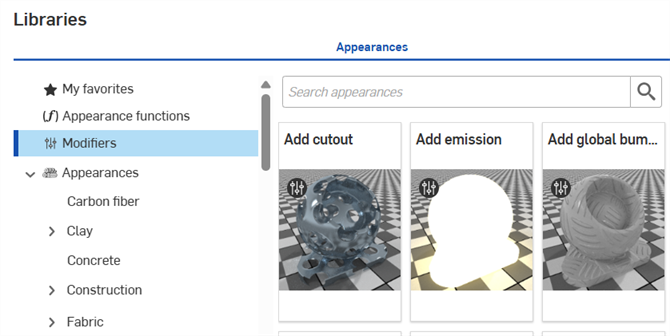
 Appearance modifiers table
The following table outlines all appearance modifiers in the Appearances library:
| Appearance folder | Appearance name | Appearance name subheading | Appearance description |
| Modifier | Add rounded corners | [N/A] | Adds rounded corners to the edges of parts, preserving the base appearance. Apply a new base appearance. Apply the rounding across different appearances. Adjust radius and roundedness parameters. |
| Modifier | Add sheen | [N/A] | Adds a sheen layer to a part/face, preserving the base appearance. Apply a new base appearance and sheen normal. Adjust sheen multiscalar tint, sheen roughness, sheen color, and sheen weight parameters. |
| Modifier | Add volume | [N/A] | Add volume properties to a part/face, preserving the base appearance. Apply a new base appearance. Adjust the absorption coefficient, directional bias, and scattering coefficient parameters. |
| Modifier | Appearance set (Render Studio Advanced) | [N/A] | Allows a set of appearances to be assigned to entities. Switching between appearances in the set provides a quick and easy method to experiment with appearance variations. |
| Modifier | Double sided | [N/A] | Adds front and back appearances to a face. Apply a front and back appearance. The appearances are forced to be thin walled. The transmission of both appearances must match. Adjust the cutout parameter, common to both sides, to determine where the faces are visible. |
| Modifier | Add global bump map | [N/A] | Modify an appearance by applying a global bump map to part/face. Local bump map of the base material parameter is preserved. |
| Modifier | Apply clear coat | [N/A] | Apply clear coat to a part/face, preserving the base appearance. Apply a new base appearance. Adjust coat filter color, ior, bumps, reflection roughness, and coat visibility parameters. |
| Modifier | Apply color fall off | [N/A] | Modify an appearance color falloff to make it view-dependent. Apply modifier to part/face. Provides 5 color falloff options to shade the part/face, from color 1 (facing direction) to color 5 (part/surface edges). Adjust base material, and 5 color parameters. |
| Modifier | Apply dust cover | [N/A] | Apply a diffuse cover of dust or dirt to a part/face, preserving the base appearance. Apply a new base appearance. Adjust dust color, dust amount, bumps, and dust density parameters. |
| Modifier | Apply flake coating | [N/A] | Apply a layer of metallic flakes to a part/face, preserving the base appearance. Apply a new base appearance. Adjust flake amount, flake orientation randomness, color, flake opacity, roughness, and flake size parameters. |
| Modifier | Apply thin film | [N/A] | Apply thin film to a part/face, preserving the base appearance. Apply a new base appearance. Adjust ior and thickness parameters. |
| Modifier | Surface blender | [N/A] | Modify surface blend characteristics of 2 appearances. Apply modifier to part/face. Current appearance is preserved. Adjust base material (current appearance) and blend material (apply a new appearance), and blend weight to mask the blend material. |
| Modifier | Surface falloff | [N/A] | Modify surface blend characteristics of 2 appearances. Apply modifier to part/face. Current appearance is preserved. Adjust base material (current appearance) and blend material (apply a new appearance), blend bias, blend weight edge, and blend weight facing. |
| Modifier, General | Add sticker overlay | [N/A] | Modify an appearance by applying a dielectric sticker overlay to part/face. Requires a mask image file for sticker definition. |
| Modifier, Lighting | Add emission | [N/A] | Modify an appearance by applying an emission, preserving the base appearance. Apply a new base appearance. Adjust intensity, color, unit for emission, and unit scale parameters. |
| Modifier, Lighting | Add thermal emission | [N/A] | Modify an appearance by applying a thermal heat emission to part/face. Adjust base material, intensity, temperature (modifies the color), and unit for emission parameters. |
| Modifier, Metal | Apply thin metal coat | [N/A] | Apply metal coat to a part/face, preserving the base appearance. Apply a new base appearance. Adjust reflection color, bumps, reflection roughness, and reflection weight parameters. |
| Modifier, Plastic>Mesh, Metal>Mesh | Add cutout | [N/A] | Modify an appearance by applying cut-outs to part/face. Forces material to be thin-walled. Used for modeling leaves, grass or fence. Requires a mask image file for cut-out definition. |