My Account - Notifications


Displays email and mobile notifications settings for shares and comments.
To navigate to your Notifications settings in Onshape, click on your Account user icon ( ) in the top right corner of your Onshape window. This opens a drop down menu. Click My account.
Click Notifications in the list on the left side of the page.
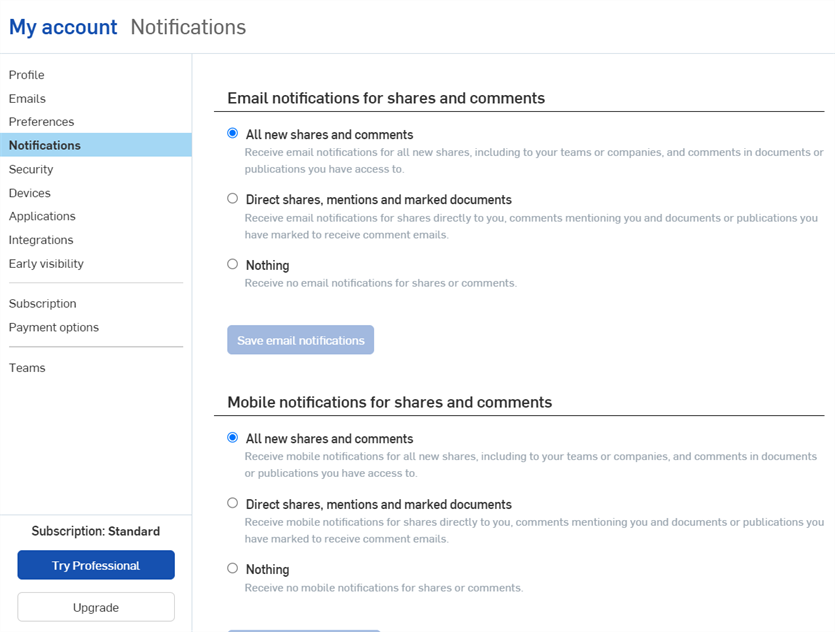
In your Notifications settings, there are two sections: Email notifications for shares and comments, and Mobile notifications for shares and comments. Both sections have various radio buttons you may or may not select in order to make notification changes, and a Save notifications button to save your changes.
 Email notifications for shares and comments
The top section of your Onshape Notifications page is where you make changes to your Email notifications for shares and comments. In this section, you have three options to choose from:
- All new shares and comments -When selected, you will receive email notifications for all new shares, including to your teams or companies, and comments in documents you have access to.
- Direct shares, mentions, and marked documents -When selected, you will receive email notifications for shares directly to you, comments mentioning you, and documents you have specifically marked to receive comment emails.
- Nothing - When selected, you will not receive any email notifications for shares or comments.
Click the radio button to the left of the option in order to select it. Click the Save email notifications button at the bottom of the section, when you have finished editing your Notifications, to save your changes.
Mobile notifications for shares and comments
The bottom section of your Onshape Notifications page is where you make changes for receiving notifications on mobile devices for shares and comments. Similar to the Email notifications for shares and comments section, in this section you have three options to choose from:
- All new shares and comments - When selected, you will receive mobile notifications for all new shares, including to your teams or companies, and comments in documents you have access to.
- Direct shares, mentions, and marked documents -When selected, you will receive mobile notifications for shares directly to you, comments mentioning you and documents you have specifically marked to receive comment emails.
- Nothing - When selected, you will not receive any mobile notifications for shares or comments.
Click the radio button to the left of the option in order to select it. Click the Save mobile notifications button at the bottom of the section when you have finished editing your Notifications to save your changes.