


Projects enable you to group documents and apply permissions to those documents for individual users and groups of users (called Teams). The permissions are assigned at the Project level through the association of a Permission scheme along with the specification of a role map (one per Project) that contains a list of user/role pairs. (The user may be an individual user or a Team of users.)
The role map plus the Permission scheme determines the level of access users (or Teams) have to the project and the documents within. Permission schemes may be edited at any time and the edits directly and immediately affect any project that refers to that permission scheme. Editing Permission schemes may render some entries in a role map ineffectual or change the permission level of users or Teams in the Project’s role map.
-
A document can only belong to one project.
-
Users with edit permissions on a project can:
-
Create documents and folders in the project.
-
Move documents into and out of the project.
-
When a project is created, the creator is automatically placed into the Project Administrator role, which grants full permission to that user. A project must always have a project admin (or someone with a similar full-permission role).
 Steps
Steps
On the Documents page:
- Select Create then in the dropdown, select Project.
The creator of the Project is automatically assigned the role of Project Administrator upon creation of the Project. This may not be undone.
- Supply a name and description for the Project.
- Select a Permission scheme from the list.
- Create the Role map by selecting a User or Team and then an associated Role from the drop down menus:
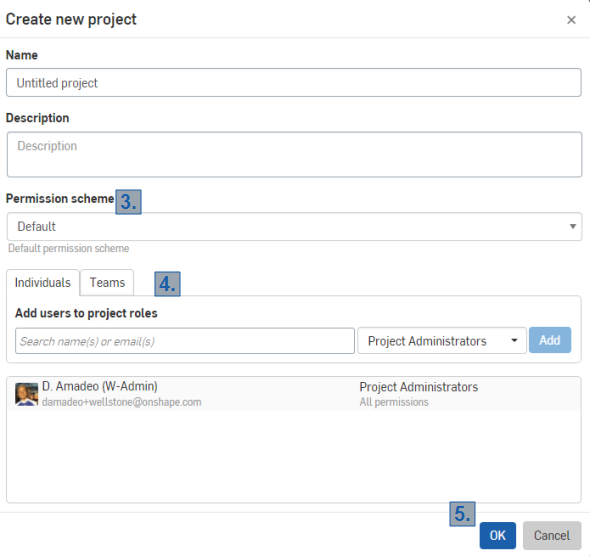
- Click Add to add each User/Role entry. The entry will appear in the lower portion of the dialog.
To enter individual users (via email address), the user must first be a part of the company domain as defined under Enterprise/Company settings > Users. Teams must also be pre-defined under Enterprise/Company settings > Teams.
- Repeat steps 4 and 5 to create additional entries in the Role map.
- Click OK to save the Project state, (or click Cancel to close without creating the Project).
A change to a Permission scheme affects all Projects that reference that Permission scheme.
Cloning existing projects
The option to clone an existing project provides an easy way to create a new project with the same permission scheme, settings, users, and role map as an already-existing document. On the documents page:
- Under Projects, right-click on the project you wish to clone.
- A context menu appears:
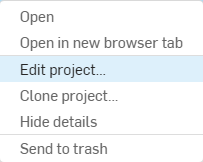
- Click Clone project...
- A dialog box appears, already filled out with the same properties from your previous project.
- Click OK in the bottom right corner to create your cloned project.
Modifying a Project state
Modifying a project’s Permission scheme, role map, name, and description requires that the user have Share permission.
Removing users or teams
On the Documents page:
- Right-click the Project in the list and select Edit project.
- Click the X next to the role in the Role map to delete an unwanted entry from the Role map. Add role map entries by selecting users and/or teams and the associated Role as described above.
Changing permission scheme
On the Documents page:
- Right-click the Project in the list and select Edit project.
- Use the drop down to select a new Permission scheme.
When a new Permission scheme is selected, all users and teams are removed from the Project role map (except the original Project Administrator) thus resetting the role map.
- Make a new role map by specifying users and roles as described above.
- Click OK to save changes, or click Cancel to close the dialog without saving any changes.
Moving documents into and out of Projects
Projects are basically containers for documents allowing you to group them; the permissions you apply to the Projects affect all documents inside the Project as well. Folders also hold documents and other folders, but can not hold Projects. Projects are always created at the root level. Projects can include folders and sub-folders. The permissions on folders within Projects are inherited from the permissions assigned to the Project.
Since permissions are applied to Project via Permission schemes and those permissions apply to all documents and folders within the Project, when you move documents or folders into and out of Projects, the permission scheme assigned to the Target project become the permissions assigned to the document and folders moved.
The action of moving documents and folders into and out of Projects itself requires the appropriate permissions:
- To move a document or folder within a Project requires Edit permission on the document or folder's Project. One example of moving a document within a Project is moving it from one folder to another within the same Project.
- To move a document or folder into or out of a Project requires full permission on both the source Project and the target project. Full permission includes: Delete, Share, Edit, View, Link, Copy, Export and Comment.
Since the permissions to the documents within a Project are assigned at the Project level, moving a document into or out of a Project may result in a change of permissions on the document. (See below for more information.)
- Select a document in the Documents list.
- Right-click on the document name on the Documents page. (Or select multiple documents and then right-click.)
- Select Move to... from the menu.
- Select a project.
- Click Show details to see which documents you are moving.
- Click New folder to create a new folder inside the current one.
- Click Sort to sort the documents, projects, and folders in the dialog.
- Click Move here to move the documents, or click Cancel without executing the move operation.
To move a document out of a project:
- Select the document (or documents) within the project.
- Right-click and select Move to... from the menu.
- Use the breadcrumbs at the top of the dialog to navigate to the desired level, project, or folder.
- Click Move here to move the documents, or click Cancel without executing the move operation.
Copying document workspaces in projects
When copying a workspace in a project (thereby creating a new document), you need edit permission on the project in order for the copy to be placed in the same project as the original document. If you do not have edit permission on the project, the copy is placed at the root level of your Onshape account which is your Company name. A blue notification is displayed at the top of the window upon successful copy that it has been created at the root level.
Notes
- Use the drag and drop method of moving documents and folders into and out of other folders and projects.
- There is no way currently for administrators to channel users into creating documents in certain projects.
- Projects are listed in the Company name page filter.
- You can only move a document out of a Project if you have Share permission on the Project and into another Project if you have Edit permission on that Project.