 Drawing Properties - Formats

Available in: Drawing
These properties enable / disable selection of objects in a drawing's border frame, border zone, and title block. The default for a new drawing is Locked; you are not able to immediately select objects in the title block, border, or border zones.
 Accessing the Formats tab
To access Format properties, click the Formats icon ( ) at the top of the Drawing properties toolbar.
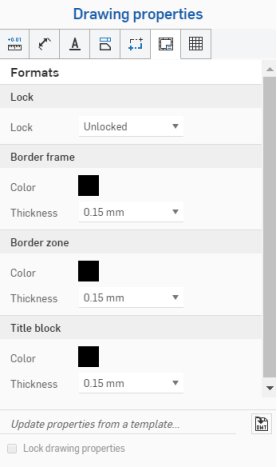
Lock
- Locked
- Lock or unlock the title block to disallow editing or allow editing.
Drawings should have this property initially set to unlocked; so the user is able to select objects in the title block or border.
If field values change, the content of the title block updates when the title block is locked.
If you move an entity to the title block, border, or border zone, and the Format is locked, you must move the entity back to Drawings in order to edit it.
Border frame
-
Color - Specify the color of the drawing's inner border.
-
Thickness - Specify the thickness of the drawing's inner border.
Border zone
-
Color - Specify the color of the labels inside the drawing's border zone.
-
Thickness - Specify the thickness of the labels inside the drawing's border zone.
Title block
-
Color - Specify the color of the drawing's lines and content of the title block.
-
Thickness - Specify the thickness of the drawing's lines and content of the title block.
Title block and border notes
In the title block and border, entities in gray inherit their values from document data or properties. However, right-click on an entity to access the context menu for that entity. Select Edit note to edit the entity. Hover over a field (or click on it) to see what the corresponding property is. You have the ability to delete the field (property) and insert your own text if you wish. Use the Insert drawing property icon in the Note edit box to insert a different property:
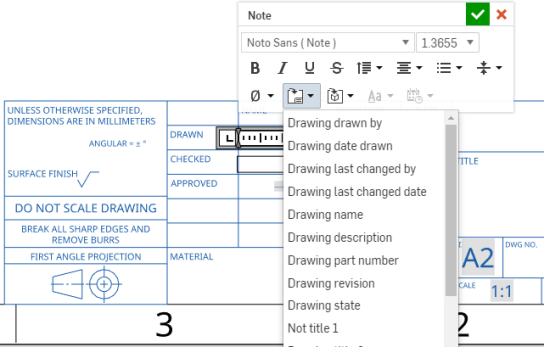
This illustration shows a field in the title block being edited (select Edit note from the context menu), and a new field being inserted via the Insert drawing property command
Notes on Drawing layers
- During an export, elements are added to the corresponding layer: Title block, Border frame, or Border zones.
- The Drawing layer will not be included on DWT exports of the drawing.
- The Border frame, Border zone, and Title block layers will be locked when the format is set to Locked.
- The Border frame, Border zone, and Title block layers can have different default color and line thickness.
- The content in the Border frame, Border zone, and Title block layers will be located on specific layers (e.g., BORDER_FRAME, BORDER_ZONES, TITLE_BLOCK) when exported to DWG/DXF.
- Please notes that older versions of DWG/DXF formats may not fully support layers.
- The title block is not replaced on drawing sheet size changes. However, the border frames and border zones are redrawn at larger/smaller sizes or more or less zones.
- All content on the Drawing layer is never replaced in sheet size changes or sheet format replacements.