 Drawing - Maximum or Minimum Dimension

Available in: Drawing
Shortcut: ctrl+m
Place a minimum or maximum dimension directly to any combination of arcs, circles and any other geometry type, excluding curves.
 Steps
Steps
-
Click
 .
.
- Select a combination of one arc/circle and any other geometry type, excluding curves.
- Drag to move the dimension text to desired location.
- Click to place the dimension.
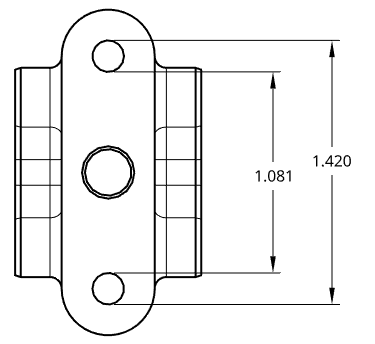
Despite clicking on the circle itself, the min-max dimension tool gives you the maximum or minimum dimension depending on where you click the entity; for example, the maximum distance, shown above as 1.420, was acquired by clicking on the top of the top circle and the bottom of the bottom circle