 Screw Relation


Available in: Assembly
Constrain the rotational degree of freedom in one Cylindrical Mate to the translational degree of freedom in the same Cylindrical Mate.

 Video example
Video transcript
A Screw relation is used to create realistic screw motion in your Assemblies. It requires both a rotational degree of freedom and a linear degree of freedom. In this example, there is a spindle made into our machine vise. The spindle is made into the vise base with a cylindrical Mate, so it is free to rotate, and also free to travel in the linear direction. To create a screw relation, click the Screw relation command on the toolbar. Then, select your rotational and linear degrees of freedom. In this example, the cylindrical Mate is all that is required. Select it in the Mate Features list. Then enter a Distance per revolution. For every rotation of the spindle, it will move in a linear direction this amount. Click the green checkmark. And now when you move the instances in the Assembly you get realistic screw-like motion.
Steps
To add the Screw relation:
- Click
 .
.
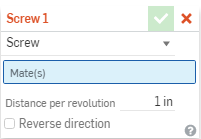
- In the dialog, confirm that Screw is selected.
- Select the Cylindrical Mate you want to relate in the main list of Mate features (or in the list of features in any of the current subassemblies). Note that a Cylindrical Mate is required.
- Enter the desired ratio.
- Optionally check the box to reverse direction.