Modeling In Context


Available in: Part Studio, Assembly
Enables the user to select and edit a part in Part Studio in context to the other parts in the Assembly. Unselected parts cannot be edited in the Part Studio and appear transparent.
Modeling a part in the context of surrounding parts is a powerful way to design top-down. Onshape provides a few methods of designing parts top-down. Each method has its own strengths, so you might want to use different methods for different designing scenarios:
- When you have one or more a pre-existing parts and Part Studios, use in-context modeling (explained in this topic). This is used when relationships between parts that were created in separate Part Studios, or even in different (linked) documents are needed.
This is also a good option when geometric relationships are dependent on assembly position. This often occurs when your Assembly already exists and you need to make some in-context edits to one of the parts. This approach also scales well to large assemblies, when it's not feasible to have one parametric history drive all the parts.
- If you have an Assembly and wish to create a new part in a new Part Studio in context, use the Create Part Studio in context tool.
- Use Onshape multi-part Part Studios when you have a strong understanding of your design intent at the start of your design process, and you want to use the power of a single parametric history to drive several inter-related parts.
Revision reference instances cannot be edited in context. Using an instance that is a Version reference or a workspace reference is allowed.
To learn more about in context design, you can follow the self-paced course here: Managed In Context Design (Onshape account required).
 Video example
 Edit in context steps
Editing a Part Studio within the context of an Assembly is initiated from the Assembly:
- In an Assembly, insert parts from one or more Part Studios and position them as desired by adding Mates and relations, or by using the triad manipulator.
- From the Instances list or graphics area, right-click on a part you want to edit (called the primary instance) and:
- If this part has no associated Contexts, select Edit in context.
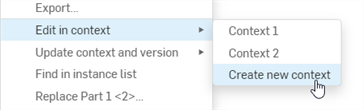
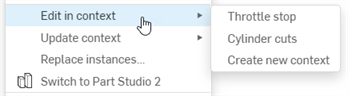
- If this part already has one or more associated Contexts, select an existing context or select Create new context from the Edit in context submenu:
- The Part Studio containing that part opens. The other assembled parts are shown transparently around the primary instance in the same spacial relationship as in the assembly. The assembly's current view orientation, zoom, and active section view are preserved.
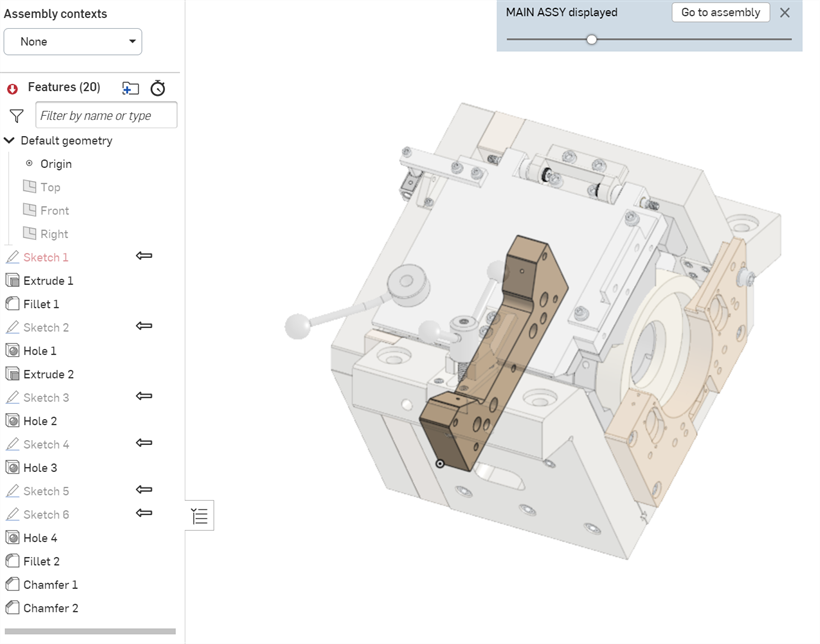
- As you edit, selecting a reference point on another part of the assembly (other than the primary instance) does the following:
- An Assembly context (snapshot) is created.
- All the geometry and positions of the components is captured in the Assembly (and the information is stored in the Assembly context snapshot).
- If this is the first Assembly context created in this Part Studio, the Assembly contexts list is created above the Features list in the Part Studio (where the snapshot is located). Otherwise, the current context is added to this Assembly contexts list.
- Make edits as desired, referencing faces, edges, or parts of the Assembly as needed. (Note that nothing automatically updates, you can manually update your Part Studio or Assembly when you want. See
Update context, below.)
You can also create multiple Contexts of the same Assembly in various articulated positions and update a Context manually in the Part Studio or Assembly. You can also switch between them and rename them.
- When finished editing, navigate back to the Assembly, in any of the following ways:
- Click Go to assembly at the top of the graphics area.
- Select the Assembly tab at the bottom of the window.
- Right-click in the empty space and select Go to assembly.
For example, if you rotate the primary instance around the axis of a ghosted part from the Assembly, when the ghosted part's axis is selected, it acts as the reference point for the context, and a new Assembly context is created.
You are able to use as many reference points as needed (selected reference points are highlighted in purple). These references are never lost or broken, so your parts never fail.
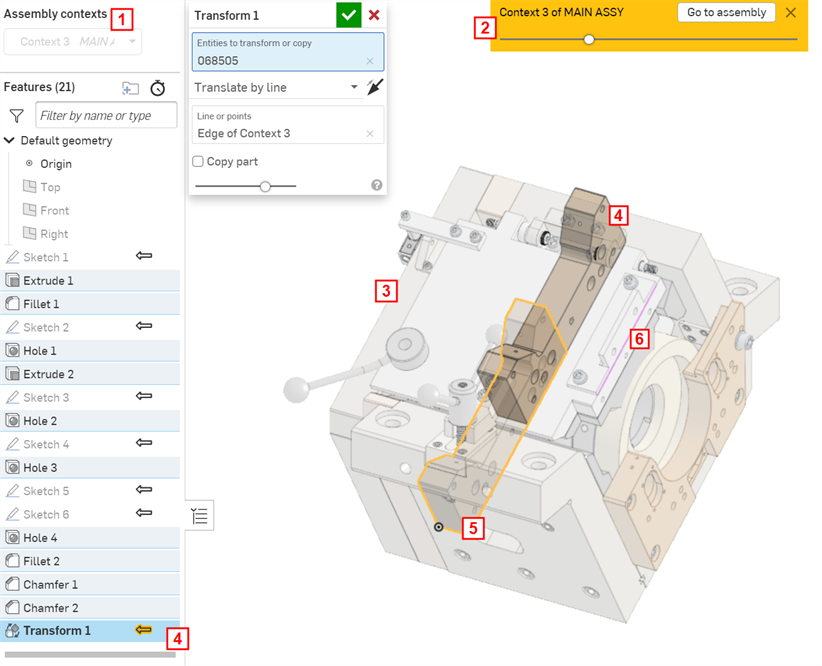
| 1 | List of Context objects in this Part Studio |
| 2 | Button to return to the Assembly (Go to assembly); use the slider to increase or decrease the opacity of the parts shown in transparency |
| 3 | Ghosted parts involved in the Assembly, at the time Edit in context was initiated |
| 4 | Newly created Feature (Transform) referencing the line of the assembled parts (shown in both the graphics area and the Features list) |
| 5 | Opaque parts originally created in this Part Studio; in the position they were created |
| 6 | Reference line from the ghosted part used for the Transform feature |
Edits are now visible in the Assembly.
Example
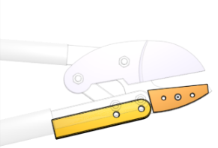
The shears and handles shown in Main Assembly are defined in separate Part Studios. Notice that the blade and limit plate do not meet:
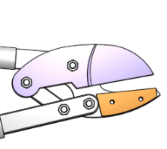
To ensure that the limit plate and blade meet, select the limit plate (the part to edit), right-click and select Edit in context to open the Part Studio in which the limit plate was created, visualized with the assembly:
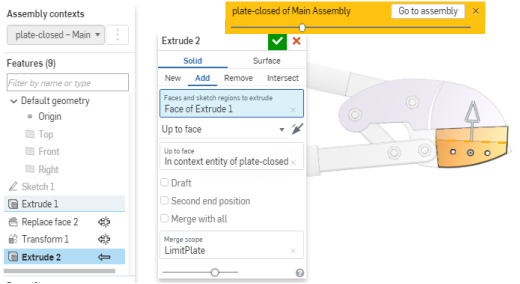
Extrude up to face, using the blade as a reference point for the Extrude feature:
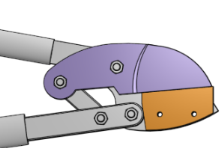
Return to the Assembly (click Go to assembly) and see the edits there.
If the design intent was clear at the outset, all the parts could have been designed in a single Part Studio. This example assumes the assembly had already been built with parts from different Part Studios, so Edit in context is the best option.
You can create a new Part Studio using the present Context of the Assembly with the Create Part Studio in Context Assembly tool.
Notes
- You can turn off a Context to make unrelated edits at any time by selecting None in the Assembly contexts list above the Feature list.
- Parts created without referencing the part being edited in-context are not automatically inserted into the Assembly.
- Best practice is to rename a Context immediately with a meaningful name; many Context objects can be created for a single Part Studio.
- Edit in context and select an existing Context when:
- You need to add additional geometric relationships
- You need to edit existing geometric relationships
To edit in context and select an existing Context: open the context menu, select the name of the existing Context you wish to edit and select "Edit in context."
-
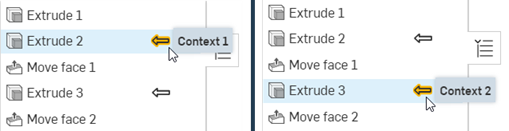
If there are multiple contexts, when a context is selected from the Assembly contexts dropdown at the top left, the features associated with the context are indicated by the in-context arrow icon highlighted in yellow. In the example below, when Context 1 is selected from the dropdown, the Extrude 2 feature's arrow icon is highlighted yellow, indicating it is associated with this context. When Context 2 is selected from the dropdown, the Extrude 3 feature's arrow icon is highlighted yellow.
-
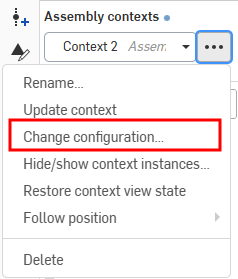
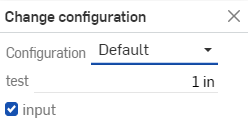
To change the configuration of context instances, open the context menu, and select Change configuration (shown in the first image below). This opens the Change configurations dialog, where you can change the configuration of the context instance set in the Assembly tab (shown in the second image below). To confirm the changes, press the enter key. A blue bubble message will appear stating the confirmed changes to the context configuration (shown in the third image below):

-
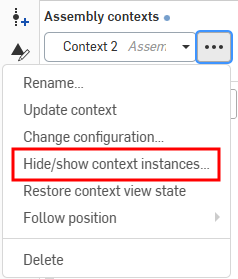
To hide or show context instances, open the context menu, and select Hide/show context instances (shown in the first image below). This opens the Hide/show context instances dialog, where you can filter the Assembly instances and toggle their visibility with the eye icon (shown in the second image below):
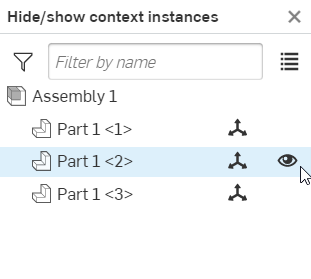
You can also Hide/show and select Mate connectors in context.
-
To hide one or more context instances from the Part Studio, select the instances you want to hide in the graphics area, then right-click and select Hide context instance(s) in the context menu (see the first image below). Click Restore context view state on the context menu to restore the context view back to its original visibility (shown in the second image below):
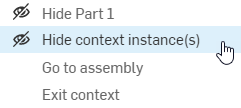
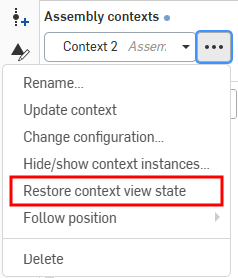
-
In the same way that the assembly's current active section view is preserved when editing the Part Studio in context, the reverse is also true; if the user creates a section view in the in-context Part Studio and then returns to the assembly, the section view is preserved in the assembly.
Update Context
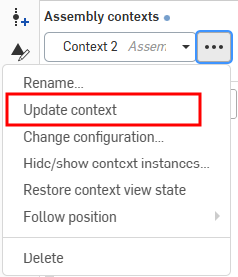
Once you have created a Context, you can make changes either in the Part Studio or in the Assembly and choose to update that Context in the Part Studio if you wish. This enables you to work in a Context in the Part Studio and not affect your Assembly unless you want to update your Assembly with the changes. The same is true for changing the Context from within an Assembly. You can make changes to the Assembly, then switch to the Part Studio and update the Context there to view the changes if you wish. Updates are never applied automatically.
To update a Context in an Assembly: Select the part edited in context, right-click and select Update context. Then, select the context you want to update:
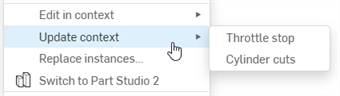
To update a Context in a Part Studio:
Select the Context in the Assembly context list, click
 and then Update context:
Update Notification
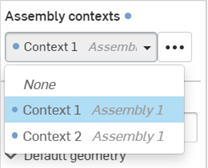
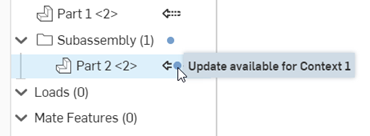
While in the context, if a change is made to a feature on which the context is based, a filled blue circle icon appears next to the Assembly contexts label at the top left, and any context in the dropdown menu (shown in the first image below). For example, if an extrude is applied to a part prior to, and on which the context relied, you will see the icon. In the Assembly, this icon is visible next to the in-context part and any subfolder to which it belongs, along with a tooltip to indicate the update is available and for which contexts (shown in the second image below). If there are more than three contexts, the tooltip indicates the first two contexts with "and more" as a suffix.
Example
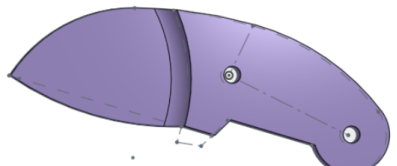
The original Context below was created with a straight purple blade:
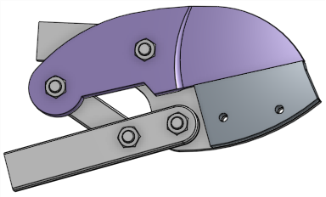
The blade was then edited to have a curved edge:
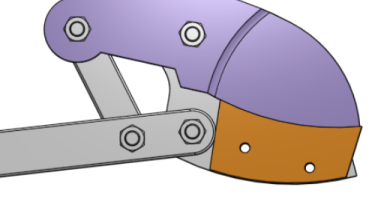
In the Assembly, select Update context (of the limit plate) to update the shears with the curved blade. Since the limit plate was extruded up to the face of the blade, when updated, the limit plate is recalculated up the face of the new, curved blade:
Follow a named position
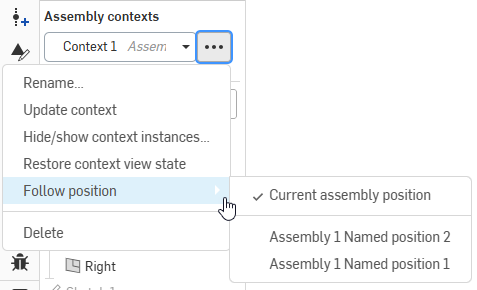
You can tie an assembly context to a named position. This enables you to sequentially update multiple contexts from the Part Studio without having to make changes to the assembly. No context goes out of date unless the named position view or the geometry changes.
In the Assembly contexts area above the Feature List, click the three-dot button (). Select Follow position and choose the current position or named position to associate with the context.
Editing a Part Studio in multiple Contexts
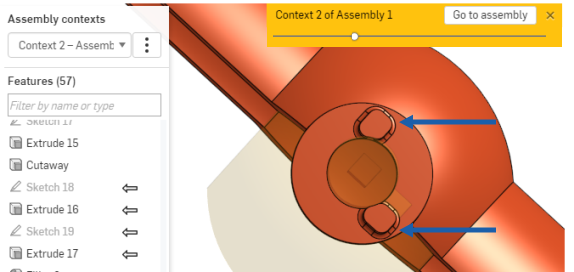
This example shows a Part Studio with two Contexts: one that references a ball valve in the closed position, and another that references the ball valve in the open position. A stop is modeled in each Context, so the final design has a stop for the open position and the closed position.
In the Part Studio, the ball valve in the closed position, in context:
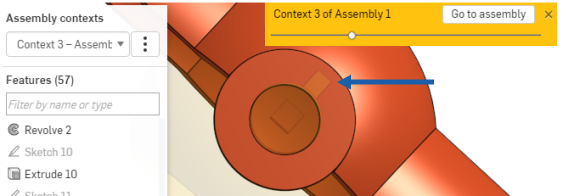
In the Part Studio, the ball valve in the open position, in context:
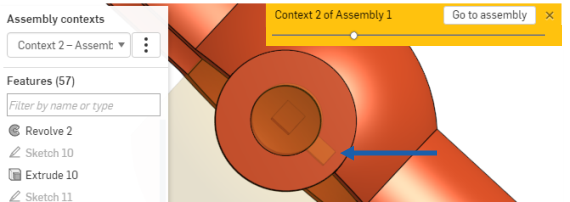
The final design of the stop mechanism in the Part Studio:
Set primary instance
The primary instance is created when you edit a part in context and is indicated by a solid arrow beside the feature in the Feature list (in the Part Studio) and beside the part in the Instance list (in the Assembly). The primary instance defines the anchor part (the part selected for the Edit in context command) for the placement of the ghosted assembly in the Part Studio; all other assembly components appear in the Part Studio in relationship to that primary instance.
You have the ability to change the primary instance of a Context at any time and may wish to do so especially in the case of a broken or missing primary instance:
- In the Assembly, select a part.
- Right-click to access the menu, and select <context name> > Set as primary instance.
The new primary instance is marked with a solid arrow
 in the Parts list, and the previous primary instance (if present) is marked with a dashed arrow
 .
.
Note that the Primary instance of a context does not show as a ghosted part of the context.
Rename Context
Context objects are given a default name when they are created. To avoid confusion, rename each Context with meaningful names as it is created.
In the Part Studio that contains the Context object:
- In the Assembly Contexts list (located above the Feature list), select the Context from the dropdown.
-
Click the
 that becomes active when the Context name is selected.
- Select Rename.
-
Type a new name and press Enter or click
 .
.
Selecting a workspace to edit
When working in one workspace and inserting a part from a version, when you select to Edit in context, the Select a workspace to edit dialog opens (since you cannot edit the part in an immutable version). This allows you to select the specific workspace in which to edit the part:
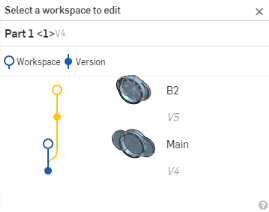
In the dialog, select the specific workspace (Main or B2, in this case) in which to edit in context.
Exit edit in context
Use this command when you want to end an edit in context session.
While editing in context in the Part Studio, right-click either in the white graphics area or on the part being edited and select Exit context. Or, click the Done button in the gold banner at the top of the graphics area:

To exit without creating an in context in the Part Studio, click the X in the blue banner at the top of the graphics area:

Modeling In Context: iOS
Context objects are listed just above the Feature list in the Part Studio. See the illustration of a Part Studio below:
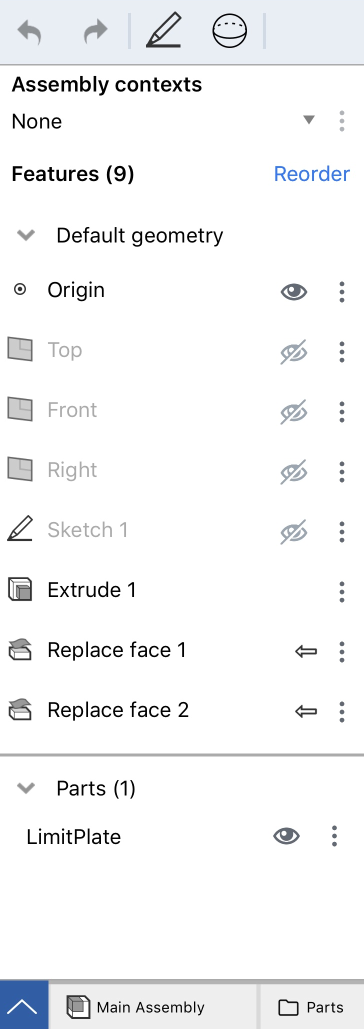
- List of Context objects in this Part Studio
- Icon to return to the Assembly
When editing in context, you are able to make as many references as you'd like to any of the parts in the assembly - safe in the knowledge that those references will never be lost or broken, so your part will never fail.
You are also able to create multiple Contexts of the same Assembly in various articulated positions and update a Context, manually, in the Part Studio or Assembly if desired. Updates are never automatic; you control if, when, and what to update through the Update context command. This prevents accidental changes to in context parts that might occur as a result of moving or redefining other parts in the Assembly.
How it works
In the Assembly, select Edit in context from the context menu of the part you want to edit. The Part Studio containing that part opens. The assembled parts are visualized in the Part Studio (ghosted) around the primary instance in the same spacial relationship as in the Assembly. In addition, all parts originally in the Part Studio are displayed, opaque, placed as they were created.
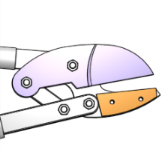
For example, the shears and handle shown below are defined in separate Part Studios. Notice that the blade and limit plate do not meet:
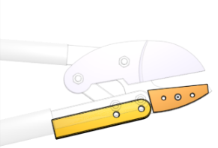
To ensure that the limit plate and blade meet, select the limit plate (the part to edit), open the context menu and select Edit in context to open the Part Studio in which the limit plate was created, visualized with the assembly:
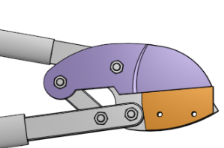
Extrude up to face, using the blade as a reference point for the Extrude feature. Return to the Assembly (tap Go to assembly) and see the edits there.
If the design intent was clear at the outset, all the parts could have been designed in a single Part Studio. This example assume the assembly had already been built with parts from different Part Studios, so Edit in context is the best option.
When editing and/or replicating a Part Studio in context, the assembly's current active section view is preserved.
If a section view is created within an in context Part Studio and then you return to the assembly, the section view is preserved in the assembly.
Edit in context steps
Edit a Part Studio within the context of an Assembly:
- In an Assembly, insert parts and position them as desired by adding Mates and relations, or by using the triad manipulator.
- Double-tap on a part to use as the reference point (primary instance) and select Edit in context from the context menu.
The Part Studio containing the selected part opens with the entire Assembly visualized in a ghosted state.
- Make edits as desired, referencing faces, edges, or parts of the Assembly as needed. (Note that nothing automatically updates, you are able to manually update your Part Studio or Assembly when you want, see
Update context, below.)
Select a reference point on another part in the Assembly (aside from the primary instance) creates a Context object above the Feature list. You are able to use as many reference points as needed. (Selected reference points are highlighted in purple.)
Be aware that you are able to repeat these steps and create many Contexts of an Assembly in the same Part Studio as well as switch between them, so be sure the rename the Context with a meaningful name.
- When finished editing, navigate back to the Assembly, in any of the following ways:
- Tap Go to assembly at the top of the Graphics area.
- Select the Assembly tab at the bottom of the window
Note the edits are visible in the Assembly.
Update Context
Once you have created a Context, you are able to make changes either in the Part Studio or in the Assembly and choose to update that Context in the Part Studio if you wish. This enables you to work in a Context in the Part Studio and not affect your Assembly unless you want to update your Assembly with the changes. The same is true for changing the Context from within an Assembly. You have the ability to make changes to the Assembly, then switch to the Part Studio and update the Context there to view the changes if you wish. Updates are never applied automatically.
To update a Context in an Assembly: Select the part edited in context, access the context menu and select Update context.
To update a Context in a Part Studio: Select the Context in the Assembly Context list, tap the horizontal-dot menu and select Update context.
Set primary instance
The primary instance is created when you edit a part in context and is indicated by a solid arrow beside the feature in the Feature list (in the Part Studio) and beside the part in the Instance list (in the Assembly). The primary instance defines the anchor part (the part selected for the Edit in context command) for the placement of the ghosted assembly in the Part Studio; all other assembly components appear in the Part Studio in relationship to that primary instance.
You have the ability to change the primary instance of a Context at any time and may wish to do so especially in the case of a broken or missing primary instance:
- In the Assembly, select a part.
- Open the context menu and select the Context and then Set as primary instance.
The new primary instance is marked with a solid arrow in the Parts list, and the previous primary instance (if present) is marked with a dashed arrow.
Rename Context
Context objects are given a default name when they are created. To avoid confusion, rename each Context with meaningful names as it is created.
In the Part Studio that contains the Context object:
- In the Assembly Contexts list (located above the Feature list), select the Context from the dropdown.
- Tap the vertical-dot menu that becomes active when the Context name is selected.
- Select Rename.
- Type a new name and tap the checkmark.
Exit edit in context
Use this command when you want to end an edit in context session and return to the Part Studio without a Context and without creating a Context object.
While editing in context in the Part Studio:
Tap the x in the gold banner at the top of the graphics area.

Selecting a workspace to edit
When working in one workspace and inserting a part from a version, when you select to Edit in context, the Select a workspace to edit dialog opens (since you are not able to edit the part in an immutable version). This allows you to select the specific workspace in which to edit the part.
Modeling In Context: Android
Context objects are listed just above the Feature list in the Part Studio. See the illustration of a Part Studio below:
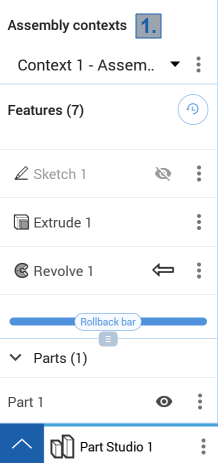
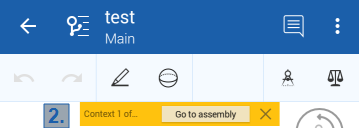
- List of Context objects in this Part Studio
- Icon to return to the Assembly
When editing in context, you can make as many references as you'd like to any of the parts in the assembly - safe in the knowledge that those references will never be lost or broken, so your part will never fail.
You are also able to create multiple Contexts of the same Assembly in various articulated positions and update a Context, manually, in the Part Studio or Assembly if desired. Updates are never automatic; you control if, when, and what to update through the Update context command. This prevents accidental changes to in context parts that might occur as a result of moving or redefining other parts in the Assembly.
How it works
In the Assembly, select Edit in context from the context menu of the part you want to edit. The Part Studio containing that part opens. The assembled parts are visualized in the Part Studio (ghosted) around the primary instance in the same spacial relationship as in the Assembly. In addition, all parts originally in the Part Studio are displayed, opaque, placed as they were created.
For example, the shears and handle shown below are defined in separate Part Studios. Notice that the blade and limit plate do not meet:
To ensure that the limit plate and blade meet, select the limit plate (the part to edit), open the context menu and select Edit in context to open the Part Studio in which the limit plate was created, visualized with the assembly:
Extrude up to face, using the blade as a reference point for the Extrude feature. Return to the Assembly (tap Go to assembly) and see the edits there.
If the design intent was clear at the outset, all the parts could have been designed in a single Part Studio. This example assume the assembly had already been built with parts from different Part Studios, so Edit in context is the best option.
Edit in context steps
Edit a Part Studio within the context of an Assembly:
- In an Assembly, insert parts and position them as desired by adding Mates and relations, or by using the triad manipulator.
- Double-tap on a part to use as the reference point (primary instance) and select Edit in context from the context menu.
The Part Studio containing the selected part opens with the entire Assembly visualized in a ghosted state.
- Make edits as desired, referencing faces, edges, or parts of the Assembly as needed. (Note that nothing automatically updates, you are able to manually update your Part Studio or Assembly when you want, see
Update context, below.)
Select a reference point on another part in the Assembly (aside from the primary instance) creates a Context object above the Feature list. You are able to use as many reference points as needed. (Selected reference points are highlighted in purple.)
Be aware that you are able to repeat these steps and create many Contexts of an Assembly in the same Part Studio as well as switch between them, so be sure to rename the Context with a meaningful name.
- When finished editing, navigate back to the Assembly, in any of the following ways:
- Tap Go to assembly at the top of the Graphics area.
- Select the Assembly tab at the bottom of the window
Note the edits are visible in the Assembly.
Update Context
Once you have created a Context, you are able to make changes either in the Part Studio or in the Assembly and choose to update that Context in the Part Studio if you wish. This enables you to work in a Context in the Part Studio and not affect your Assembly unless you want to update your Assembly with the changes. The same is true for changing the Context from within an Assembly. You are able to make changes to the Assembly, then switch to the Part Studio and update the Context there to view the changes if you wish. Updates are never applied automatically.
To update a Context in an Assembly: Select the part edited in context, access the context menu and select Update context.
To update a Context in a Part Studio: Select the Context in the Assembly Context list, tap the horizontal-dot menu and select Update context.
Android Set primary instance
The primary instance is created when you edit a part in context and is indicated by a solid arrow beside the feature in the Feature list (in the Part Studio) and beside the part in the Instance list (in the Assembly). The primary instance defines the anchor part (the part selected for the Edit in context command) for the placement of the ghosted assembly in the Part Studio; all other assembly components appear in the Part Studio in relationship to that primary instance.
You are able to change the primary instance of a Context at any time and may wish to do so especially in the case of a broken or missing primary instance:
- In the Assembly, select a part.
- Open the context menu and select the Context and then Set as primary instance.
The new primary instance is marked with a solid arrow in the Parts list, and the previous primary instance (if present) is marked with a dashed arrow.
Rename Context
Context objects are given a default name when they are created. To avoid confusion, rename each Context with meaningful names as it is created.
In the Part Studio that contains the Context object:
- In the Assembly Contexts list (located above the Feature list), select the Context from the dropdown.
- Tap the vertical-dot menu that becomes active when the Context name is selected.
- Select Rename.
- Type a new name and tap the checkmark.
Exit edit in context
Use this command when you want to end an edit in context session and return to the Part Studio without a Context and without creating a Context object.
While editing in context in the Part Studio:
Tap the x in the gold banner at the top of the graphics area.
Selecting a workspace to edit
When working in one workspace and inserting a part from a version, when you select to Edit in context, the Select a workspace to edit dialog opens (since you are unable to edit the part in an immutable version). This allows you to select the specific workspace in which to edit the part.