


在草圖中提供此功能
將一個點限制在直線或弧的中點上。
Toggle on constraints while you make selections. Each pair of entities selected are constrained to each other. Click to toggle off, or select another tool to toggle off automatically.
快速鍵:Shift+m
 步驟
步驟
- 選擇一條直線與一個點,或選擇一個弧與一個點。
- 按一下「中點」圖示 (
 )。
)。
點會被限制在直線或弧的中點。
將點置於直線上另外兩點的中點上:
-
選擇起點。
-
選擇終點。
-
選擇介於起點與終點間的點 (中點)。
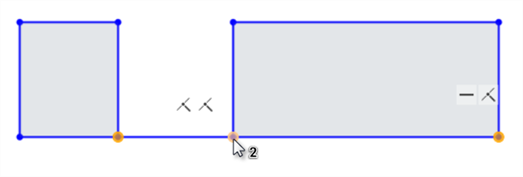
先選擇起點 (左圖) 與終點 (右圖),然後再選擇中點 (游標下方所示)
-
按一下工具列上的「中點」圖示 (
):
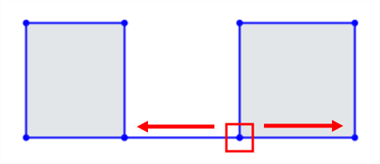
第三點被限制在距起點與終點間的等距位置:
詳細資訊請參考「學習中心」的 Introduction to Sketching (Onshape account required) 課程。