
在 Feature Studio 中提供此功能
Feature Studio 是一個操作 FeatureScript 的 Onshape 分頁,是用來定義自訂特徵的程式設計語言。
由 Onshape 設計的 FeatureScript 可建立特徵與操控 3D 參數式模型。這個程式設計語言完全內建於 Onshape 中,提供 Part Studio 模型建構的基礎,包括定義標準 Onshape 特徵 (像是擠出、圓角與薄殼等)。
這個頁面重點說明如何使用 Feature Studio 使用者介面。
- 有關編寫 FeatureScript 以建立自訂特徵的詳細資訊,請參考 FeatureScript Docs。
- 有關將這些自訂特徵加入至 Part Studio 的說明,請參考自訂特徵。
關於使用 AI 來協助您編寫 FeatureScript 程式碼的資訊,請參考 FeatureScript 程式碼自動完成。
 提交 FeatureScript 變更
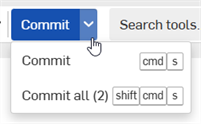
與 Onshape 中的所有頁籤一樣,在您輸入時,會自動儲存 FeatureScript 的變更。若要提交變更並將新的 FeatureScript 程式碼套用到整個文件中,按一下提交按鈕。
-
若僅要提交目前 Feature Studio 中的變更,按一下提交按鈕。
-
您也可以按一下下拉清單然後從功能表中選擇提交。
-
You can also press cmd/ctrl + s
-
-
To commit all changes in all Feature Studios in the document, click the Commit button dropdown and select Commit all.
-
會在下拉功能表中以括弧顯示有未提交變更的 Feature Studio 數量。
-
You can also press cmd/ctrl + shift + s
-
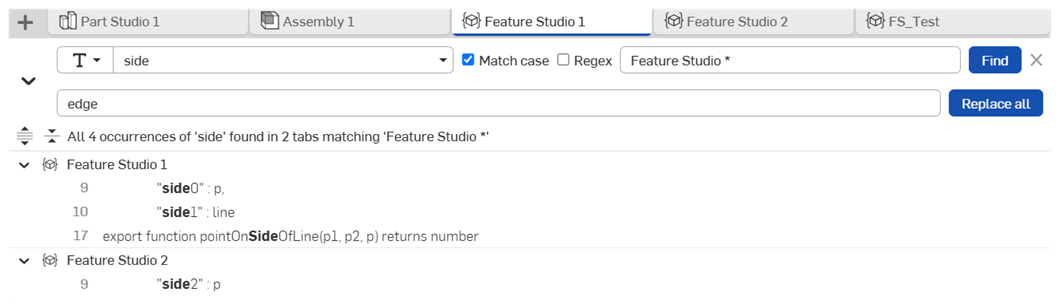
搜尋、取代與重新命名
-
按一下功能表列中的搜尋 Feature Studios 按鈕 (
 ) 來開啟如上圖所示的文字搜尋窗格。
-
您也可以使用 ctrl/cmd + shift + f 來開啟文字搜尋窗格。
-
您可以在符號上按右鍵,然後從環境選單中選擇在工作區中尋找用法或在工作區中重新命名來開啟符號搜尋窗格。
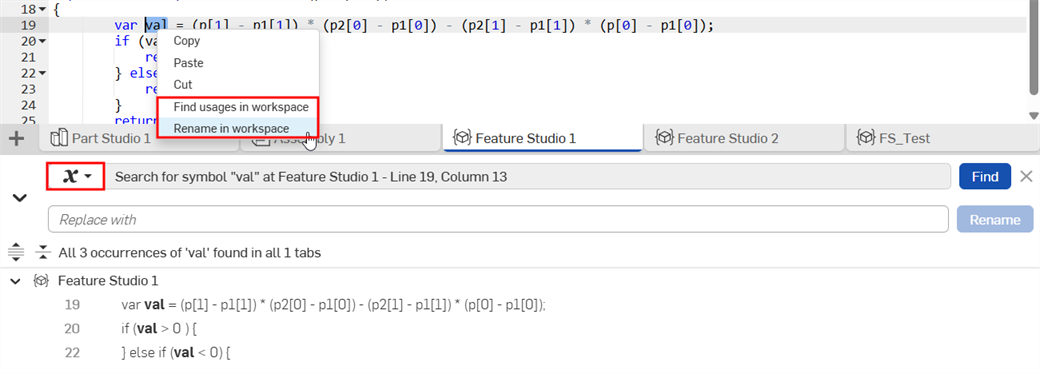
-
-
Click the Search mode dropdown to switch between text, symbol, and standard library import search.
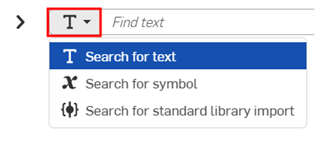
-
(Text search only) Enter your search text into the Find text field. Specify optional search parameters:
-
大小寫相符 - 選擇核取方塊來執行大小寫視為相異的搜尋。
-
Regex - 選擇核取方塊來執行正規表達式搜尋。
-
Feature Studio 名稱篩選器 - 篩選搜尋結果,只顯示與輸入文字相符的分頁。
-
-
(Standard library import search only) Enter the search options to find the matching standard library import:
-
Include and Exclude: - Enter versions and version ranges as comma-separated lists. Imports appear in the search results only if their versions is returned in the Include list and not the Exclude list.
-
Include a minor version (e.g., 3081.2) to return only that exact version (3081.2). Exclude the minor version (e.g., 3081) to return all minor versions within the major version (3081.0, 3081.1, 3081.2, 3081.3).
-
Version ranges (e.g., 3081.0-3081.2) are inclusive.
-
Use a dash to match all versions before and including (e.g., -3081.2) or after and including (e.g., 3081.2- a version).
-
Comma-separated searches return the union of matches (e.g., 3079 - 3080, 3081.2 returns all minor versions in 3079, all minor versions in 3080, and 3081.2).
-
Leave Include empty to match everything. Leave Exclude empty to exclude nothing.
-
-
Feature Studio 名稱篩選器 - 篩選搜尋結果,只顯示與輸入文字相符的分頁。
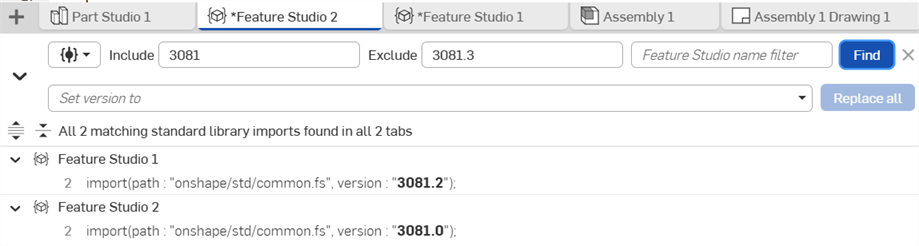
-
-
按一下 尋找。
- 會在 FeatureScript 程式碼中強調顯示搜尋結果。
-
使用展開 (
 ) 與摺疊 (
 ) 按鈕來根據 Feature Studio 分頁檢視結果。
 -
使用展開搜尋結果 (
 ) 與 摺疊搜尋結果 (
 ) 按鈕來展開或摺疊所有結果。
 -
Click a search result to jump to its location in the Feature Studio.
-
(Optional) To replace the search text, rename a symbol, or update the standard library import version:
-
Click the Toggle Replace arrow (
) to the left of the Search mode button. -
Type your replacement text in the Replace with field (text or symbol search), or type the desired version number in the Set version to field (standard library search). You can also select a supported version from the Set version to dropdown list.
-
Click Replace all (text or standard library search) or Rename. (symbol search).
-
巡覽概要
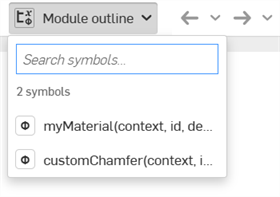
按一下 Feature Studio 工具列上的模組概要箭頭來檢視概要。您也可以:
-
按一下搜尋結果來巡覽至 FeatureScript 程式碼的該部分。
-
在搜尋符號欄位中搜尋文字來優化結果。
關於「學習中心」的其他資源,請跟著此處講師引導的訓練課程操作:FeatureScript Fundamentals (需要有 Onshape 帳戶)。