 Drawing Properties - Formats

在工程圖中提供此功能
These properties enable / disable selection of objects in a drawing's border frame, border zone, and title block. The default for a new drawing is Locked; you are not able to immediately select objects in the title block, border, or border zones.
 Accessing the Formats tab
To access Format properties, click the Formats icon ( ) at the top of the Drawing properties toolbar.
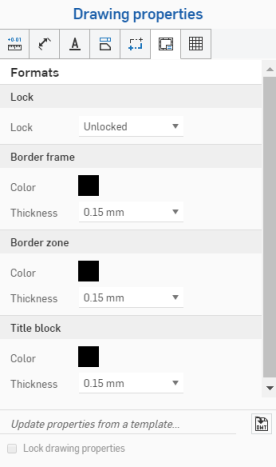
Lock
- Locked - Lock or unlock the title block to disallow editing or allow editing.
Drawings should have this property initially set to unlocked; so the user is able to select objects in the title block or border.
If field values change, the content of the title block updates when the title block is locked.
If you move an entity to the title block, border, or border zone, and the Format is locked, you must move the entity back to Drawings in order to edit it.
Border frame
-
Color - Specify the color of the drawing's inner border.
-
Thickness - Specify the thickness of the drawing's inner border.
Border zone
-
Color - Specify the color of the labels inside the drawing's border zone.
-
Thickness - Specify the thickness of the labels inside the drawing's border zone.
Title block
-
Color - Specify the color of the drawing's lines and content of the title block.
-
Thickness - Specify the thickness of the drawing's lines and content of the title block.
Title block and border notes
標題區塊與邊框中的灰色圖元會沿襲使用其來自文件資料或屬性的值;不過,在圖元上按右鍵可存取該圖元的環境選單。選擇編輯註解來編輯圖元。移動滑鼠至一欄位上暫留 (或點按欄位) 可查看相對應的屬性。如果需要,您可以刪除欄位 (屬性) 並插入自己的文字。使用編輯註解方塊中的插入工程圖屬性圖示來插入不同的屬性:
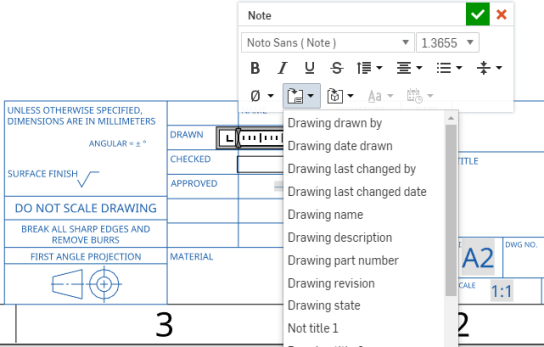
這個圖例顯示正在編輯標題區塊中的欄位 (從環境選單中選擇 [編輯註解]),然後使用 [插入工程圖屬性] 指令來插入新的欄位
工程圖圖層的注意事項
- 在匯出的過程中會加入至相對應圖層的元素:標題區塊、邊框框架、或邊框區域。
- 不會將工程圖圖層包括在工程圖的 DWT 匯出中。
- 當格式是設定為已鎖定時,會鎖住邊框框架、邊框區域、與標題區塊圖層。
- 邊框框架、邊框區域、與標題區塊圖層可以有不同的預設色彩與線條粗細。
- 當匯出至 DWG/DXF 時,在邊框框架、邊框區域、與標題區塊圖層中的內容會位在特定的圖層中 (例如,BORDER_FRAME, BORDER_ZONES, TITLE_BLOCK)。
- 請注意,較舊版本的 DWG/DXF 格式可能不會完全支援圖層。
- 當工程圖圖頁大小變更時,標題區塊不會改變。不過,邊框框架與邊框區域會以較大/較小的大小或是更多或更少的區域來重新繪製。
- 在圖頁大小變更或圖頁格式置換時,並不會取代工程圖圖層中的所有內容。