CAM Studios

僅為 提供。
在 CAM Studio 中提供此功能
Onshape CAM Studios 可讓您根據 CAD 模型幾何來建立切削策略或刀具路徑。這些策略會發佈為 CNC 工具機可解讀稱為 Gcode 的程式語言。CNC 工具機使用這些程式碼來操控工具機的軸與切削工具來從一塊原料中移除材料,是某種形式的減材製造。
Onshape 的 CAM Studio 提供兩種產品:CAM Studio 與 CAM Studio Advanced。CAM Studio 是包括在 Onshape Professional (或更高層級) 的訂閱中,並包括基本的刀具路徑策略與 2.5 與 3 軸選項的機器加工。CAM Studio Advanced 包括進階的刀具路徑策略與 2.5、3、4、3+2、與 5 軸的機器加工。
 建立 CAM Studio
-
在 Onshape 文件中,按一下介面左下角的「插入新頁籤」圖示
 。
。 -
從功能表中選擇 Create CAM Studio。新的 CAM Studio 頁籤即會自動開啟。
您可以點按問號圖示來使用整個 CAM Studio 介面中的工具提示,讀取關於各種可用操作和選項的詳細資訊。
使用者介面
在建立「CAM Studio」頁籤後會有「Components」頁面出現:
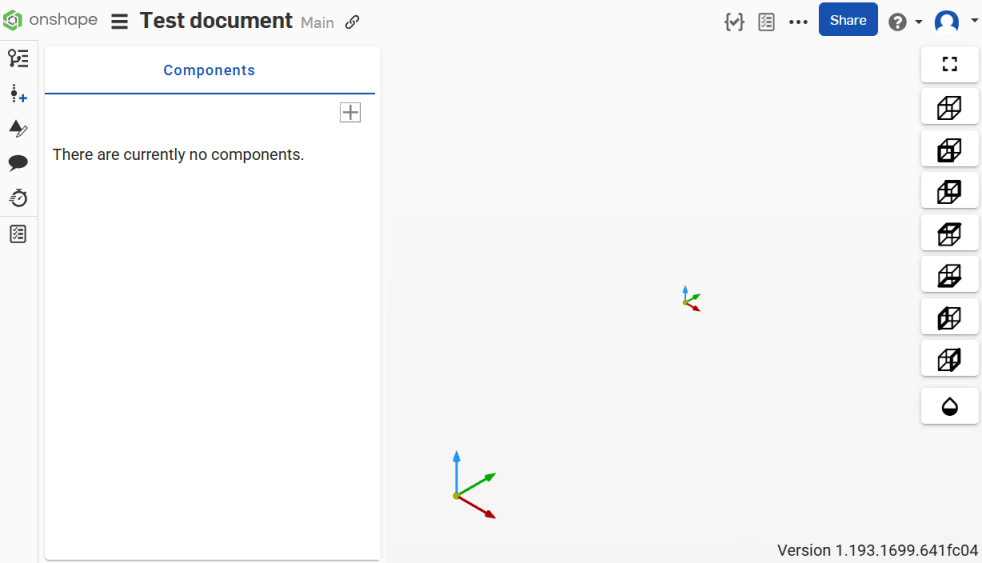
在將一個零組件加入至 CAM Studio 後,系統會將該零組件加入到介面左側的「Components」面板中。
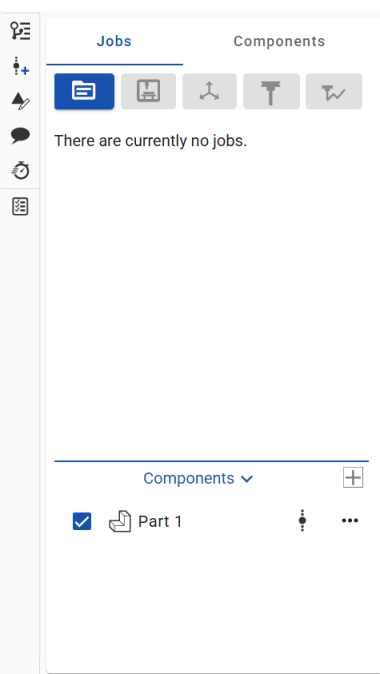
加入零組件會啟動介面最上方工具列中的「Create job」按鈕。
工具列
工具列位在介面的左側,「Jobs」與「Components」面板的上方,其中包括下列選項:

(從左至右)
-
Insert part, workholding, and stock
-
Create job
-
Create machine
-
Create setup
-
Create tool
-
Create toolpath
-
Create work plane
在下方相對應的部分讀取每個選項的具體細節。
工具列按鈕一開始不是啟用的,當您完成 CAM Studio 過程中的各步驟時會變為啟用。
檢視選項
檢視選項位在 CAM Studio 介面的右側 (下圖中以紅色輪廓線框出):
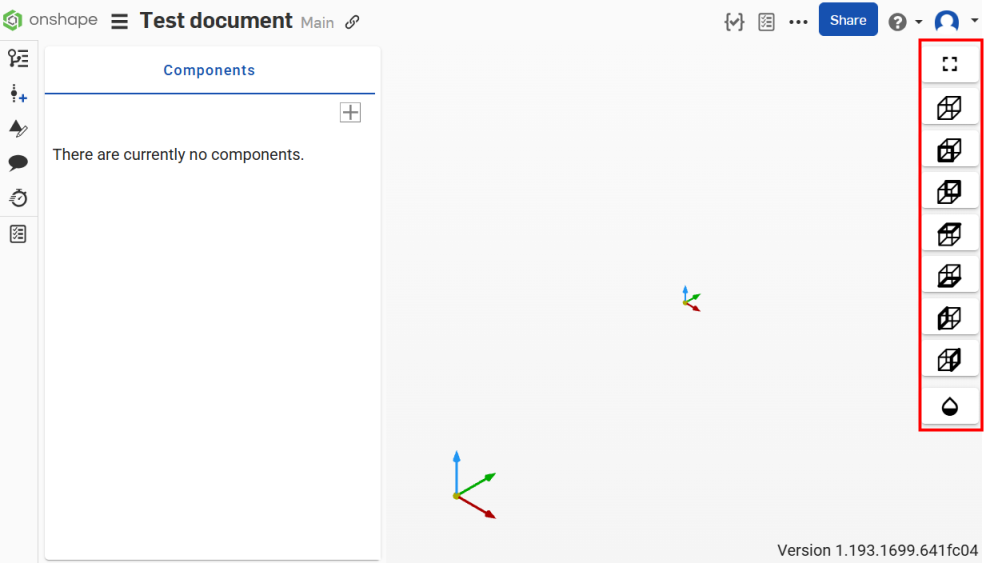
可用的選項有:
| 指標 | 名稱 | 說明 |

|
Fit all | 在圖形區域中將顯示的模型置中。 |

|
Isometric | 在圖形區域中以等角檢視模型 |

|
Front | 在圖形區域中標準的正面模型檢視 |

|
Back | 在圖形區域中標準的背面模型檢視 |

|
Top | 在圖形區域中標準的頂面模型檢視 |

|
Bottom | 在圖形區域中標準的底面模型檢視 |

|
Left | 在圖形區域中標準的左面模型檢視 |

|
Right | 在圖形區域中標準的右面模型檢視 |

|
Toggle transparency | 將圖形區域中的零組件或模型變為透明的。 |
按一下視角圖示來在圖形區域中運用該視角。
環境選單
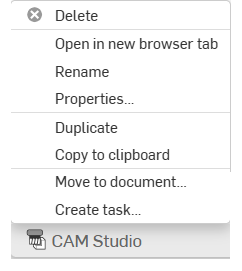
在「CAM Studio」頁籤 (Onshape 介面的底部) 上按右鍵來存取環境選單:
-
刪除 - 刪除目前的 CAM Studio (即使是使用中的)。無法刪除最後剩下的頁籤。
-
在新瀏覽器分頁開啟 - 在新的瀏覽器中開啟這個 CAM Studio 頁籤。
-
重新命名 - 重新命名這個 CAM Studio。
-
屬性 - 存取提供更多關於 CAM Studio 資訊的「屬性」對話方塊。
-
複製 - 建立 CAM Studio 的即時副本。系統會將副本ˋ直接貼到目前的文件中,自ˋ動產生一個新的 CAM Studio 頁籤。
-
複製到剪貼簿 - 將 CAM Studio 複製到您的剪貼簿中。
-
更新連結的文件 - 如果適用的話,允許您更新至所連結文件的特定版本。
-
移動至文件 - 將 CAM Studio 移動到一個新的或現有的文件中 (如果移動到新文件中,會在這個操作的過程中建立新文件)。
-
建立工作 - 建立可指派給其他使用者 (或目前使用者) 的工作,工作可參考零件並有到期日。系統會通知被指派工作的使用者關於該工作。您可以從任何 Onshape CAM Studio、Part Studio,、組合件與工程圖頁籤,以及從頁籤管理員的環境選單中建立工作。
加入零組件
-
在介面左側的「Components」區段中,按一下「插入」圖示下拉式清單,然後選取一種零組件類型以定義要加工的零件:
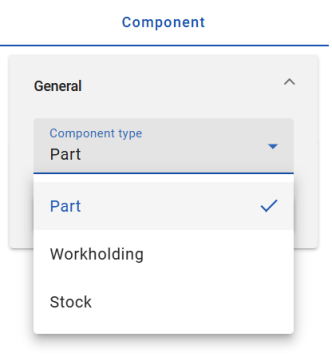
從這些選項中選擇:
Insert part - 將要加工的零組件。
Insert workholding - 在工具機中用來夾住零件的零組件 (這可以包括虎鉗、軟鉗口、壓鉗等)。
Insert stock - 經加工除料以產生零件的原材料。
這些每個選項都需要一個版本參考。
-
選擇一個零件。會將您選取的零件加入至零組件清單中以進行加工,「Insert」對話方塊會自動關閉。
-
在零組件上按右鍵來存取環境選單的選項:Edit、Suppress、或 Delete。
建立工作
-
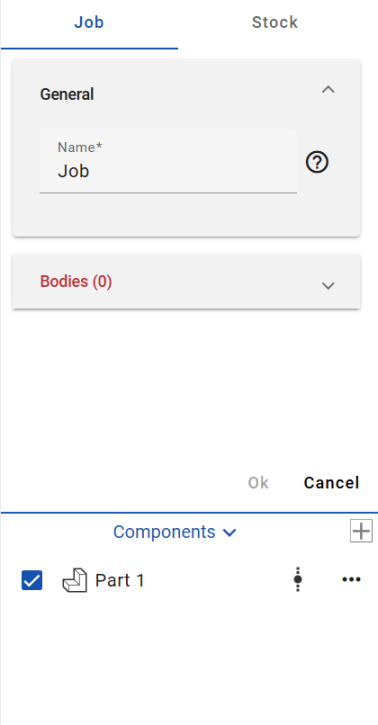
按一下「Jobs」面板上方工具列中的 Create job 按鈕。「Create job」對話方塊開啟:
-
在「Job name」欄位輸入工作的名稱:
-
按一下來啟用「Bodies」欄位,然後在圖形區域中選擇此工作的零件。
-
在「Stock」的部分,從下拉功能表中選擇一個「Stock type」。可選的選項有:
-
Box - 定義圍繞目標模型的邊界方塊。您可以用 X、Y 與 Z 輸入值來調整原料的大小。
-
Cylinder - 建立圍繞目標零件可調整的圓柱原料模型。
-
User defined - 可讓您指定一個在 CAD 中設計的選取模型,然後匯入至 CAM Studio 來做為原料。
-
-
在「Stock」的部分,從下拉功能表中選擇一個「Stock direction type」。可選的選項有:
-
World - 為方向類型選擇模型原點。
-
Z and X - 選擇 Z 與 X 軸點的方向類型 (在選擇之後指定 stock Z direction 與 stock X direction )。
-
Z and Y - 選擇 Z 與 Y 軸點的方向類型 (在選擇之後指定 stock Z direction 與 stock Y direction )。
-
X and Y - 選擇 X 與 Y 軸點的方向類型 (在選擇之後指定 stock X direction 與 stock Y direction )。
-
-
在「Dimensions」部分,然後根據您的喜好輸入所需的參數。
-
按一下來啟用「Workholdings」欄位,然後在圖形區域中選擇工作的本體。
-
按一下對話方塊上方的綠色核取記號來接受。
Right-click on a job to access the context menu options: Edit, Suppress, or Delete.
You can also click on a job and then press the Delete key to delete it.
建立工具機
-
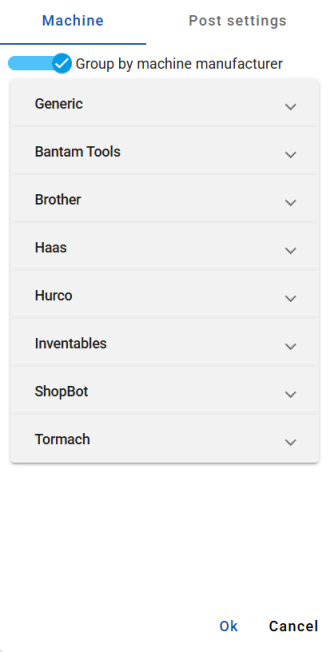
按一下「Jobs」面板上方工具列中的 Create machine 按鈕來開啟「Create machine」對話方塊:
-
根據預設,Select by machine builder 選項是開啟的。從下拉清單中選擇一個機器製造商:
-
Generic
-
Bantam Tools
-
Brother
-
DATRON
-
Haas
-
Hurco
-
Inventables
-
Langmuir
-
ShopBot
-
STEPCRAFT
-
Thermwood
-
Tormach
取決於您的選擇,對話方塊欄位的選項會自動更新。
-
-
從下拉清單中選擇一個機器。取決於您的選擇,對話方塊欄位的選項會自動更新。
-
在「Post settings」的部分,根據您的喜好為後處理編輯參數。設定包括:
-
Program - 選擇輸出單位。
-
Datum - 選擇性地關閉預設的 Advanced work planes 選項。
-
NC general - 「Sequence numbering」預設是開啟的。輸入「Block number start」與「Block number increment」。選擇性地切換開啟 Block number at tools only 或 Block number as tool number 選項。
-
Movement - 選擇性地切換關閉預設的 Rapid positioning option 選項,然後手動輸入一個「Rapid rate」。您也可以選擇切換開啟/關閉下列的選項:「Output Arcs」、「Arcs in XY plane」、「Arcs in XZ plane」、「Arcs in YZ plane」與「Output helices」。輸入小數位數。
-
Retracts - 選擇性地開啟/關閉以下選項:「Force on tool changes」、「Force on plane changes」、與「Force on program end」。
-
Fixed cycles - 選擇性地切換開啟/關閉下列的選項:「Drilling canned cycles」、「Peck drilling canned cycles」、「Thread tapping canned cycles」、與「Chip break canned cycles」。
後處理器 (post processor) 是一個轉譯程式,用來將 CAM 資料轉換為特定工具機控制器類型的 Gcode。
-
-
按一下對話方塊上方的綠色核取記號來接受。
Right-click on a machine to access the context menu options: Edit, Suppress, or Delete.
You can also click on a machine and then press the Delete key to delete it.
建立設定
「Setup」建立工作元素的 Work Coordinate System (WCS)。工作座標系統是設定的參考點,用來建立相對於工具機座標系統的已知基準。工作座標系統定義與 CNC 工具機ˋ相關的 X、Y、與 Z 軸的原點和方位,且是所有加工操作的參考點。可以使用多個設定。
-
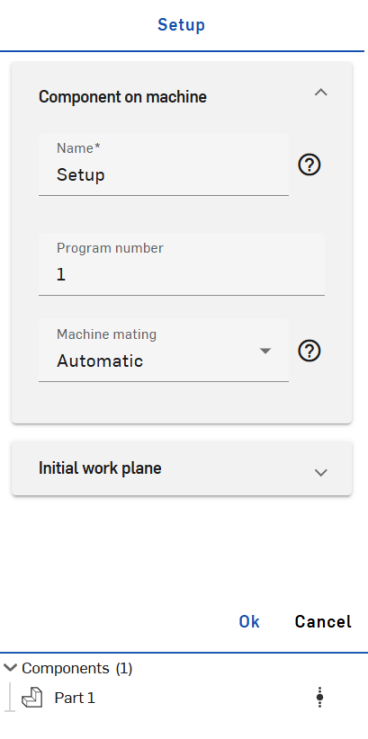
按一下「Jobs」面板上方工具列中的 Create setup 按鈕來開啟「Create setup」對話方塊:
-
根據您的喜好填入參數:
-
Setup name - 輸入設定的名稱。
-
Program number - 輸入程式編號。
-
Machine mating - 選擇自動或手動工具機結合。如果選擇了「Manual」,請手動輸入 Offset X、Offset Y、與 Offset Z 的參數。如果選擇了「Automatic」,系統會考慮零組件底部區域與工具機連接器的結合來將零組件移動至理想的結合位置。工具機結合是負責將零組件 (以線性方式) 定位在工具機空間中。
在「Work planel」的部分:
-
Name - 輸入工作平面的名稱。
-
Origin - 選擇工作平面的原點;可從 World、Component box point、Stock box point、或 Manual 中選擇。工作平面是負責用來定位零組件中的基準的。
-
Position - (適用於 Component box point 與 Stock box point 原點工作平面)。在圖形區域中選擇一個零組件以用於定位工作平面。
-
Orientation - 選擇一個工作平面方位。
- Override datum - 選擇性使用,在提供的欄位中手動輸入您自己的基準來覆寫自動指派的絕對工作平面基準。
-
-
按一下對話方塊上方的綠色核取記號來接受。
Right-click on a setup to access the context menu options: Edit, Suppress, or Delete.
You can also click on a setup and then press the Delete key to delete it.
建立刀具
-
按一下「Jobs」面板上方工具列中的 Create tool 按鈕。
-
「Tool」面板開啟。在「Cutter」的部分選擇性地切換開啟/關閉「Library」選項。當啟用時,您可以使用「Library」切換選項右邊的匯入/匯出圖示來匯出目前的刀具資源庫,或將新的刀具資源庫匯入到 CAM Studio 中 (請注意,在切換關閉「Library」選項的情況下,您僅能匯入新的刀具資源庫,且必須手動輸入像是「Machining type」、「Cutter type」、「Unit」、「Tool hand」「Diameter」、「Cutting length」、「Overall length」 等的參數,並選擇性地切換開啟/關閉「Center cutting」)。
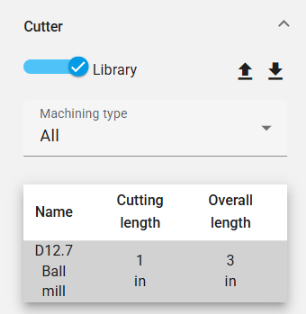
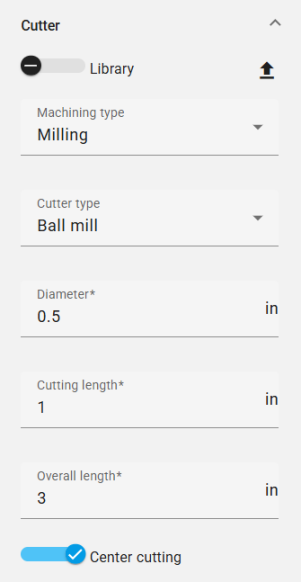
左圖是「Cutter」部分中啟用「Library」選項的螢幕擷取畫面。右圖是「Cutter」部分中關閉「Library」選項的螢幕擷取畫面。
「Machining type」的選項有:
-
All - 顯示所有可用的刀具類型。
-
Milling - 顯示所有銑具類型:
-
Ball mill
-
End mill
-
Bull mill
-
Dove mill
-
Lollipop mill
-
Slot mill
-
Taper mill
-
Chamfer mill
-
-
Hole making - 顯示所有鑽孔刀具的類型:
-
Drill
-
Thread tap tool
-
為其餘參數設定額外的規格:
-
Cutter type
-
Unit
-
Tool hand
-
直徑
-
Thread direction - (僅適用於「Thread tap tool Cutter 」類型,且自動會與「Tool hand」的選擇同步)。
-
Thread type - (僅適用於「Thread tap tool Cutter」類型)。
-
Threads per inch - (僅適用於「Thread tap tool Cutter」類型)。
-
Cutting length
-
Overall length
取決於「Machining type」,會有不同的「Cutter type」選項與組態。
-
-
在「Tool」面板的「Arbor」部分,選擇性地按一下「Enable」來使用心軸以抓住並固定刀具。當啟用時,請輸入心軸的名稱,選擇「Profile typ」,並選擇性地加入點。
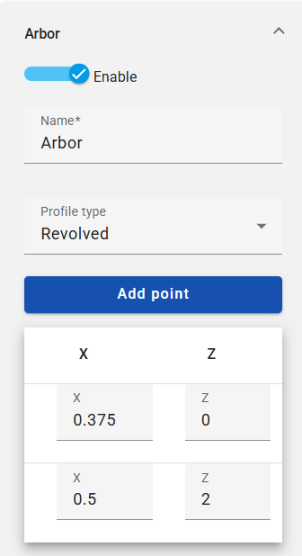
Arbor (心軸) 定義刀具的延伸類型。
-
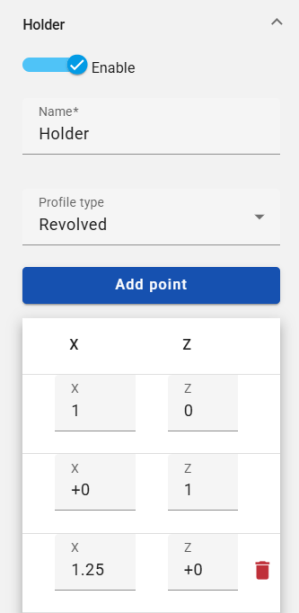
在「Tool」面板的「Holder」部分,按一下「Enable」來使用一個夾持具以固定切割刀。當啟用時,請輸入夾持具的名稱,選擇「Profile type」,並選擇性地加入或刪除點。
-
在「Tool」面板的「Assembly」部分的下方,設定獨特的 Assembly number 來識別工具機中的刀具。
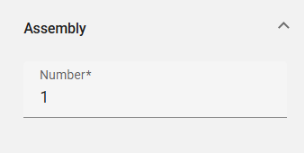
這個值與刀具資源庫不是連結的,當在其他工作中使用時需要再次設定。您可以隨時編輯 Assembly number 而不複製刀具組合件。
-
按一下 [OK] 來接受。
「Arbor」 與「Holder」定義使用 X 和 Z 值的旋轉。其資源庫允許使用者利用先前定義的資料。
Right-click on a tool to access the context menu options: Edit, Suppress, or Delete.
You can also click on a tool and then press the Delete key to delete it.
匯入刀具資源庫
若要匯入一個刀具資源庫:
-
按一下在「Tool」面板的「Cutter」部分中的 Import tool library 圖示 (下圖中以紅色輪廓線框出):
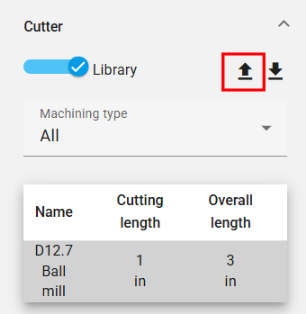
-
這樣會開啟「Select tool library」對話方塊:
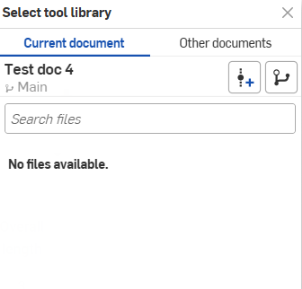
您可以直接從目前文件中匯入,或瀏覽至其他文件中來選取。
-
選擇性地點按「建立版本」圖示
 來建立使用中文件的一個版本。按一下「版本圖表」圖示
  來查看使用中文件的版本圖表。按一下「檢視已發行的項目」圖示
  (如果適用的話) 來檢視該文件的已發行項目。
匯出刀具資源庫
若要匯出一個刀具資源庫:
-
按一下在「Tool」面板的「Cutter」部分中的 Export tool library 圖示 (下圖中以紅色輪廓線框出):
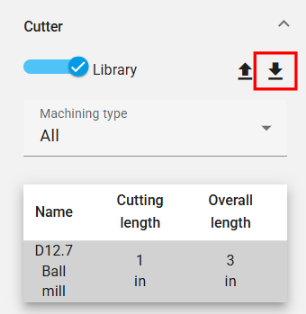
-
刀具資源庫會匯出到文件的一個新頁籤中。
-
按一下頁籤來存取刀具資源庫,您可於其中更新或下載資源庫。
建立刀具路徑
-
按一下「Jobs」面板上方工具列中的 Create toolpath 按鈕。
-
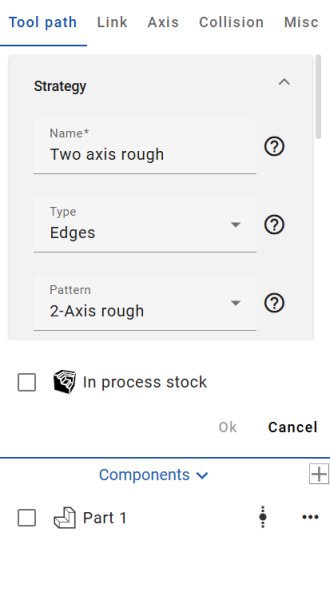
「Toolpath」設定的部分開啟:
-
在 Toolpath「Strategy」設定的部分,填入依據您喜好的參數:
Name - 輸入刀具路徑的名稱。
Type - 從可用的選項中選擇一個刀具路徑類型:
-
Edges - 根據線框輸入驅動邊線來計算刀具路徑。可作用在沒有加工面時。
-
Faces - 根據輸入驅動本體計算刀具路徑。
-
Bodies - 根據整個輸入本體計算刀具路徑。
-
Holes - 根據輸入的鑽孔計算刀具路徑 (若要選擇鑽孔順序,請使用「Holes」下拉清單來啟用「Select all blind holes」和/或「Filter same diameter」的切換)。
Pattern - 從可用的選項中選擇一個刀具路徑要依循的模式:
-
2-Axis rough - 用來快速移除大量的多餘材料。
-
2-Axis profile - 根據驅動曲線來建立刀具路徑 (驅動曲線必須是平的)。
-
2-Axis chamfer - 根據驅動曲線來建立刀具路徑,並用於倒角與去毛邊的操作中。
-
3-Axis profile - 依循驅動曲線建立刀具路徑。
-
5-Axis profile - 建立依循驅動曲線的刀具路徑,其中刀具軸是由沿者驅動曲線的方向線所控制。
-
Face - 用來加工的平坦區域 (驅動曲線必須是平的)。
-
Trochoidal - 透過擺線運動提供依序驅動曲線的加工。
-
Engrave - 沿驅動曲線加工。
Sub-pattern - 從可用的選項中選擇刀具路徑的子模式:
-
Offset - 建立從所選加工表面偏移的多個深度的多個切割。
-
Parallel - 建立在多個深度上的平行切割。
-
Adaptive - 確保切割條件幾乎保持一致 (這個策略透過不斷測量刀具與材料的接合量,並逐漸從剩餘原料中移除材料來避免全寬度的切割)。
-
選擇性地切換可啟用凹陷與凸出加工的 2.5-Axis 選項。
在檢查刀具路徑的資訊時,所有相關的參數都會顯示,以讓您組態相要的操作。當您調整參數時,系統會篩選出適用的選項。
-
-
根據您的喜好填入剩下的刀具路徑設定參數:
Drive edges - 選擇零件的邊線或曲面來定義刀具路徑的切割位置。為選取項目篩選器類型選擇「Loop」或「Contour」(請注意,當插入曲線時,無法使用 「Loop」選擇選項。您必須選擇曲線的各個線段)。如果適用,按一下箭頭圖示來在圖形區域中變更箭頭的方向。
Orientation lines - 選擇一條 (或多條) 邊線來設定為方向線。如果適用,按一下箭頭圖示來在圖形區域中變更箭頭的方向。
Offset - 指定留在驅動曲線上的材料量。
Step down - 指定深度步驟。
Step over - 定義刀具每次通過時水平接觸材料的程度。
Sorting - 提供反轉切割順序的選項,以及「Cutting method」、「Cutting directions」、與「Machined By」的參數。
Heights - 設定「Start height type」、「Start height」、「End height type」、與「End height」。
Area - 設定「Draft angle degree」與 (選用) 切換「Close offsets」選項。
Re-machining - 提供最佳化刀具路徑的參數以減少過度切割並僅切割需要的量。
Edge containment - 將刀具路徑限制在選取的曲線之中。
Speeds - 定義不同的刀具路徑速率與方式。 設定「feed rate」、「plunge rate」、與「retract rate」的速度。啟用「rapid approach」、「rapid retract」、或「adaptive feed rate」。
Posting - 定義主軸速率與在加工過程中是否使用冷卻劑。
-
按一下「Link」部分 (「Toolpath」部分的右邊) 來存取刀具路徑的「Link」設定。根據您的喜好填入參數。
在「Clearance area」下拉的部分,「Clearance area type」指定刀具在此操作中縮回和接近的間隙區域。
在「First entry」下拉的部分,「Use ramps」選項決定刀具是否使用接近策略或直接進入材料中。
在「Ramps」下拉部分的選項取決於使用的刀具類型,切割的材料與機器的剛度。 -
按一下「Axis」部分 (「Link」部分的右邊) 來存取刀具路徑的「Axis」設定。選擇一個「Output type」,(選用) 啟用「Tilting」,調整「Limits」,調整「Tool repositioning」(選擇性地切換開啟/關閉「Retract and rewind」選項),然後選擇一個「Solution」。
當啟用時,「Tilting」會定義傾斜軸。
只有當「Axis Output」類型為 4-Axis 或 5-Axis 時,才能進行刀具重新定位。 -
按一下「Collision」部分 (「Axis」部分的右邊) 來存取刀具路徑的「Collision」設定。根據您的喜好填入參數。
「Collision」群組下拉部分的選項可修改刀具路徑縮回、修剪、與重新連結的參數,以及沿指定軸停止刀具。
-
按一下「Misc」部分 (「Collision」部分的右邊) 來存取刀具路徑的其他設定。根據您的喜好填入參數:
Profile pass - 加入一條依循驅動曲線輪廓的路徑到刀具路徑中。
Smoothing - 選擇性選取來切換下列的選項:
-
Smooth corners - 在刀具路徑的尖角處建立圓角 (請注意,不會將圓角套用到刀具路徑的外輪廓上)。
-
Smooth final pass - 在刀具路徑外輪廓的尖角處建立圓角。
-
Remove corner pegs - 自動修改切削間距並在角落加入額外的切割以去除未切割的材料。
Filtering - 選擇根據「Regions」(移除在閥值內的刀具路徑區域) 或「Contours」(移除在閥值內的刀具路徑輪廓) 來篩選。選擇「Filter type」並輸入一個 「Filter threshold value」。
Quality - 輸入一個切割公差來指定刀具路徑的精確性。這是刀具路徑相對於要加工特徵的弦偏差。
-
-
按一下 [OK] 來接受。刀具路徑會加入至「Jobs」清單中。
Right-click on a toolpath to access the context menu options: Edit, Suppress, or Delete.
You can also click on a toolpath and then press the Delete key to delete it.
建立一個工作平面
工作平面是可以在 CAM Studio 定義的座標系統,可用於機械加工和數控輸出。
-
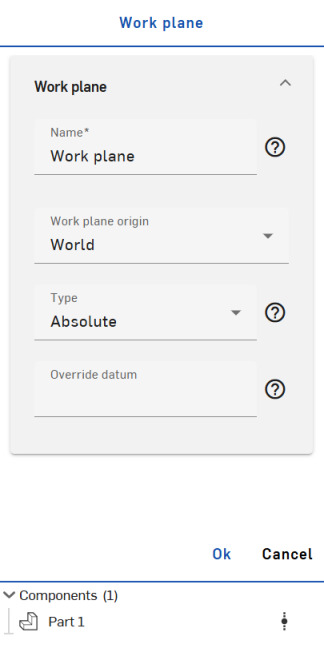
按一下「Jobs」面板上方工具列中的「Create work plane」圖示來開啟「Work plane」對話方塊:
-
Name - 輸入工作平面的名稱。
-
Origin - 選擇工作平面的原點;可從「World」、「Component box point」、「Stock box point」、或「Manual」中選擇。
-
Position - (適用於 Component box point 與 Stock box point 原點工作平面)。在圖形區域中選擇一個零組件以用於定位工作平面。
-
Type - 選擇工作平面的類型,以定義給定工作平面中刀具路徑的輸出方法。請從下列選項中選擇:
-
Absolute - 輸出是在工具機/控制上預先建立(同等定義) 的固定基準。
-
Dynamic - 輸出是在暫時的座標系統中,由像是 "G68.2" 等的函式動態定義。
-
None - 輸出仍保留在最初的座標系統中 (世界座標),而加工/刀具路徑則保持在定義的工作平面上 (這通常不涉及在生成的 NC 中變換的輸出)。
-
-
Override datum - 選擇性使用,在提供的欄位中手動輸入您自己的基準來覆寫自動指派的絕對工作平面基準。
-
Right-click on a work plane to access the context menu options: Edit, Suppress, or Delete.
You can also click on a work plane and then press the Delete key to delete it.
預覽操作
在「Jobs」部分下方,按一下操作右邊的「Preview operation」圖示來檢視「Back plot」、「Verify」、或「Simulate」。若要一次驗證或模擬所有的操作,按一下「Jobs」部分中一個設定右邊的「Preview operation」。
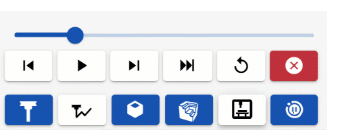
這會在圖形區域下方啟動預覽操作的選項:

每個選項會產生不同的結果:
-
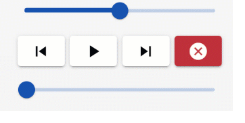
Back plot - 沿刀具路徑移動刀具。
使用上方滑桿來設定動畫的速度 (左邊是最慢的,右邊是最快的)。
根據需要使用「Step back」、「Run」、「Step next」、與「Cancel」選項。
底部的滑桿代表 backplot 動畫的進度。
-
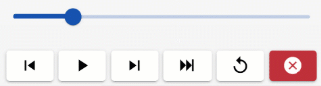
Verify - 在移除材料時,沿著刀具路徑移動刀具,可讓您進一步了解鑿痕與過度的情況,並細化處理過程中的材料 (原料)。
滑桿可設定動畫的速度 (左邊是最慢的,右邊是最快的)。
根據需要使用「Step back」、「Run」、「Step next」、「Go to end」、「Reset」、與「Cancel」選項。
-
Simulate - 預覽操作。
滑桿可設定動畫的速度 (左邊是最慢的,右邊是最快的)。
根據需要使用「Step back」、「Run」、「Step next」、「Go to end」、「Reset」、與「Cancel」選項 (在上方的按鈕列中)。
下方的按鈕列可讓您選擇主軸方向,以及切換刀具、刀具路徑、工件、原料、與工具機外殼的視覺顯示與否。
您同時有在碰撞時切換暫停的選項。
匯出
匯出操作:
-
在「Jobs」面板中,於您要匯出的設定上按右鍵來開啟環境選單,然後按一下 [Post child operations]:
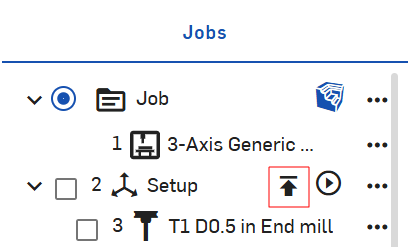
按一下「Post selected operations」選項來僅匯出所選的操作。
-
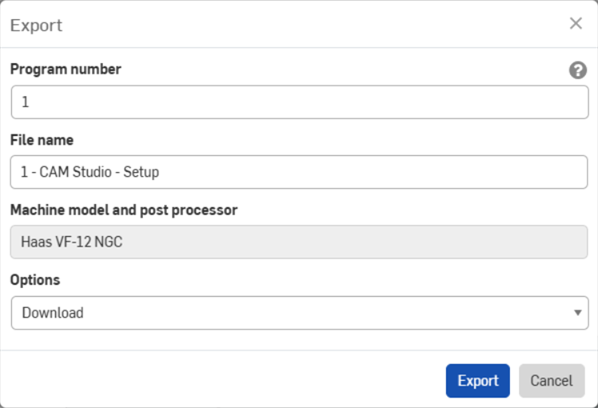
「Export」對話方塊開啟:
-
輸入偏好的程式編號。
-
輸入喜好的檔案名稱。
-
檢視匯出選擇的「Machine model and post processor」。
-
View the output units for the export.
-
從下拉功能表中選擇一個下載選項:[下載]、[下載並在新頁籤中存放檔案]、或 [在新頁籤中存放檔案]。
-
按一下 [Export]。
關於「學習中心」的其他資源,請用自己的步調跟著 Introduction to CAM Studio (需要有 Onshape 帳戶) 的課程操作。