


可用于:草图
将一个点约束为一条线或一个圆弧的中点。
在进行选择时打开约束条件。所选的每对实体都相互约束。单击可关闭,或选择其他工具自动关闭。
快捷方式:shift+m
 步骤
步骤
- 选择直线和点,或选择圆弧和点。
- 单击“中点”图标 (
 )。
)。
该点将约束为线或圆弧的中点。
要在一条直线上两点之间的中点处放置一个点,请执行以下操作:
-
选择起点。
-
选择端点。
-
选择起点和端点之间的点(中点)。
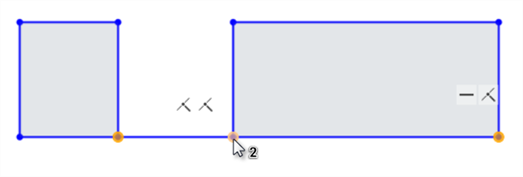
首先选择起点(左)和端点(右),然后选择中间点(显示在光标下方)
-
单击工具栏上的“中点”图标 (
)。
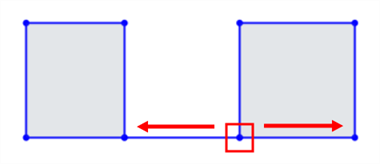
第三个点被约束为与起点和端点等距:
请参见学习中心课程“草图简介”(需要 Onshape 帐户)了解更多信息。