 Flow

Available in: Sketch
Create flow continuous transitions (G3) between sketch splines (and conics) and surrounding geometry. Position, tangency, curvature, and the rate of change of curvature all match where the curves join. Use Flow when you need a smoother transition than Curvature provides, for example on aesthetic surfaces or motion paths.
在进行选择时打开约束条件。所选的每对实体都相互约束。单击可关闭,或选择其他工具自动关闭。
 Steps
To make two curves G3 (flow) continuous, do either of the following:
- Select the two curves, and then click the Flow icon (
 ).
- Click the Flow icon ( ), and then select the two curves.
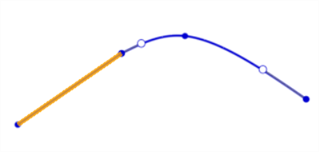
Before using the Flow constraint (line in yellow, spline in blue)
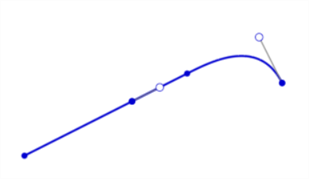
After using the Flow constraint
Notes
- One of the two curves must be a spline or conic with enough control points to satisfy the constraint.
- You can constrain two curves in the current sketch, or a curve in the current sketch and an external edge.
- Flow cannot be applied to an offset spline.
- Flow constraints are listed in the Constraint manager as Flow 1, Flow 2, and so on.
请参见学习中心课程“草图简介”(需要 Onshape 帐户)了解更多信息。