 工程图属性——格式

可用于:工程图
这些属性可启用/禁用工程图的边框、边框区域和标题栏中对象的选择。新工程图默认设置为“已锁定”,您无法立即选择标题栏、边框或边框区域中的对象。
 访问格式页签
要访问格式属性,请单击工程图属性工具栏顶部的格式图标( )。
)。
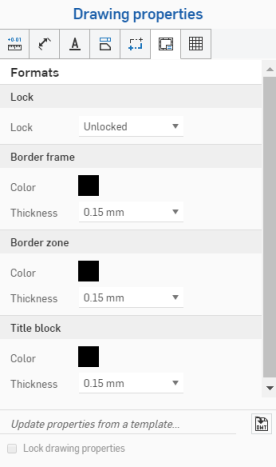
锁定
- 已锁定——锁定或解锁标题栏以禁止编辑或允许编辑。
工程图最初应将该属性设置为“已解锁”,以便用户能够选择标题栏或边框中的对象。
标题栏锁定后,如果输入框值更改,标题栏的内容会更新。
如果将某个图元移至标题栏、边框或边框区域且格式处于锁定状态,则必须将该图元移回工程图才能对其进行编辑。
边框
-
颜色——指定工程图的内边框的颜色。
-
粗细——指定工程图的内边框的粗细。
边框区域
-
颜色——指定工程图的边框区域内的标签的颜色。
-
粗细——指定工程图的边框区域内的标签的粗细。
标题栏
-
颜色——指定工程图线的颜色和标题栏的内容。
-
粗细——指定工程图线的粗细和标题栏的内容。
标题栏和边框注释
在标题栏和边框中,灰色的图元从文档数据或特性继承其值。不过,右键单击图元可访问该图元的环境菜单。选择编辑注释可编辑图元。将光标悬停在输入框上(或单击输入框)可查看相应的特性是什么。如果需要,您可以删除输入框(特性)并插入您自己的文本。使用“注释”编辑框中的插入工程图特性图标可插入不同的特性:
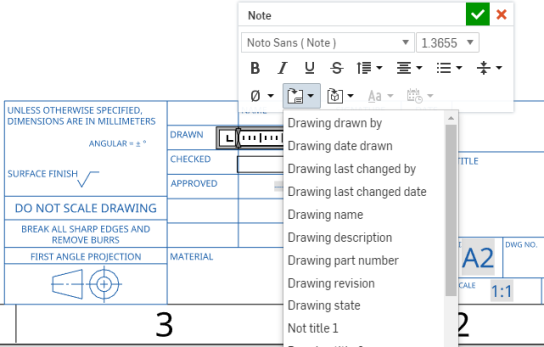
此图显示了标题栏中一个正在编辑的输入框(从环境菜单中选择“编辑注释”),以及一个正在通过“插入工程图特性”命令插入的新输入框
关于工程图图层的注意事项
- 在导出过程中,元素被添加到相应的图层:标题栏、边框或边框区域。
- 工程图图层将不包含在工程图的 DWT 导出中。
- 当格式设置为“已锁定”时,边框框架、边框区域和标题块图层将被锁定。
- 边框框架、边框区域和标题块图层可以有不同的默认颜色和线条粗细。
- 导出到 DWG/DXF 时,边框框架、边框区域和标题块图层中的内容将位于特定图层(例如 BORDER_FRAME、BORDER_ZONES、TITLE_BLOCK)上。
- 请注意,旧版本的 DWG/DXF 格式可能不完全支持图层。
- 更改工程图图纸尺寸时不会替换标题块。但是,边框和边界区域将以更大/更小的大小或更多或更少的区域重新绘制。
- 在页面尺寸更改或页面格式替换中,工程图图层上的所有内容都不会被替换。