 齿轮齿条关系


可用于:装配体
使具有旋转自由度的嵌合与具有线性自由度的嵌合相关。
 视频示例
视频示例 步骤
步骤
要添加齿轮齿条关系:
- 单击
 。
。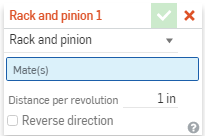
- 在对话框中,确认选择了“齿轮齿条”。
- 在嵌合特征的主列表中(或在当前的任何子部件的特征列表中)选择两个嵌合。请注意,选择一个滑块嵌合和一个旋转嵌合可提供齿轮齿条要求的确切自由度。
- 如有必要,请指定该嵌合的自由度:
- 选择一个滑块嵌合和一个旋转嵌合时,无需任何进一步的操作,因为每个嵌合具有齿轮齿条要求的确切自由度。
- 如果选择的嵌合具有的自由度比要求的多,会再显示一个对话框,从中可以为该嵌合选择所需的自由度。
- 输入所需的线性值。
- (可选)选中用来反转方向的框。
为关系选择自由度后,不能对其进行更改,除非从对话框中删除嵌合、更改嵌合类型或删除嵌合并重新开始。