고품질로 보기

이용 가능 플랫폼: Part Studio, 어셈블리
쉬프트+r
현재 활성화된 Part Studio 또는 어셈블리에 대해 사용 가능한 최고 품질의 테셀레이션 뷰를 선택/선택 취소합니다. 이 기능을 사용하면 성능이 약간 저하될 수 있습니다.
 단계
단계
-
카메라 및 음영처리 옵션을 선택한 다음 고품질로 보기를 선택합니다.
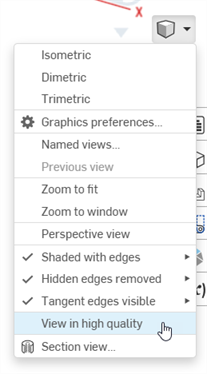
-
이 옵션을 켜면 아래와 같이 파란색 알림이 표시됩니다.
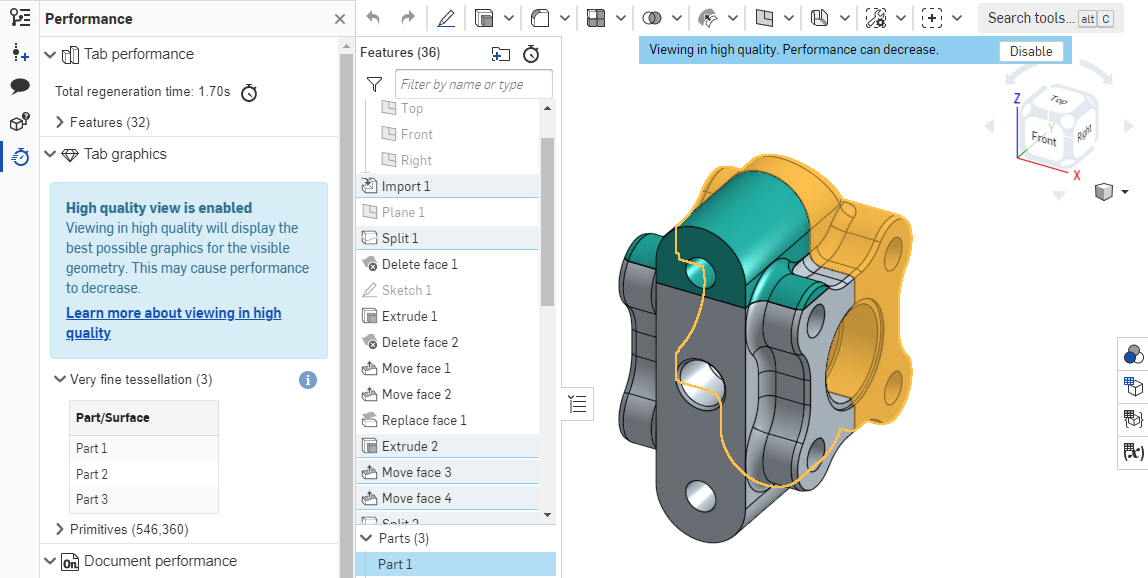
이 뷰 모드가 성능에 미치는 영향에 대한 자세한 내용은 고품질 모드를 참조하십시오.